Comet Executive Gas Operating Guidelines
3-5
JOG REVERSE button (D):
CAUTION
Turn the SPEED CONTROL
knob to the slowest speed
before using the JOG
REVERSE button. Failure to
do so may result in unsafe
conditions or damage
to the unit.
Moves the ironing cylinder and all ribbons in
reverse in small increments. Only works while
button is being held down.
This feature should only be used in the
following situations:
• To clear jams
• For maintenance at the slowest speed
• For repair at the slowest speed
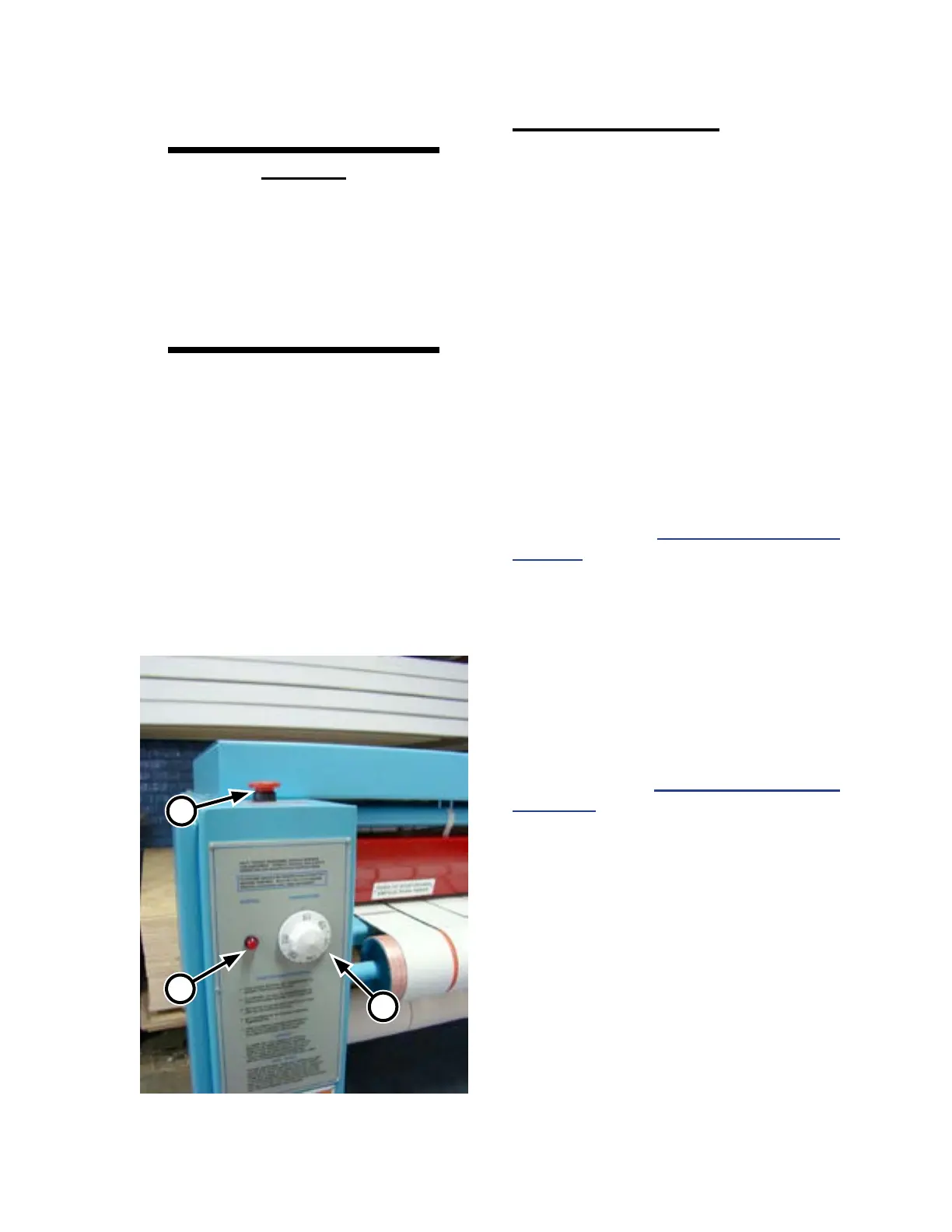
Figure 3-7: Left endframe control panel.
C
B
A
Left Endframe Controls
The following operating controls and indicator
lamps are located at the front of the left endframe
(Figure 3-7).
• TEMPERATURE control dial (A)
• HEATING indicator lamp (B)
• STOP button (C)
TEMPERATURE control dial (A):
Sets the desired operating temperature of the
burner system which heats the ironing cylinder.
When power is turned ON at the main disconnect
switch, turn the control to the desired temperature.
The red ON indicator will be lit.
For more information on determining the
proper operating temperatures for dierent types
of atwork, refer to Processing Standards on
page 3-15.
HEATING indicator lamp (B):
Lights when the heat is called for in the ironing
cylinder and the gas burner system is active.
STOP button (C):
Functions the same as the red safety STOP
buttons on the right endframe. For more
information, refer to Right Endframe Controls
on page 3-4.



 To Next Page