141
Controls in detail
Memory function
The memory button and stored position
switch are located on the respective
door.
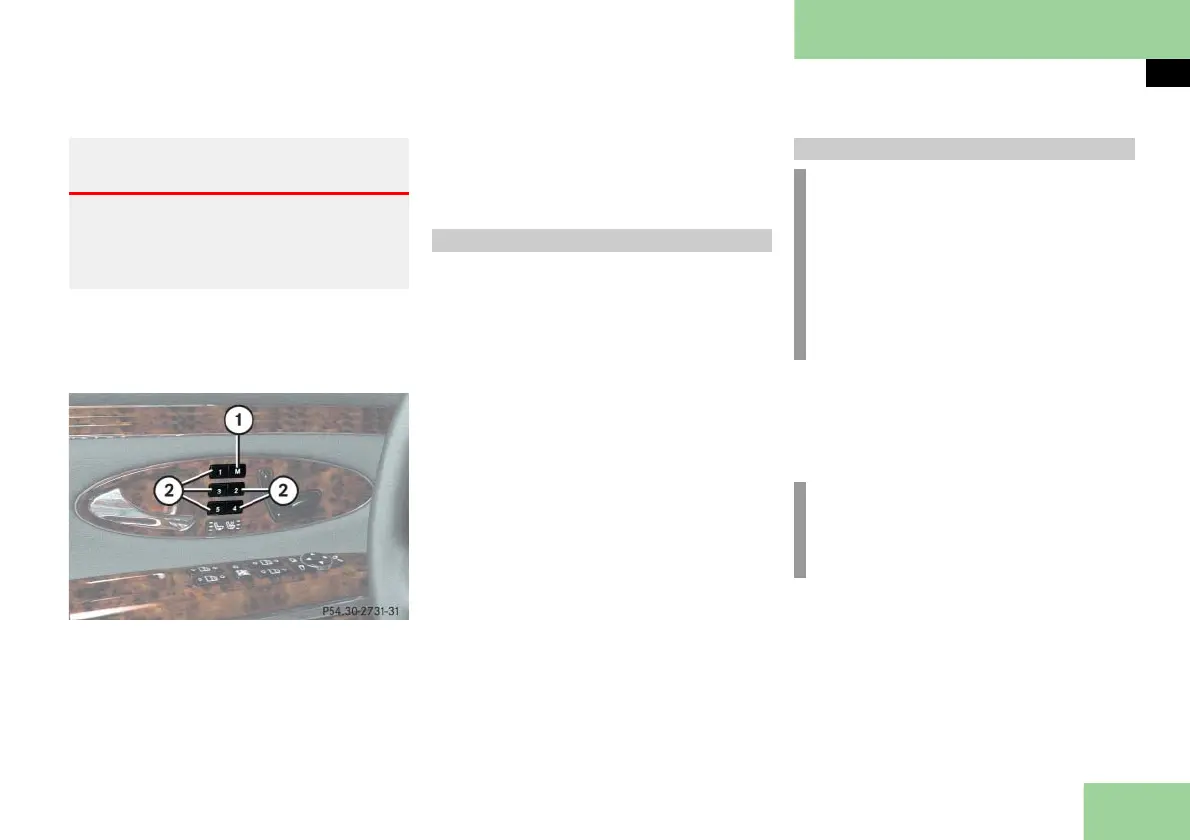
Example illustration from Maybach 57
1 Memory button M
2 Memory position buttons 1 - 5
Switch on ignition ( page 54).
or
Open the respective door.
Adjust the seats, steering wheel and
mirrors to the desired position
(
page 57).
Press memory button M.
Release memory button M and push
memory position button 1, 2, 3, 4 or 5
within three seconds.
All the settings are stored at the se-
lected position.
Press and hold memory position
button 1, 2, 3, 4 or 5 until the seat,
steering wheel and mirrors have fully
moved to the stored positions.
Warning! G
Do not activate the memory function while
driving. Activating the memory function
while driving could cause the driver to lose
control of the vehicle.
Storing positions in memory
Recalling positions from memory
!
Do not operate the power seats using
the memory button if the seat back-
rest is in an extremely reclined posi-
tion. Doing so could cause damage to
front or rear seats.
First move seat backrest to an upright
position.
i
Releasing the button immediately
stops movement to the stored posi-
tions.



 To Next Page