52
Getting started
Unlocking
The "Getting started" section provides
an overview of the vehicle's most basic
functions.
If you are already familiar with the basic
functions described here, the "Controls
in detail" section will provide you with
further information. The corresponding
page references are located at the end of
each segment.
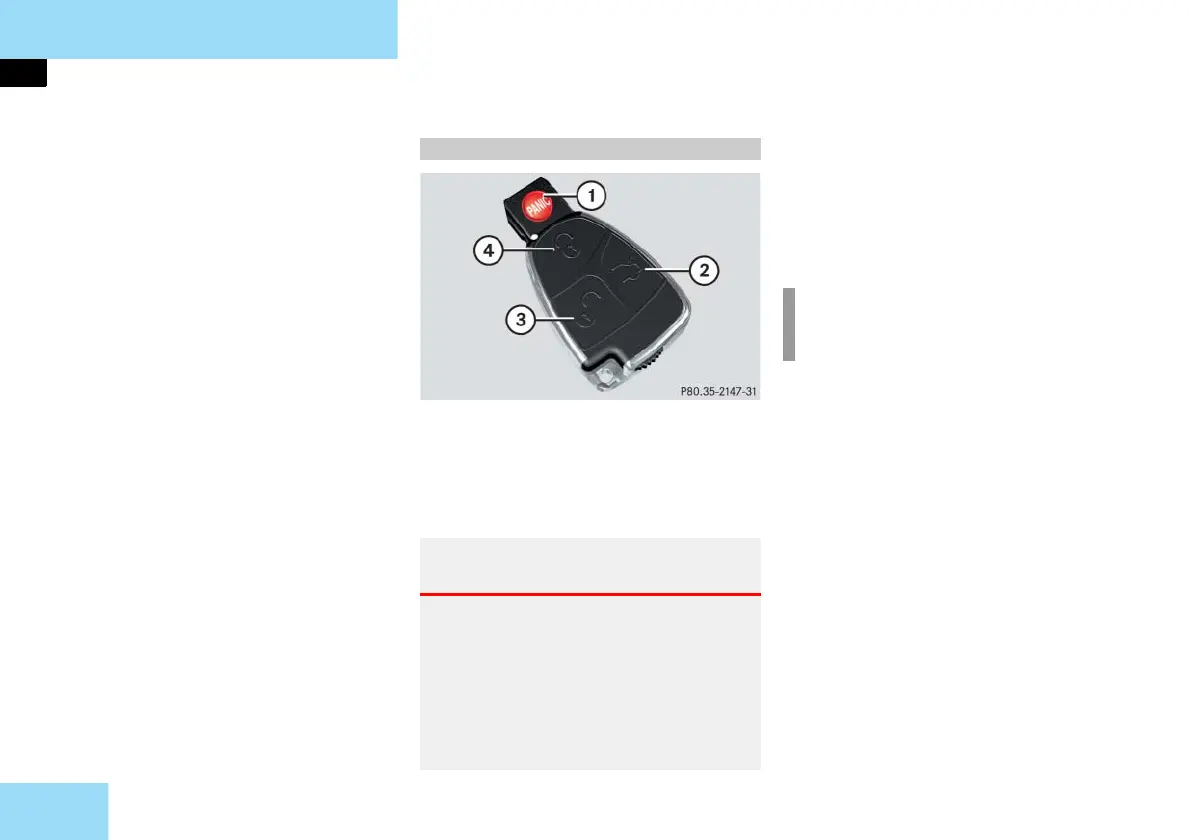
SmartKey with remote control
1 Â Panic button ( page 95)
2 Š
Unlock button for trunk lid
3 Œ
Unlock button
4 ‹
Lock button
Press unlock button Πon the
SmartKey.
All turn signal lamps flash once. The
vehicle unlocks. The locking knobs in
the doors move up. The anti-theft
alarm system is disarmed.
Get in the vehicle and insert the
SmartKey in the starter switch.
For more information, see "SmartKey"
(
page 108).
Unlocking with the SmartKey
Warning! G
When leaving the vehicle, always remove
the SmartKey from the starter switch, take
it with you, and lock the vehicle. Do not
leave children unattended in the vehicle,
or with access to an unlocked vehicle. Un-
supervised use of vehicle equipment may
cause an accident and/or serious personal
injury.
i
The SBC brake system is activated
(
page 101).



 To Next Page