168
Controls in detail
Control system
The
NAVI
menu contains the functions
needed to operate your navigation sys-
tem.
Press button è or ÿ repeatedly
until you see
NAVI
in the multifunc-
tion display.
If the navigation system is switched
off, the message
NAVI OFF
is shown in
the multifunction display.
If the navigation system is on and no
destination has been entered, you
will see the current direction in which
the vehicle is moving and the names
of streets in the multifunction dis-
play.
Please refer to the separate COMAND
and Rear-Cabin Audiovisual System man-
ual for instructions on how to activate
the route guidance system.
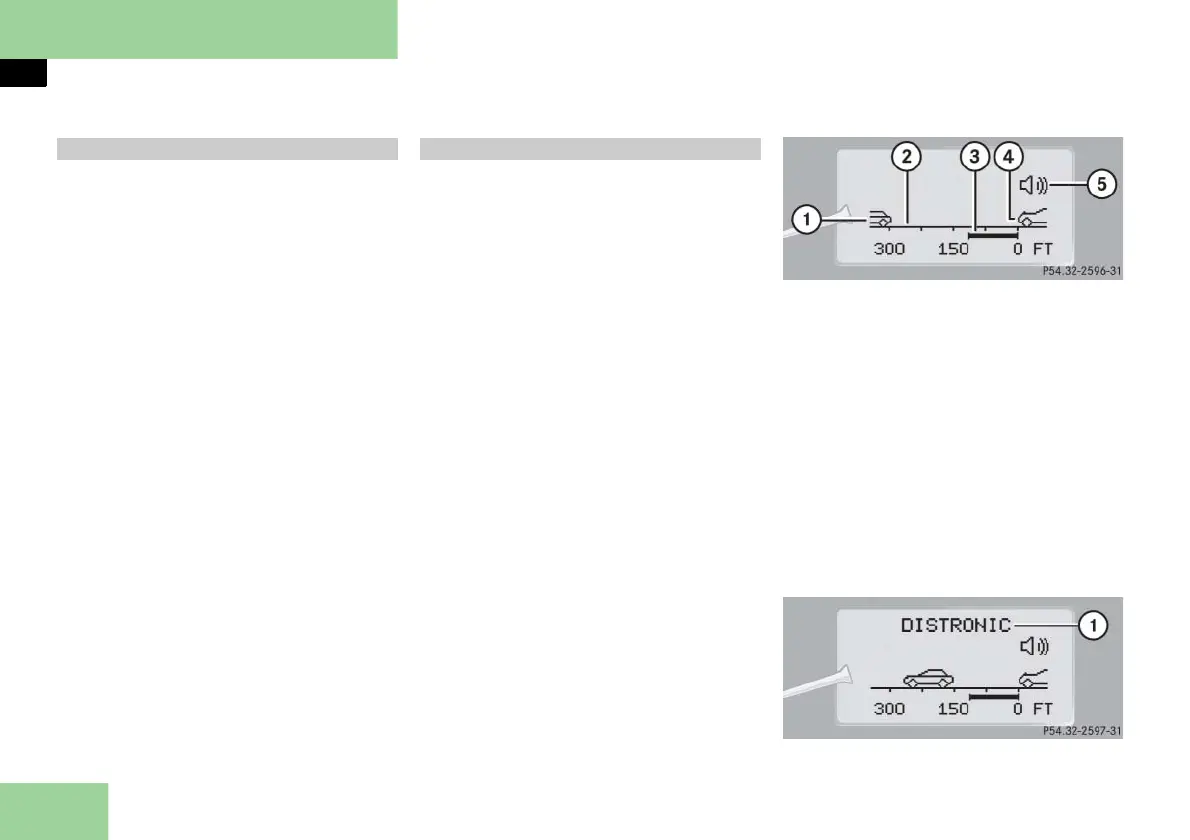
Use the DISTRONIC menu to display the
current settings for your Distronic sys-
tem. What information is shown in the
multifunction display depends on
whether the Distronic system is active or
inactive.
Please refer to the "Driving systems" sec-
tion of this manual (
page 236) for in-
structions on how to activate Distronic.
Press button è or ÿ repeatedly
until you see one of the following
two pictures in the multifunction dis-
play.
Distronic deactivated
When Distronic is deactivated, you will
see the standard display.
1 Vehicle ahead, if detected
2 Actual distance to vehicle ahead
3 Preset distance threshold to vehicle
ahead
4 Your vehicle
5 Symbol for activated distance warn-
ing function
Distronic activated
When you activate Distronic, you will see
the set speed for about five seconds in
the Distronic display. The following dis-
play then appears:
1 Distronic activated
Navigation menu Distronic** menu



 To Next Page