169
Controls in detail
Control system
Use the trip computer menu to call up
statistical data on your vehicle. The fol-
lowing information is available:
Fuel consumption statistics after start
Press button ÿ or è repeatedly
until you see the first function of the
trip computer menu.
Press button j or k repeatedly
until you see
AFTER START
in the mul-
tifunction display.
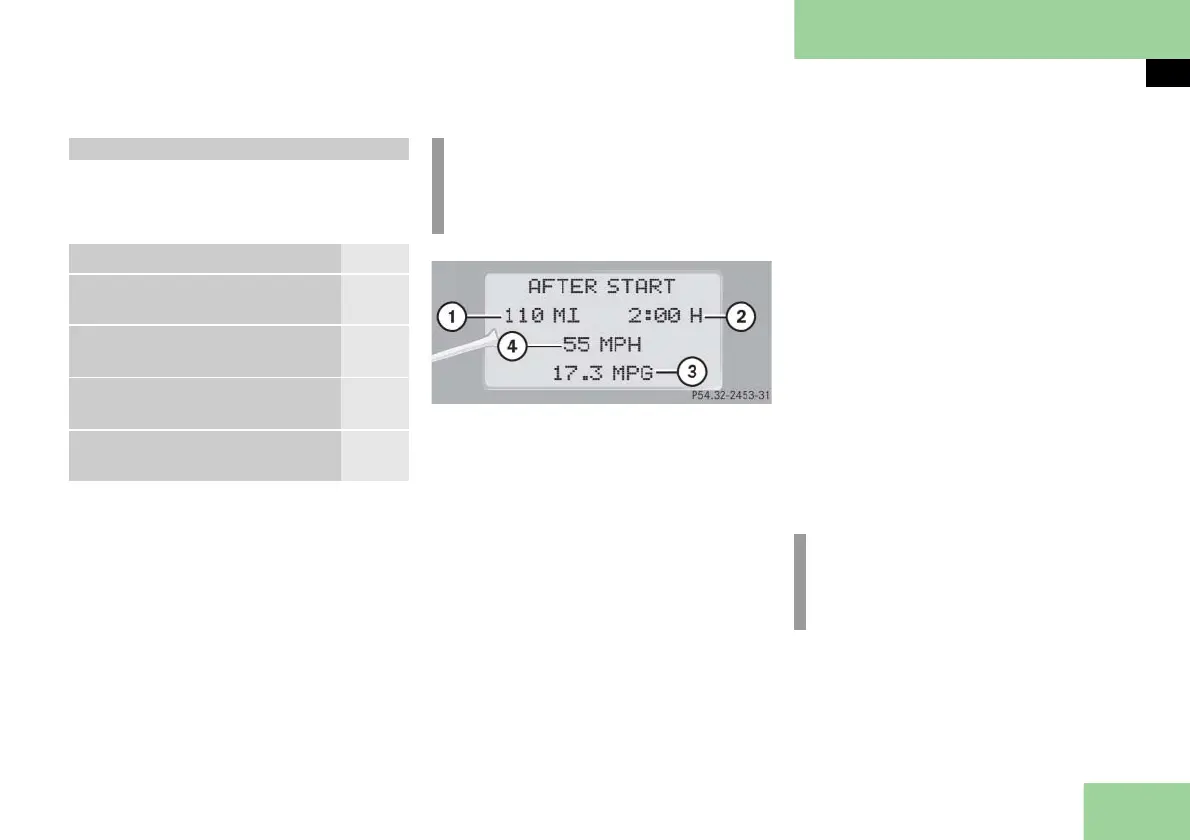
1 Distance driven since start
2 Time elapsed since start
3 Average fuel consumption since start
4 Average speed since start
Incorporating statistics from the previ-
ous journey in the consumption statis-
tics
When you restart the engine, the
AFTER START
display flashes for:
a distance of approximately
1.25 miles (two kilometers)
or
a duration of two minutes
During this period, the data from the
previous journey can be incorporated as
follows:
Press reset button J ( page 25) in
the instrument cluster.
The statistics will be incorporated.
Trip computer menu
Function Page
Fuel consumption statistics
after start
169
Fuel consumption statistics
since last reset
170
Resetting fuel consumption sta-
tistics
170
Call up range (distance to
empty)
170
i
Each time you call up the trip com-
puter, the last function used appears
as the first display.
i
If you do not press reset button J,
the consumption statistics will be re-
set to
0
.



 To Next Page