54
Getting started
Unlocking
SmartKey
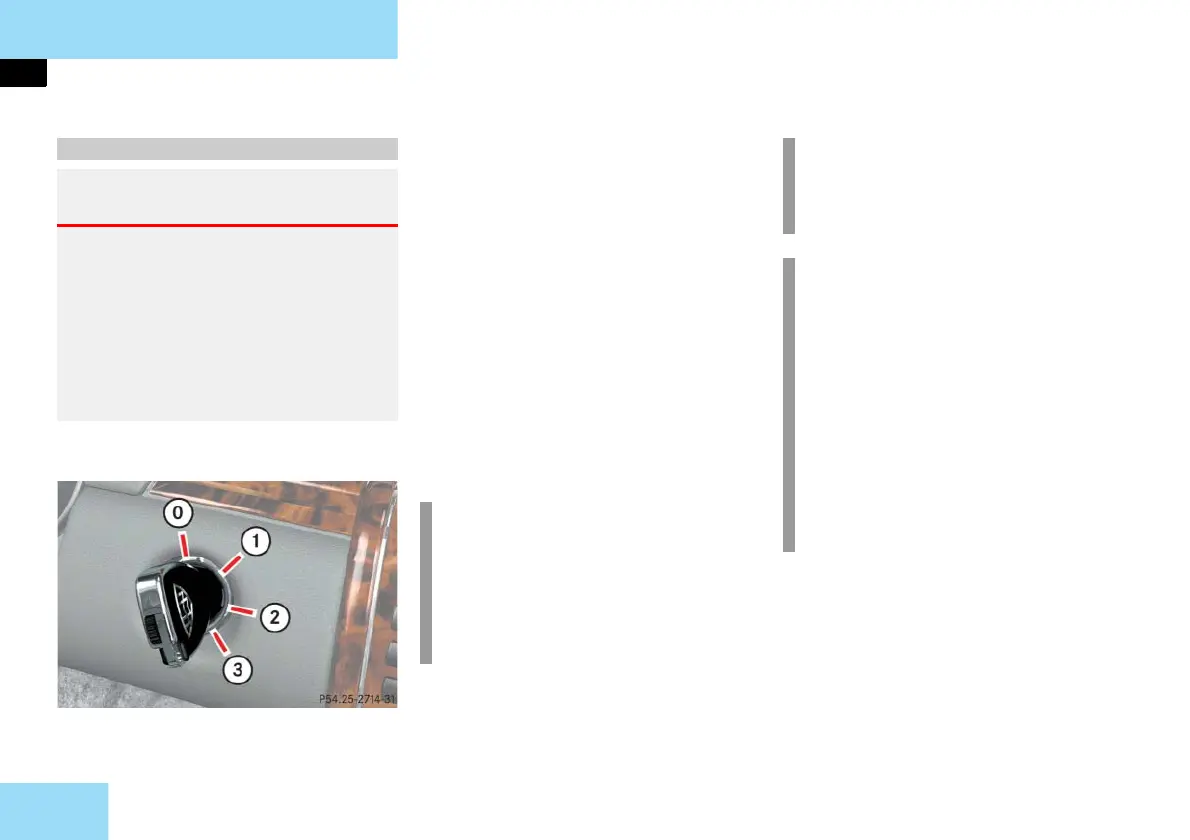
Starter switch
0 For removing SmartKey
1 Power supply to some electrical con-
sumers, such as seat adjustment
2 Ignition (power supply for all electri-
cal consumers) and driving position.
All lamps in the instrument cluster
come on. If a lamp in the instrument
cluster fails to come on when the ig-
nition is switched on, have it checked
and replaced if necessary. If a lamp in
the instrument cluster remains on af-
ter starting the engine or comes on
while driving, refer to "Lamps in in-
strument cluster" (
page 384).
3 Starting position
For information on starting the engine
using the SmartKey, see "Starting with
the SmartKey" (
page 66).
Starter switch positions
Warning! G
When leaving the vehicle, always remove
the SmartKey or SmartKey with
KEYLESS-GO from the starter switch, take
it with you, and lock the vehicle. Do not
leave children unattended in the vehicle,
or with access to an unlocked vehicle. Un-
supervised use of vehicle equipment may
cause an accident and/or serious personal
injury.
i
When you switch on the ignition, the
indicator and warning lamps in the
instrument cluster come on. This indi-
cates that the respective systems are
operational. They should go out
when the engine is running.
i
The SmartKey can only be removed
from the starter switch with the gear
selector lever in position P.
!
If the SmartKey can still not be
turned, the battery may not be suffi-
ciently charged.
Check the starter battery and
charge it if necessary
( page 441).
Get a jump start ( page 445).
To prevent accelerated battery dis-
charge or a completely discharged
battery, always remove the SmartKey
from the starter switch.



 To Next Page