312
Controls in detail
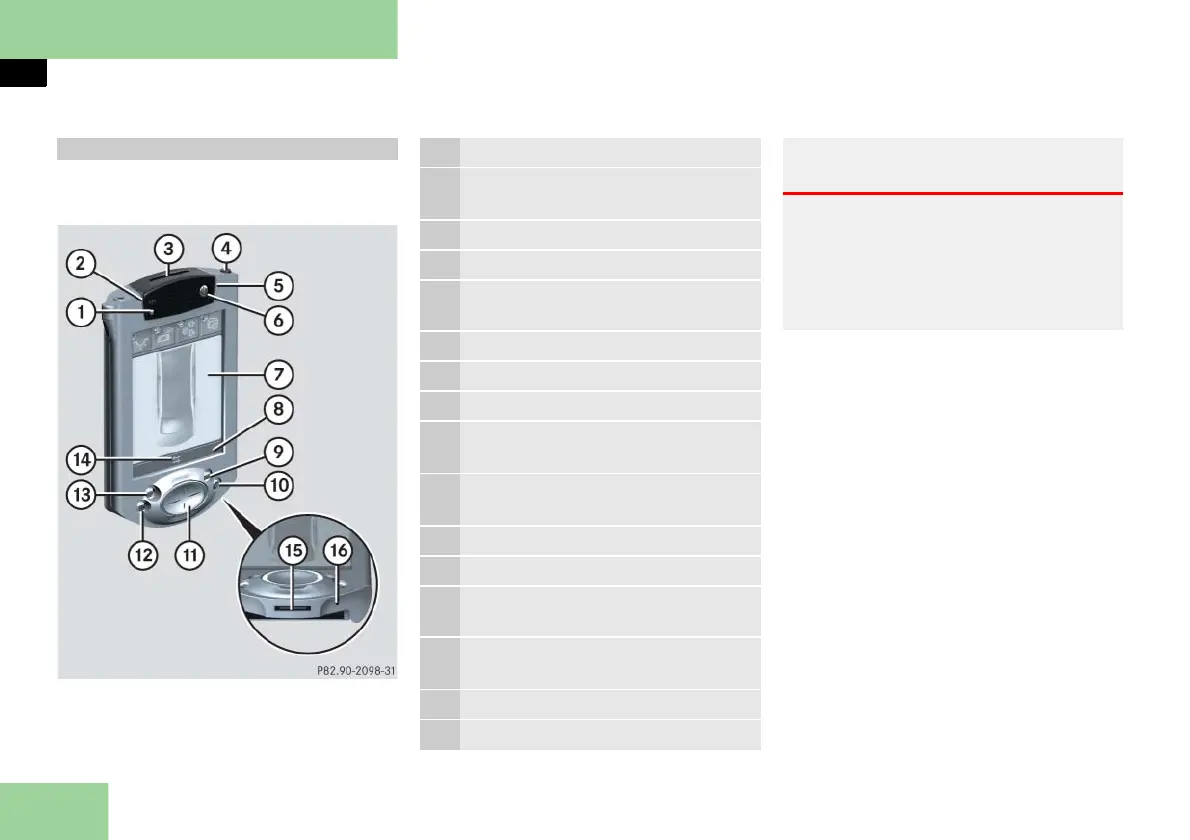
Pocket PC remote control*
Your vehicle is equipped with either
Pocket PC 1 or Pocket PC 2 (
page 315).
Your Pocket PC can be operated in two
ways. You can select your preferred
mode of operation by doing one of the
following:
press main menu function button 9,
a, c or d and then choose your set-
tings via navigation button b.
Tap on a menu symbol shown in dis-
play 7 (touch-screen) using your fin-
ger or stylus 4.
You can switch between these two
modes of operation at any time.
Pocket PC 1
1 Light sensor
2 Blue Bluetooth wireless indicator
lamp
3 Memory card inserted
4 Stylus
5 Yellow battery charge indicator
lamp
6 On/Off button
7 Display
8 Status line
9 Main menu function button:
Manual Adjustments
a Main menu function button:
Pocket PC Settings
b Navigation button
c Main menu function button: Light
d Main menu function button: Pri-
vacy
e Bluetooth wireless connection dis-
play
f Battery charge terminal
g Reset button
Warning! G
Only operate the Pocket PC remote control
from the rear passenger compartment.
Monitor the settings and operation of the
equipment you control using the Pocket PC
to make sure there is no danger of anyone
being harmed by the operating procedure.



 To Next Page