243
Controls in detail
Driving systems
Setting the following distance in
Distronic
You can set the specified following dis-
tance for Distronic by varying the time
setting between 1.0 and 2.0 seconds. Us-
ing this time setting and the current
speed of your vehicle, Distronic calcu-
lates and sets the required following dis-
tance to the vehicle ahead. The set
distance will be shown in the multifunc-
tion display field.
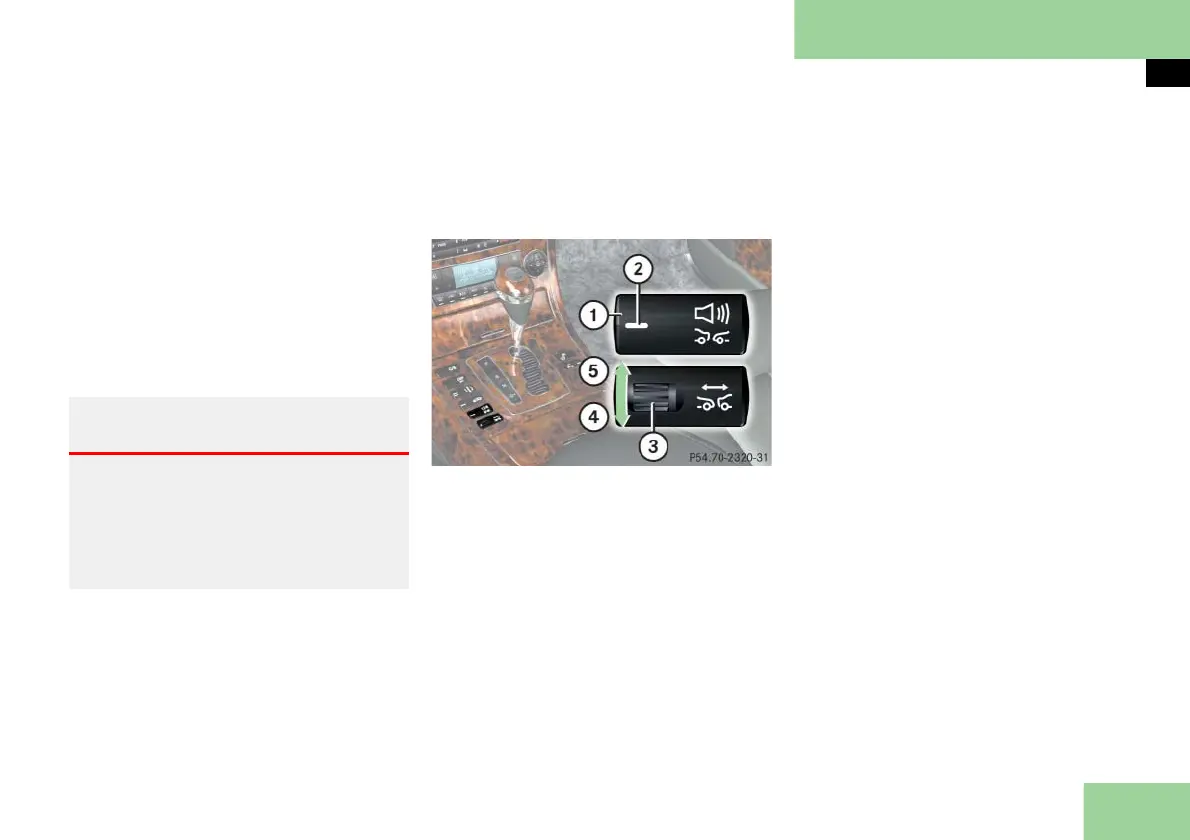
The distance warning function on/off
button and thumbwheel for setting dis-
tance are located on the lower part of
the front center console.
1 Distance warning function on/off
button
2 Indicator lamp
3 Thumbwheel for setting distance
4 Increasing distance
5 Decreasing distance
Increasing distance
Increasing the distance setting tells Dis-
tronic to maintain a greater following
distance to the vehicle ahead.
Turn thumbwheel 3 direction of
arrow 4.
Decreasing distance
Decreasing the distance setting tells Dis-
tronic to maintain a shorter following
distance to the vehicle ahead.
Turn thumbwheel 3 direction of
arrow 5.
Distance warning function
When Distronic is deactivated, this func-
tion will continue to warn you when rec-
ognizing a stationary obstacle or a
slower vehicle moving in the vehicle’s
path and the danger of a collision exists:
The distance warning lamp l in
the instrument cluster comes on
An intermittent warning sounds.
If these warnings are issued, you must
brake manually to maintain a safe dis-
tance and avoid a collision with the vehi-
cle ahead.
Warning! G
It is up to the driver to exercise discretion
to select the appropriate setting given
road conditions, traffic, driver’s preferred
driving style and applicable laws and driv-
ing recommendations for safe following
distance.



 To Next Page