322
Controls in detail
Pocket PC remote control*
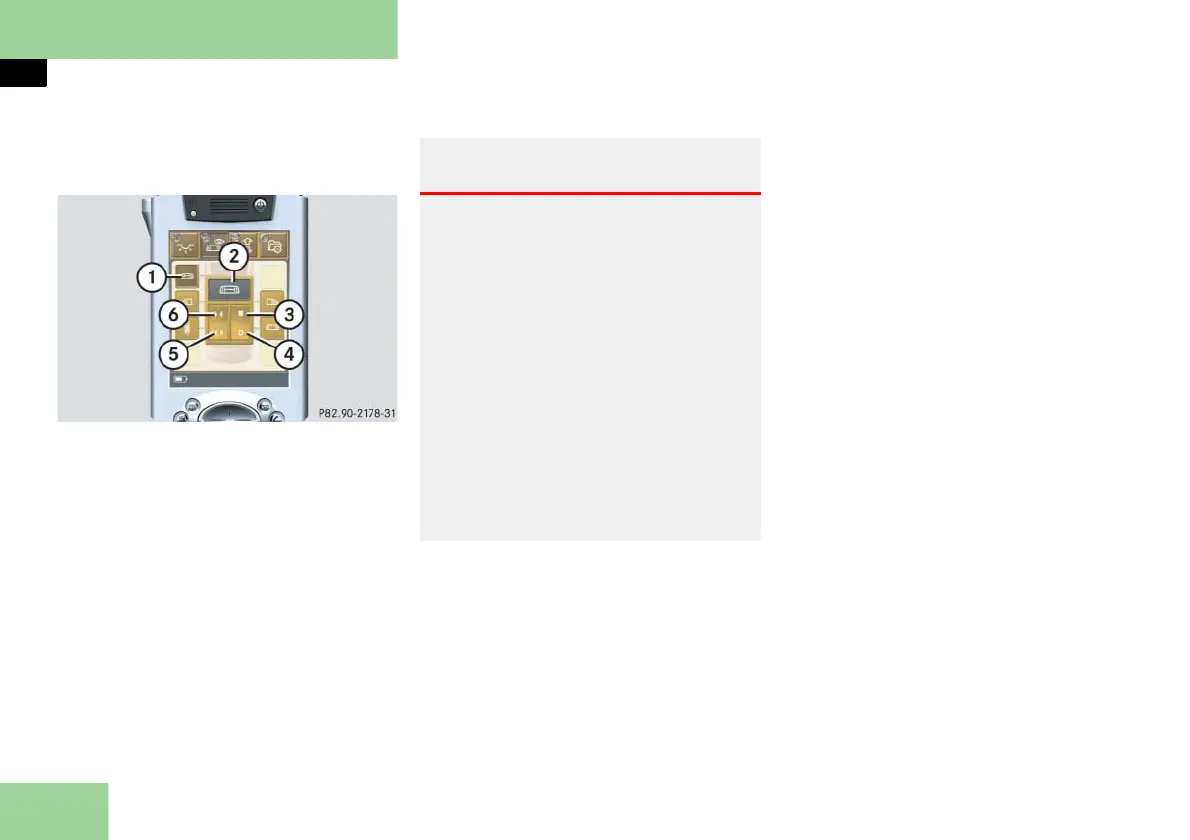
Selecting submenu: Operating the parti-
tion curtain*
1 Submenu: Partition curtain
2 Settings menu
3 To close curtain automatically
4 To open curtain automatically
5 To open curtain
6 To close curtain
Press submenu button: Partition cur-
tain 1.
The selected symbol in button 1 is
highlighted in the display and you
will see the corresponding settings
menu 2.
Opening the curtain
Press and hold symbol 5.
The curtain opens until you release
symbol 5.
Closing the curtain
Press and hold symbol 6.
The curtain closes until you release
symbol 6.
Fully opening the curtain (Express-open)
Briefly press symbol 4.
The curtain opens completely.
To stop the procedure, press
symbol 4 again.
Fully closing the curtain (Express-close)
Briefly press symbol 3.
The curtain closes completely.
To stop the procedure, press
symbol 3 again.
Warning! G
When operating the curtains, make sure
there is no danger of anyone being
harmed by the opening or closing proce-
dure.
The opening or closing procedure can be
immediately halted by releasing symbol 5
or 6 or by again pressing symbol 4 or 3.
When leaving the vehicle, always remove
the SmartKey or SmartKey with
KEYLESS-GO** from the starter switch,
take it with you, and lock the vehicle. Do
not leave children unattended in the vehi-
cle, or with access to an unlocked vehicle.
Unsupervised use of vehicle equipment
may cause an accident and/or serious per-
sonal injury.



 To Next Page