338
Controls in detail
Pocket PC remote control*
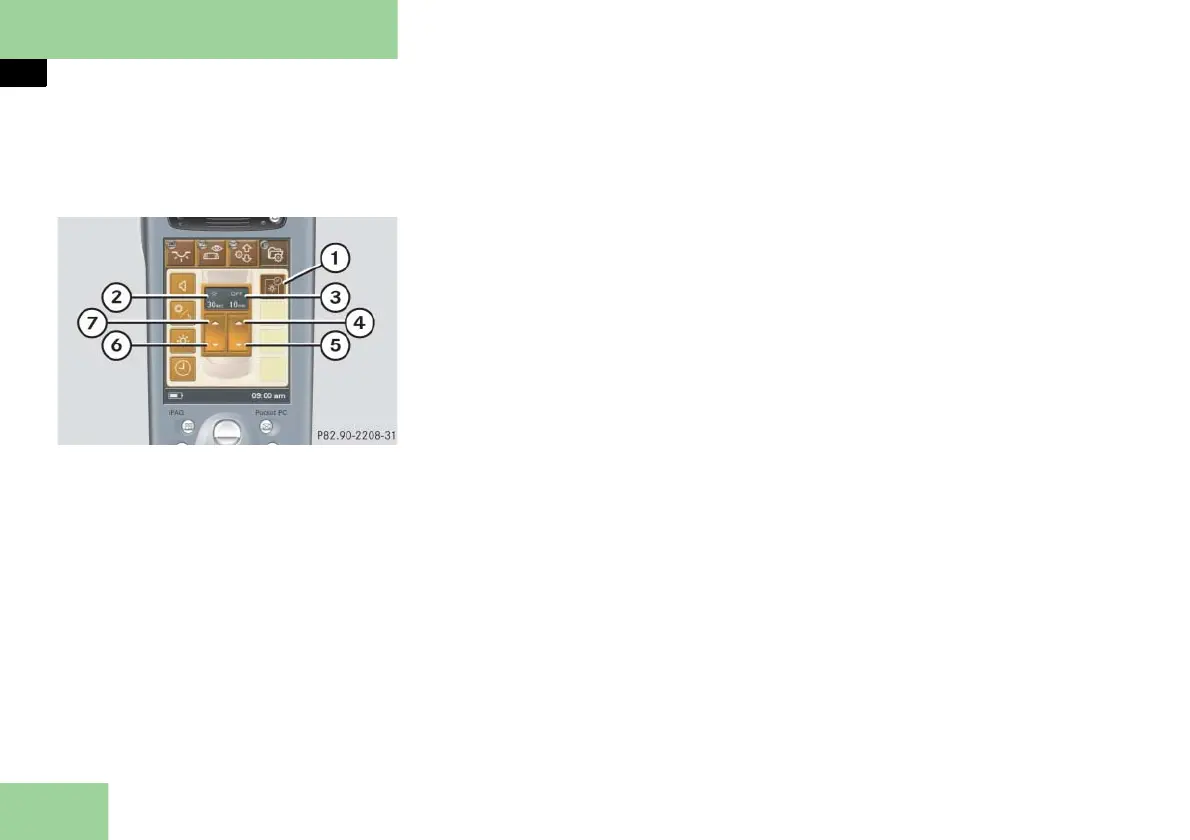
Selecting submenu: Automatic switch-
off for display/equipment and selecting
settings (Pocket PC 2 only)
1 Submenu: Automatic switch-off for
display and device
2 Settings menu for automatic display
switch-off
3 Settings menu for automatic device
switch-off
4 To set time for automatic device
switch-off forward
5 To set time for automatic device
switch-off backward
6 To set time for automatic display
switch-off backward
7 To set time for automatic display
switch-off forward
Press submenu button: Automatic
switch-off for display and device 1.
The selected symbol in button 1 is
highlighted in the display and you
will see the corresponding settings
menus 2 and 3.
Setting minutes for automatic
equipment switch-off forward or
backward
Press symbol 4 or 5 repeatedly until
the desired interval is set.
When the set time has elapsed, the
Pocket PC automatically switches
itself off.
Setting minutes for automatic display
switch-off forward or backward
Press symbol 6 or 7 repeatedly until
the desired interval is set.
When the set time has elapsed, the
display darkens.



 To Next Page