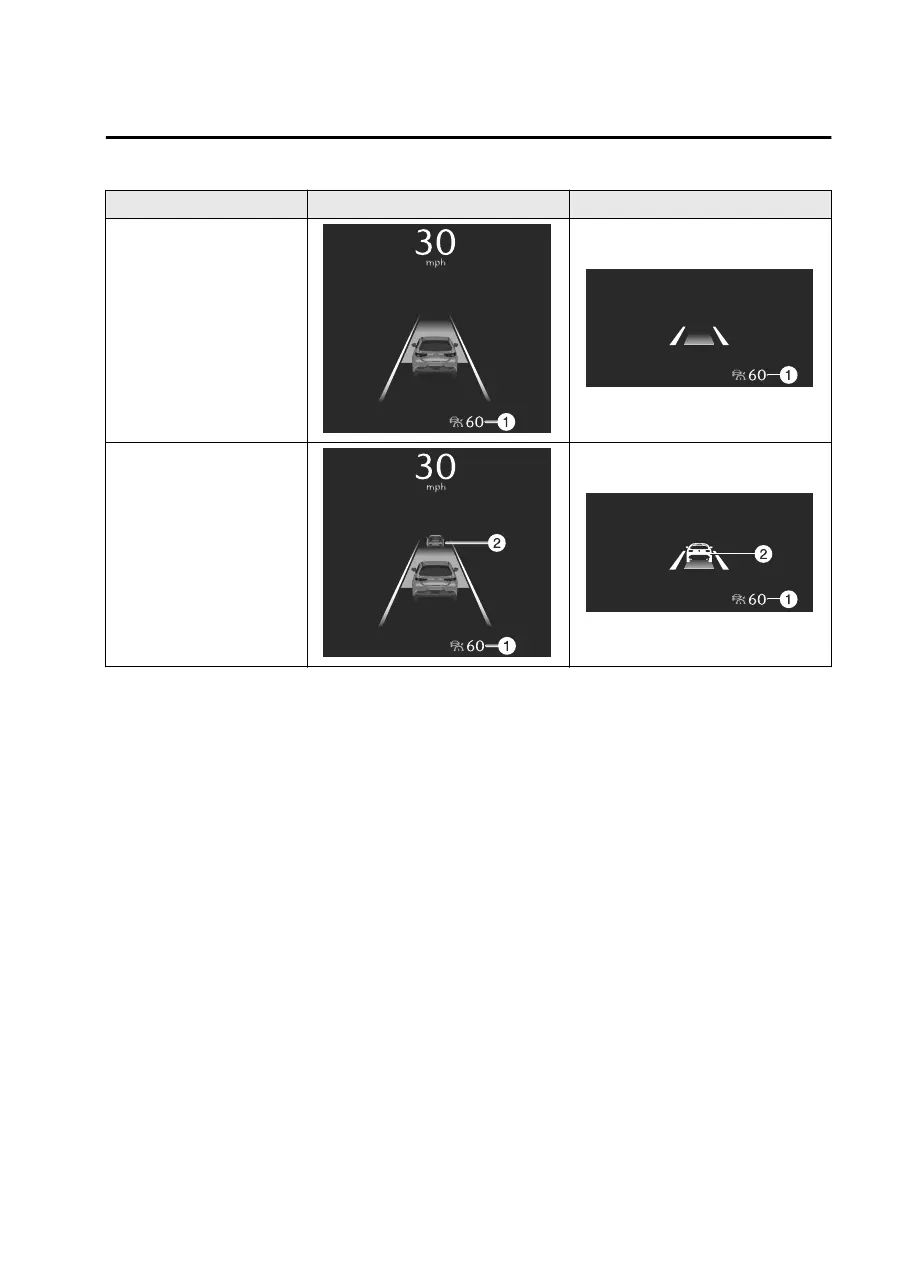
Driving condition Instrument cluster display Active driving display indication
During travel at constant
speed
During travel under head-
way control
1. Set speed
2. Vehicle ahead indication
NOTE
If there is a structure on the road or an obstruction at a low height off the ground
in front of the vehicle, the system may recognize it as a vehicle ahead.
Acceleration and deceleration by accelerator pedal operation takes priority while
traveling at a constant speed or in headway control. When the accelerator pedal is
released, the vehicle returns to driving at a constant speed or headway control at
the set speed.
If a vehicle ahead is traveling at an extremely low speed, the system may not
detect it correctly.
While driving using the MRCC, intended engine braking is not applied even if the
selector lever/shift lever is operated.
The brake lights turn on while the brakes are operating by the MRCC control.
The MRCC is also turned off automatically when the vehicle power is switched
OFF.
If the distance between vehicles control is disabled using Mazda Connect, the
system switches to the cruise control. At this time, the MRCC switch functions as
the cruise control switch.
Refer to the Settings section in the Mazda Connect Owner's Manual.
Driving
Mazda Radar Cruise Control (MRCC)
5-149
Mazda3_8LX5-EA23E_Edition2_new 2023-4-17 20:22:43



 To Next Page