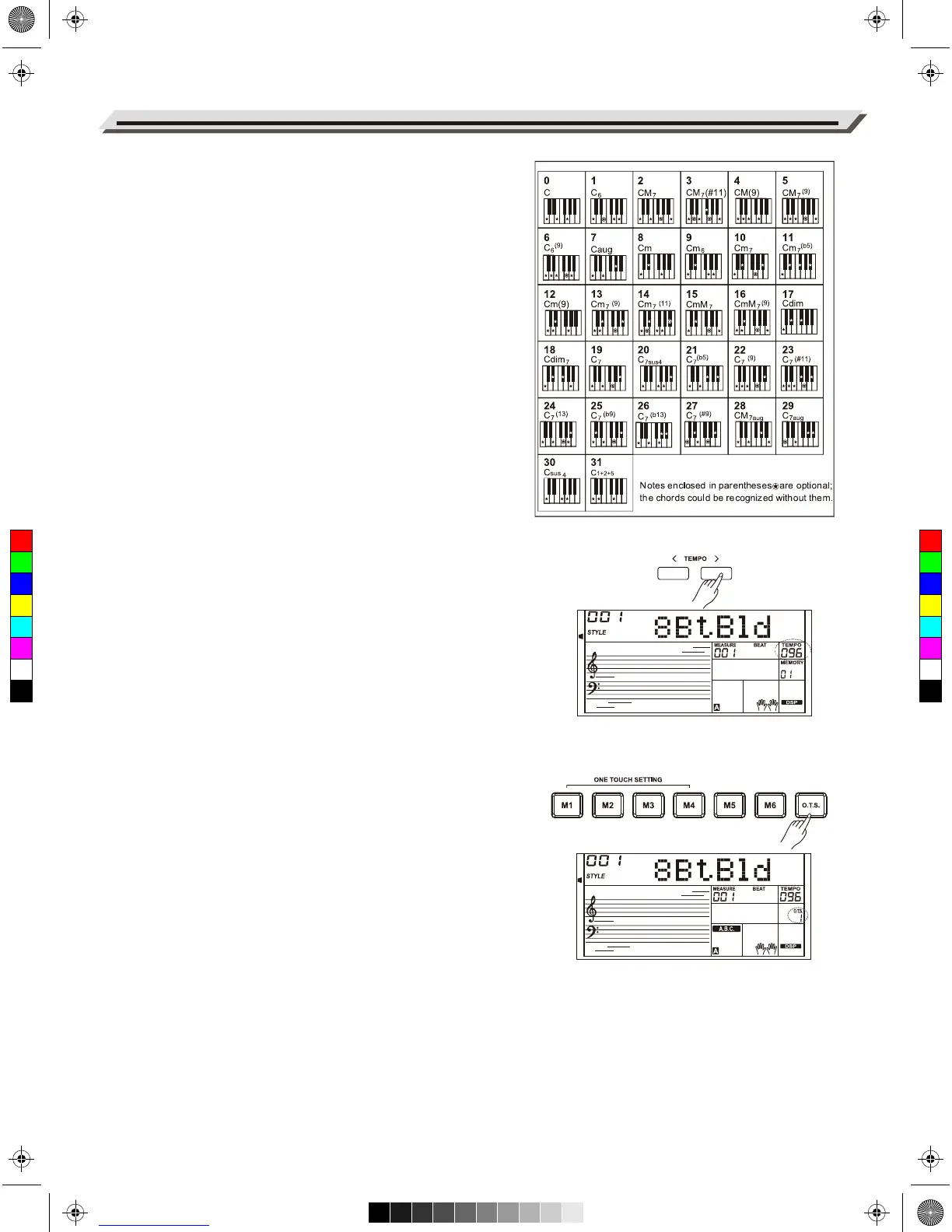
Multi-finger
Multi-finger allows you to play chords in normal fingering. Try playing
the 32 types of C chords listed on the right.
Full Range
In Full Range mode, it detects chords played in normal fingering
(Multi-finger) over the entire keyboard range.
Tempo
Each style is preset with a default or standard tempo, but you can
change it as needed.
1. Change the tempo.
Press the [TEMPO+]/[TEMPO-] buttons to edit the tempo setting.
When the tempo value is flashing on LCD, use the data dial to
make a quick change in the value.
2. To restore the default tempo setting, press the [TEMPO+] and
[TEMPO-] buttons simultaneously.
One Touch Setting
When One Touch Setting is switched on, you can instantly recall all
auto accompaniment related settings including voices selection and
digital effects, all with the single touch of a button.
1. Press the [O.T.S.] button to turns on the function. The “O.T.S.”
indicator lights up and the A.B.C. function will be turned on.
2. Press one of the [M1] - [M4] buttons. Various panel settings
(including voice and effects) that match the current style will be
recalled instantly.
3. Play the keyboard.
One Touch Setting parameter list:
Part ON/OFF (VOICER1,R2,L)
Voice Number (VOICER1,R2,L)
Voice Volume (VOICER1,R2,L)
Voice Reverb Level (VOICER1,R2,L)
Voice Chorus Level (VOICER1,R2,L)
Note:
In O.T.S. mode, the Registration Memory is not available.
Auto Accompaniment
16
C
M
Y
CM
MY
CY
CMY
K
AW_AW830_Manual_G03_171207.pdf 16 17/12/12 17:59



 To Next Page