The instrument recognizes USB flash drives, sizing from 16M to 32G in
the format of FAT16 and FAT32. It does not support USB partition. We
recommend you format the USB flash drive on the instrument before
using. Do not edit the backup files saved in the USB flash drive.
Common Operation
1. The function buttons related to USB Flash Drive: [USB DEVICE],
[+/YES], [-/NO], data dial and [START/STOP].
2. Press [USB DEVICE] button to enter USB Device mode, press it
again to exit the function.
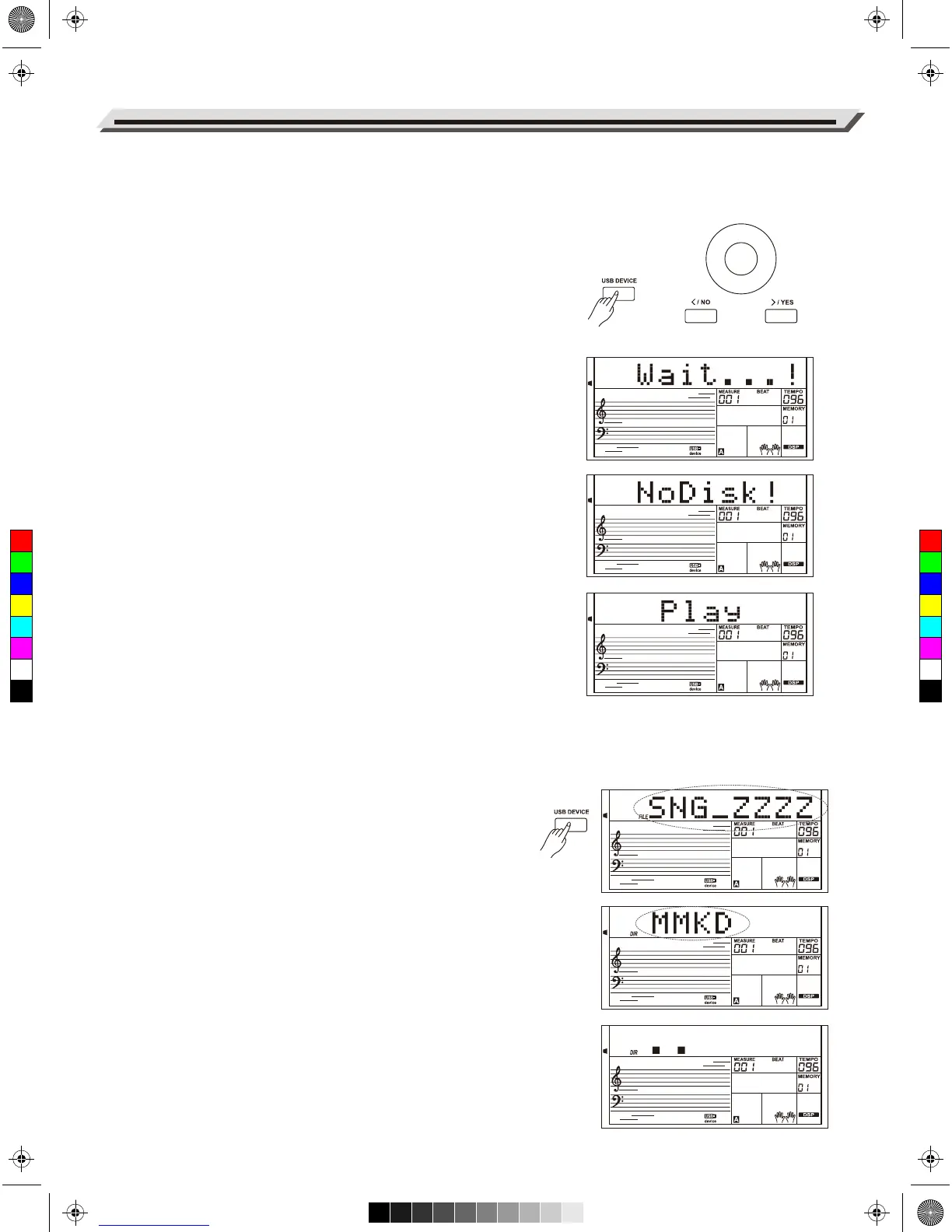
3. If you connect a USB flash drive to the instrument, LCD will first
show “Wait...!”, indicating the initialization is in progress. If the
initialization succeeds, LCD will show “Play”, otherwise, it will show
“DiskErr”. If the USB Flash Drive is not connected, LCD will show
“NoDisk”.
4. In the USB Device mode, you can use the data dial to choose menu,
press [+/YES] button to go forward or, press [-/NO] to return to
previous menu.
5. In USB Device mode, it can read a maximum of 512 files in a
directory. “DIR” means a directory, and “FILE” means a file.
In USB Device mode, you can press [USB DEVICE]/ [STYLE]/
[SONG] or a STYLE select button to exit the mode.
6. When playing a MIDI file, press the [MIXER+]/[MIXER-] buttons to
adjust the playing volume, over the range from 0 to 127.
7. The operation to load, save or delete will apply to files in the “MMKD”
folder only.
Note:
An “MMKD” folder will be generated automatically in the USB flash drive
for the initial time when you save data to it. Please wait patiently until
the process is finished.
Play
1. Press [USB DEVICE] button to enter USB Device mode, use the
data dial to select the “Play” menu.
2. Press [+/YES] button, LCD will display the MIDI files and directories
in the root of the USB flash drive.
3. If you select a sub-directory, LCD will display the sub-directory name
and the “DIR” sign. Press [+/YES] button to enter the current
sub-directory, LCD will show all files in the sub-directory.
4. If there is no recognizable file in the current directory, LCD will
display “..”, press [+/YES] button to go back.
5. Use the data dial to select a MIDI file. Press [START/STOP] button
to play it repeatedly. Press [+/YES] button to play all files in the
current directory circularly. Press [START/STOP] button again to
stop playing, press [-/NO] button to return to previous menu or press
[USB DEVICE] button to exit the mode.
Connecting USB Flash Drive
34
C
M
Y
CM
MY
CY
CMY
K
AW_AW830_Manual_G03_171207.pdf 34 17/12/12 17:59



 To Next Page