5 Frequently Asked Questions (FAQ)
21
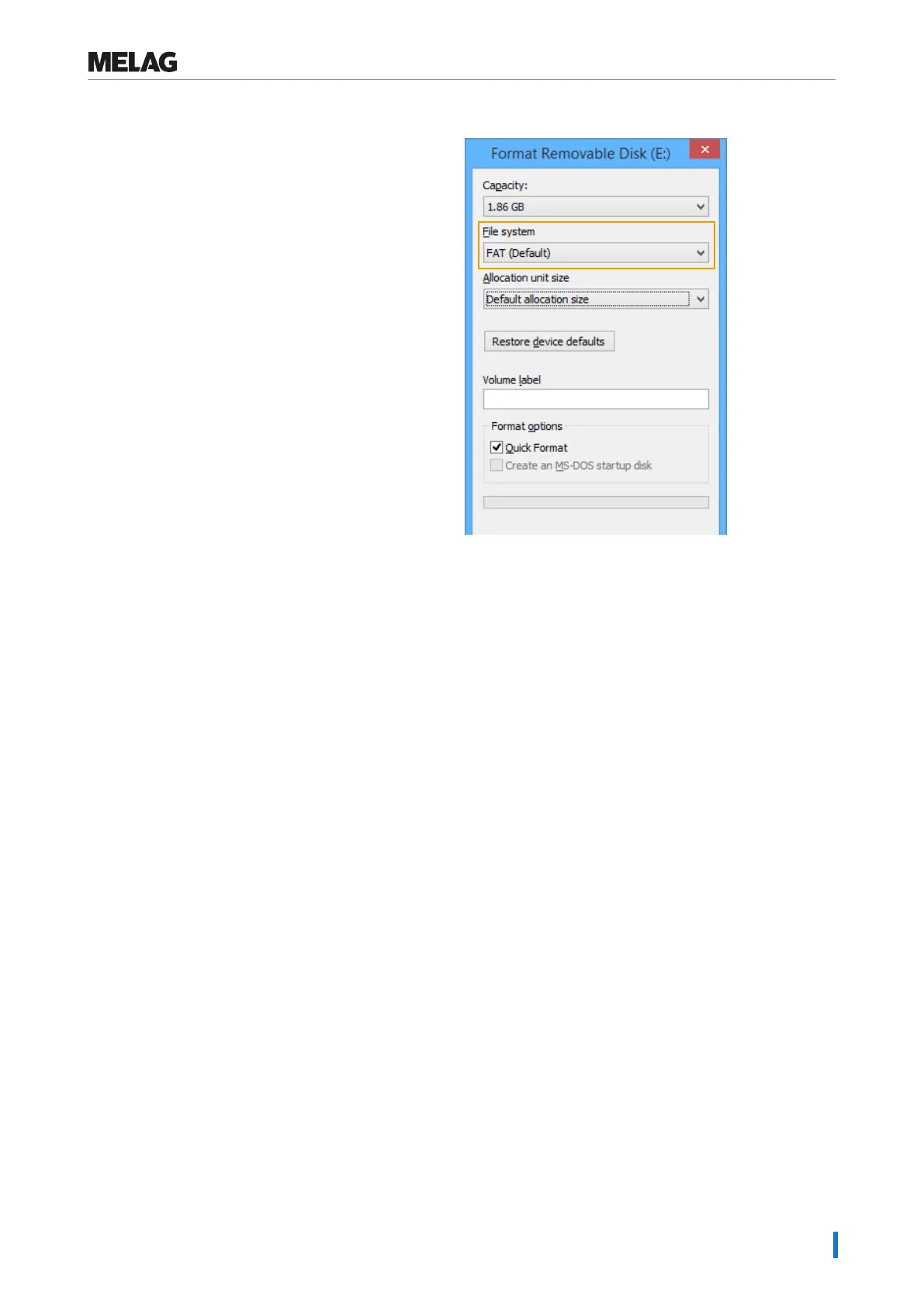
Formatting on a computer is described in Windows 7:
1. Insert the CF card in the MELAflash card reader
installed and connected to the computer.
2. Working in Windows Explorer “Computer” > “Devices
with Removable Storage” select the corresponding
drive and open the menu window by right-click.
3. Working in the menu window, select the “Format...”
option. The adjacent dialogue window opens.
4. Working under file system, select the format “FAT
(Default)”.
5. Working under “Allocation unit size” Windows
automatically selects the appropriate allocation unit for
the respective size of the CF card. The allocation unit
is dependent of the size of the CF card.
6. Click on “Start”.
How to incorporate the device in a (practice) network?
Arrange for the IT company that services your network to incorporate your device in the network.
Note the following:
n The computer is equipped with a network card with a RJ45 bushing (LAN).
n Log archive via FTP: An FTP server*
)
or an FTP service is installed on the computer that permits the creation of
users with write permission independent of the operating system.
n Log output via TCP: A suitable program, e.g. MELAtrace, is installed.
*
)
We recommend using the MELAG FTP server to incorporate network-compatible MELAG devices in a (practice)
network.
1. Setting up the FTP server (only with log output via FTP)
A computer must be determined in the (practice) network on which the FTP server should run. This program receives the
logs via data transfer. The steam sterilizer searches for the FTP server using the IP address set in the steam sterilizer
and logs on. The logs of the completed program are saved on this computer later. When choosing the computer, be
aware that it would be advantageous to integrate the logs thus saved in the practice automatic data saving system.
MELAG provides its own FTP program free of charge. Using the MELAG FTP server enables the registration of multiple
devices as users simultaneously and the receipt of data from the steam sterilizer and other devices such as a washer-
disinfector. The FTP server supports the so-called multithread capability. You can determine the folder in which the
device directory and log files are to be stored in the FTP server program.
1. Working in the (practice) network, determine which computer should run on the FTP server.
2. If an FTP server has not yet been installed, install the MELAG FTP server for preference and set the steam sterilizer
as user with a user name and password.
3. Working on the steam sterilizer, set the computer as the log output medium (log output via FTP). Further information
regarding log output is set out in the user manual (chapter Settings, Logging).













 To Next Page