Operation and Control
26 D39303 02/2024
See also
2 Materials [}12]
2 Technical Data [}14]
6.4 Operating the Appliance
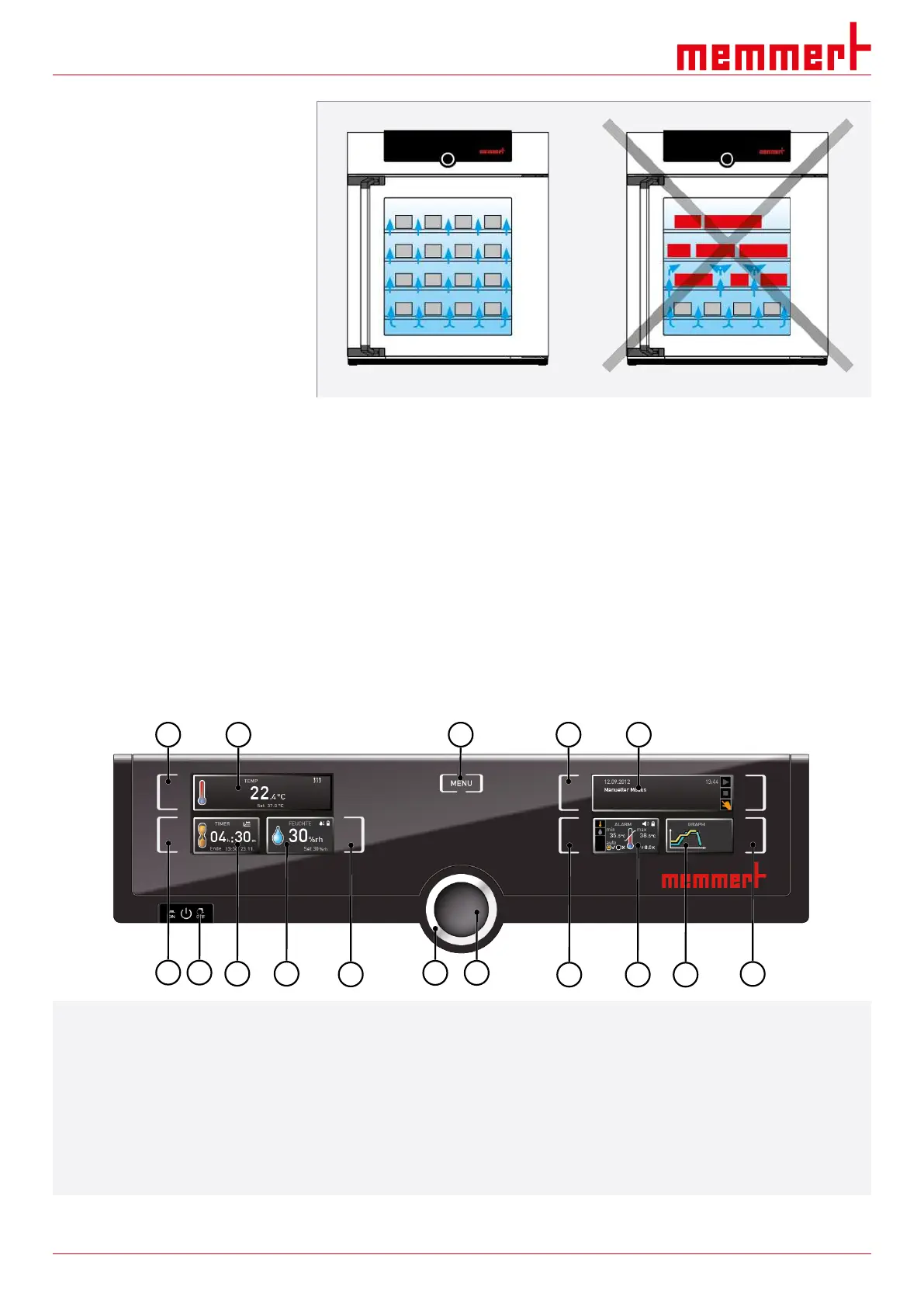
6.4.1 ControlCOCKPIT
In manual operation, the desired parameters are entered at the ControlCOCKPIT on the
front of the appliance. You can also make basic settings here (menu mode). Warning
messages are also displayed, e.g. if the temperature is exceeded. In programme mode, the
parameters defined, the programme description, the programme segment currently active
and remaining programme runtime are displayed.
1
2
3
4
5
6
7
8
9 10
11
12
13
14 15
16
1 Activation key for temperature setpoint input 2 Setpoint and actual temperature display
3 Switch to menu mode 4 Activation key for digital backwards counter with target
time setting, adjustable from 1 minute to 99 days
5 Main switch 6 Display of digital backwards counter with target time
setting, adjustable from 1 minute to 99 days
7 Display of humidity setpoint and actual value 8 Humidity control activation key
9 Turn control for setpoint adjustment 10 Confirmation key (applies setting made with the turn
control)
11 Activation key for the appliance state 12 Appliance state and programme display


 To Next Page