Menu Mode
49 D39303 02/2024
i
If all calibration correction values are set to 0.0 K, the factory calibration settings are
restored.
8.5.2 Humidity Calibration
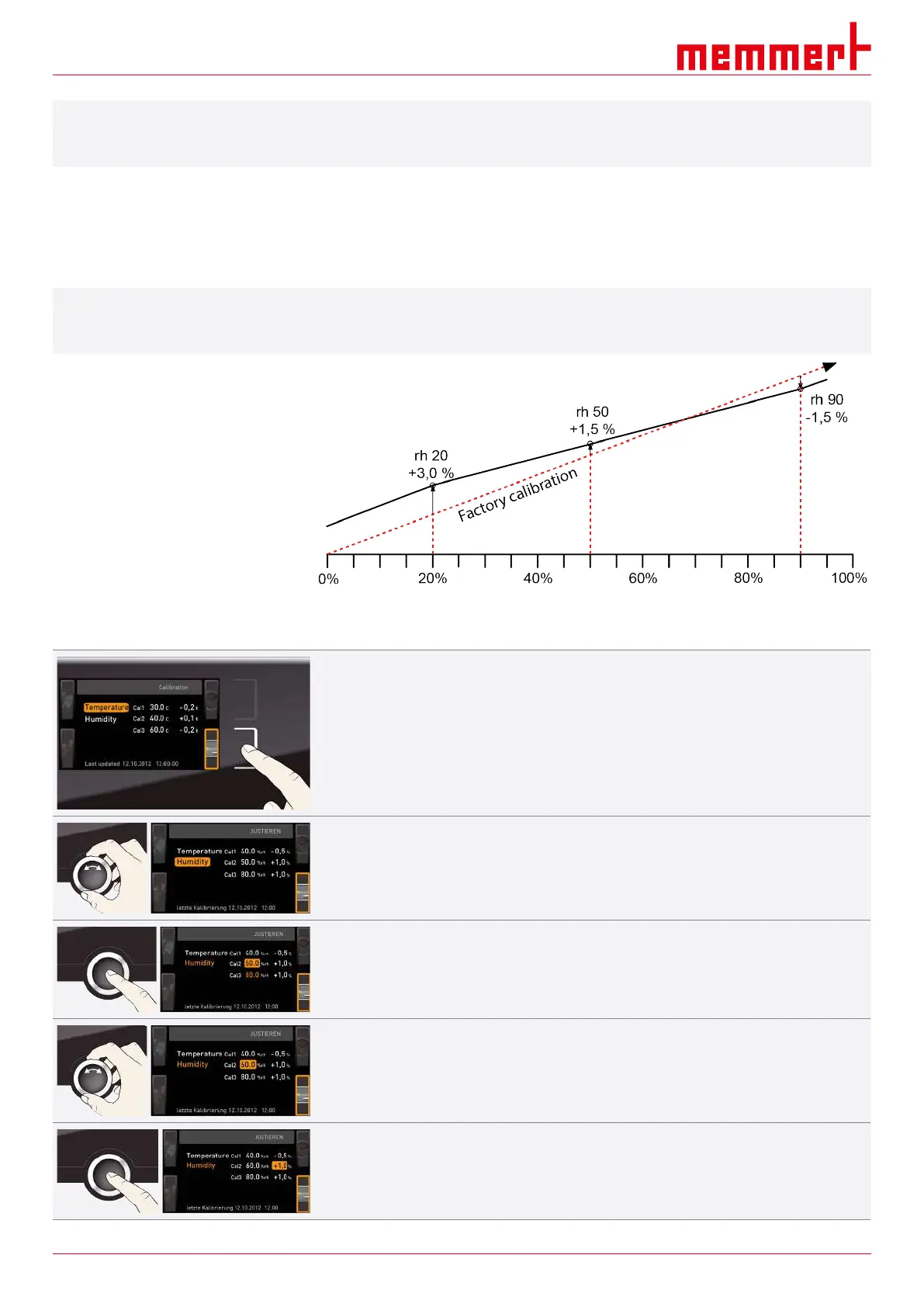
Closed-loop humidity control can be adjusted according to customer requirements by
means of three freely selectable calibration points. For each selected calibration point, a
positive or negative calibration correction value between –10% and +10% can be set.
i
For humidity adjustment, you will need a calibrated reference instrument.
Example: Humidity deviation at 60% rh needs to be corrected
1. Press the activation key to the right of the CALIB display.
ð The display is enlarged and the temperature adjustment option is automatically
highlighted.
2. Turn the turn control until Humidity is highlighted.
3. Press the confirmation key repeatedly, until the calibration point Cal2 is highlighted.
4. With the turn control, set the calibration point Cal2 to 60% rh.
5. Save the setting by pressing the confirmation key.
ð The corresponding calibration correction value is automatically highlighted.


 To Next Page