Operation and Control
36 D39303 02/2024
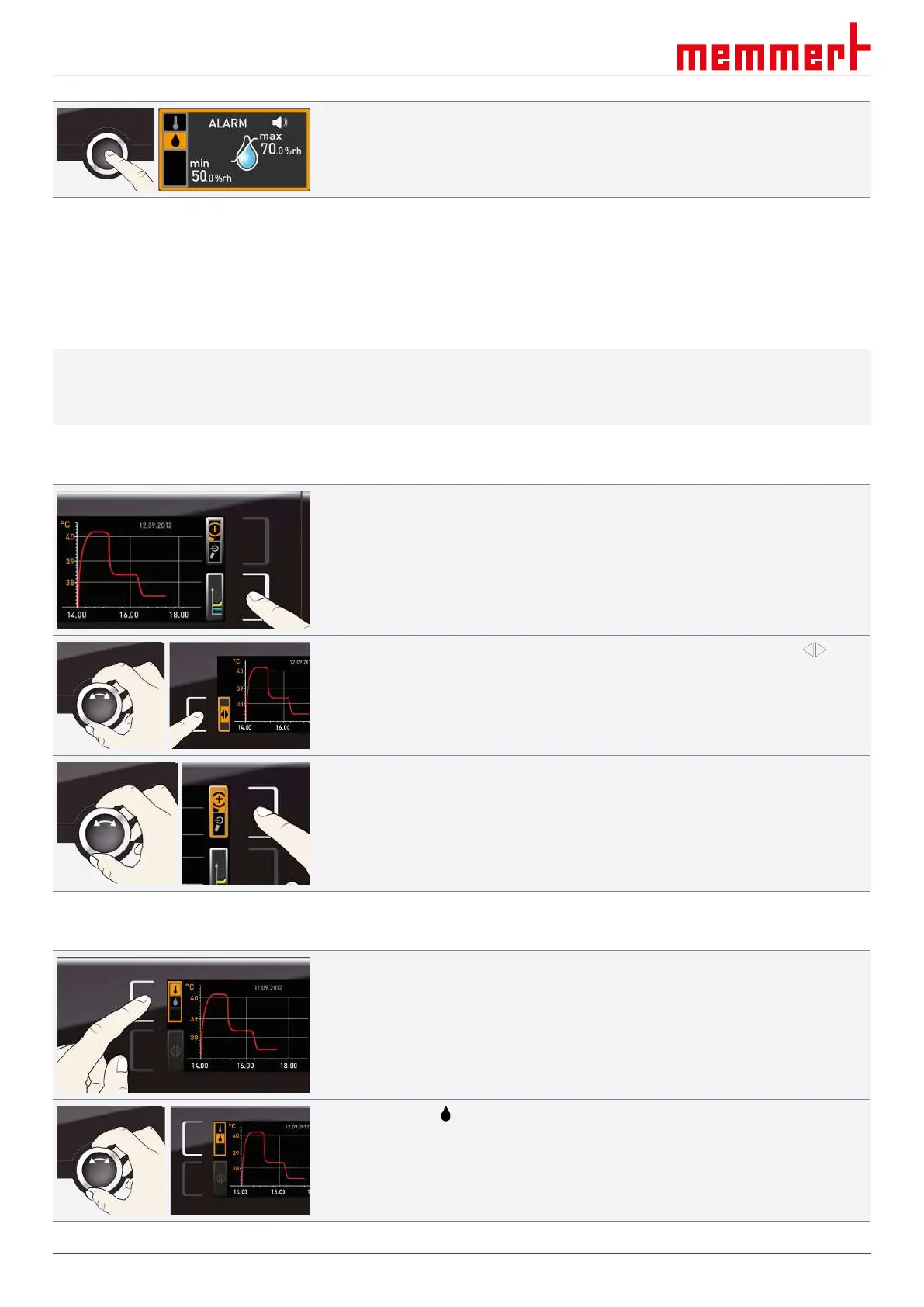
7. Press the confirmation key to confirm.
8. Press the activation key on the side to exit the Alarm display.
ð Humidity monitoring is now active.
See also
2 Acoustic Signals [}51]
2 Malfunctions, Warning and Error Messages [}38]
6.7 Graph
i
The GRAPH display provides an overview of the chronological sequence of the set values
and the actual values as a curve.
■ Press the activation key again to close the graphic display.
6.7.1 Temperature Curve
1. Press the activation key to the right of the GRAPH display.
ð The display is enlarged and the temperature curve is displayed.
2. To change the time range to display press the activation key next to the arrow
symbols.
ð The time range to display can now be displaced by turning the turn control.
To zoom in or out in the graph:
3. Press the activation key next to the magnifying glass symbol.
4. With the turn control, select if you want to zoom in or out (+/–).
5. and confirm your selection by pressing the confirmation key.
ð To close the graphic display, press the activation key again.
6.7.2 Humidity Profile
1. Activate this graphic display as described above.
2. Press the activation key next to the parameter selection.
3. Set the humidity with the turn control.


 To Next Page