26
SETUP MENU (CONTINUED)
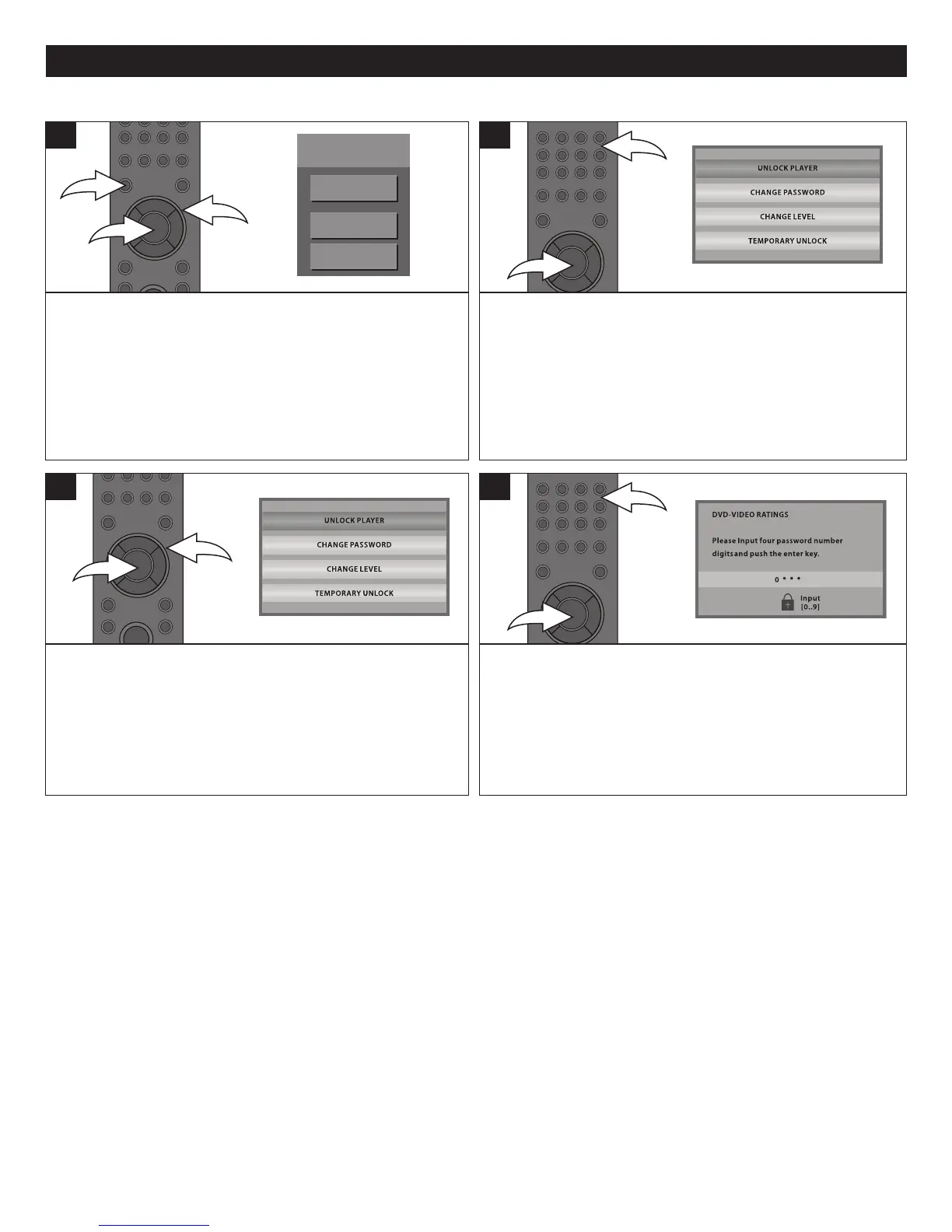
Press the SETUP button 1 and the BD-Video Menu will
appear. Select SETTING using the Navigation (π,†)
buttons 2, then press the ENTER button 3 to enter the Main
menu.
Select PARENTAL using the Navigation (π,†) buttons 2,
then press the ENTER button 3 to enter the Parental menu.
1
Follow the steps on page 24 to access the DVD VIDEO
RATINGS. After completing, the next time you attempt to go
to the DVD-VIDEO RATINGS menu, it will again prompt you
to enter a password. Enter it using the Number (0-9) buttons
1. Then press the ENTER button 2; the Parental sub-menu
will appear.
NOTE: You can change the Password in either DVD rating
or BD rating.
2
SETTING PARENTAL PASSWORD
Select CHANGE PASSWORD using the Navigation (π,†)
buttons 1, then press the ENTER button 2; the Change
password screen will appear.
3
Enter the desired four-digit password using the Number (0-
9) buttons 1 then press the ENTER button 2. This will be
your new password. Press the ENTER button 2 again to
return to the Parental Menu.
4
BD-Video
TOP MENU
SETTING
BD-VIDEO DATA ERASE



 To Next Page