TS790+ & TS900+ Installation Manual System Installation
5
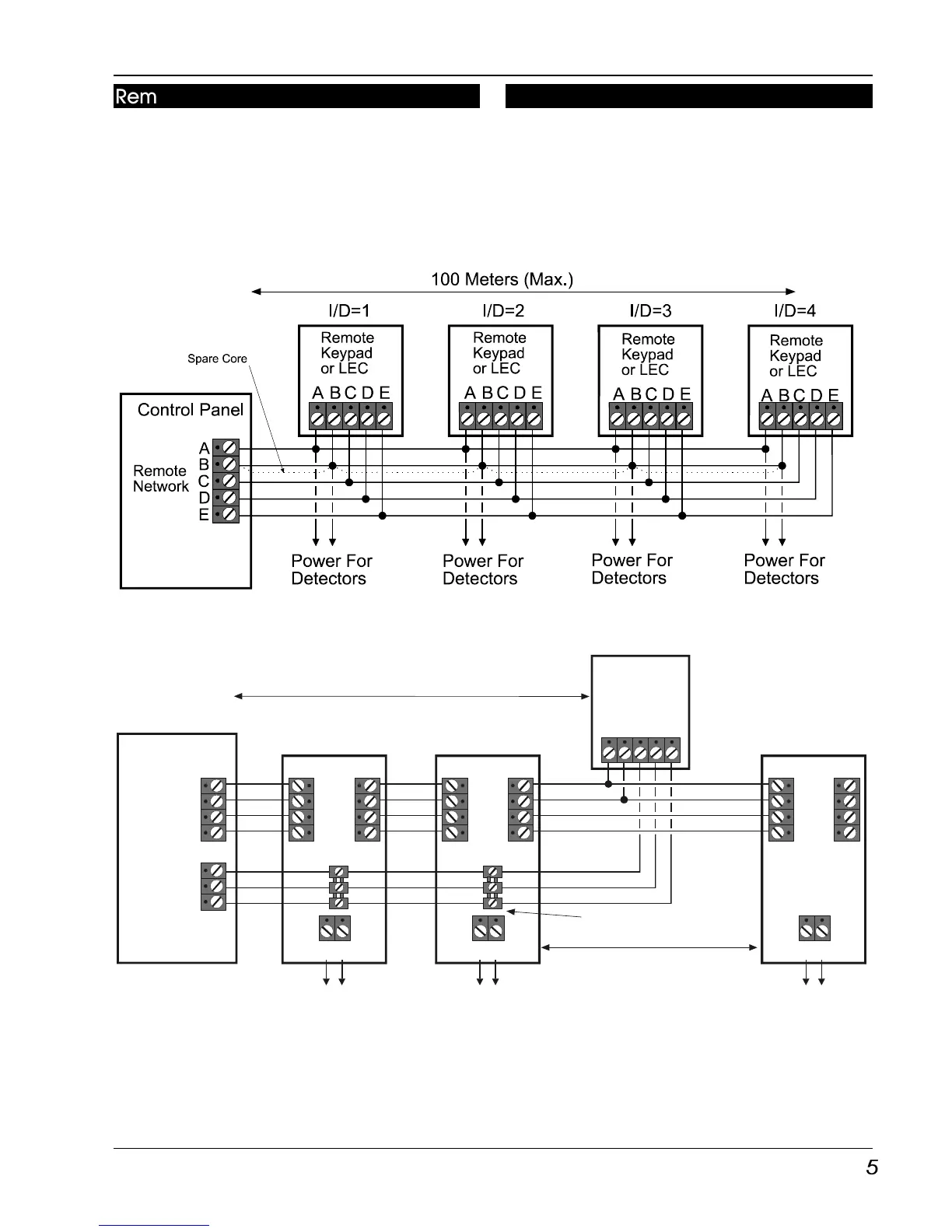
Remote Network Wiring
Devices on the “Remote Network” require a 6
core cable for interconnection, and may be
connected in a “star” or “daisy-chain”
configuration. The distance to the furthest
device from the control panel must not exceed
100 metres. Power for detectors are provided
by the A and B terminals (Figure 3).
Figure 3. TS790+ & TS900+ Remote Network wiring
Figure 4. TS900+ Combined Network Wiring
Combined Network Wiring (TS900+)
On some installations it may be desirable to
have a remote keypad connected after the
XNodes. This can be achieved by using an
eight core cable from the control panel and
connector strips within the XNode and remote
keypads (Figure 4).
Remote
Keypad
or LEC
Node
Network
Remote
Network
Control Panel
Power For
Detectors
Power For
Detectors
Power For
Detectors
C
D
E
IN OUT
AUX 12V
XNode
I/D=2
A
B
F
G
A
B
F
G
IN OUT
AUX 12V
XNode
ABCDE
I/D=1
A
B
F
G
A
B
F
G
A
B
F
G
IN OUT
AUX 12V
XNode
I/D=3
A
B
F
G
A
B
F
G



 To Next Page