32
Fill the bottle with at least 500 mL of sanitizer.
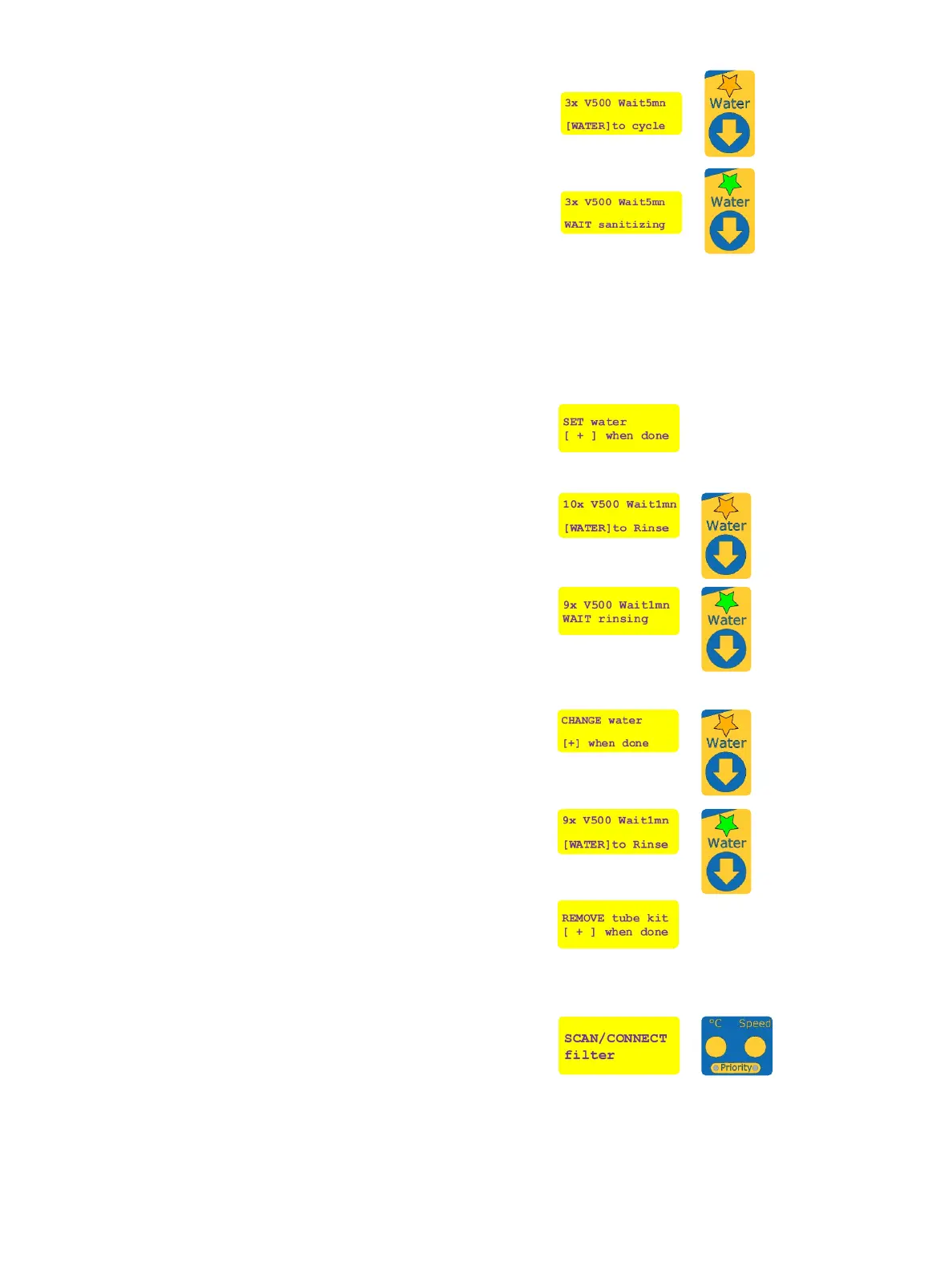
The screen displays the number of sanitizer recirculation
cycles and the waiting time between each. The “Water” LED
ashes orange and the user is prompted to press [WATER] to
start the sanitization process.
Press [WATER] to start sanitization. The “Water” LED will
be ashing green and the sanitization process is conducted
automatically.
After sanitization, replace the sanitizing solution with
deionized water to rinse the instrument. Disconnect the
sanitization kit from the instrument, rinse the bottle
and tubing with fresh deionized water, reconnect to the
instrument, with the straight connector on the water inlet
port, and the elbow connector on the outlet port. Fill the
bottle with 1 L or 2 L of fresh deionized water and press [+]
to conrm.
Alternatively, the sanitization kit can be disconnected, the
water tubing re-connected to the water port (Figure 2, L1),
and the outlet sanitization tubing connected to instrument
outlet port (Figure 1, F1). Place the other extremity of the
outlet tubing with the other extremity placed in a container to
collect 2.5 L of rinsing water.
The screen then displays the number of rinsing cycles and the
waiting time between each. The “Water” LED will be ashing
orange. Press [WATER] to start the rinsing step.
The “Water” LED ashes green as the water pump
recirculates the rinsing water.
After recirculation, the display shows the remaining waiting
time until the next rinsing cycle.
After each rinsing cycle, change the water for fresh deionized
water and conrm by pressing [+].
Alternatively, if the instrument was reconnected to the water
source, make sure enough capacity remains in the container
collecting the rinsing water.
The “Water” LED will be ashing orange. Press [WATER] to
perform the second rinsing cycle like the rst.
During rinsing the “Water” LED will be ashing green.
Repeat the rinsing steps until no further rinsing cycle is
requested by the system.
At the end of the sanitization and rinsing process, disconnect
the sanitization kit from the instrument.
Rinse with deionized water and dry the sanitization kit, the
bottle, and the outlet tubing before storage.
Once removed, press [+] to exit the sanitization mode. The
two “Priority” LEDs will stop ashing green.
If needed, reconnect the water inlet tubing to the media
unit and follow instructions on the display to set up the
consumables as described in page 14.
The system is now ready.
!


 To Next Page