Copyright Meritor, Inc., 2021Printed in USA
MM-2034 / Issued 02-21
Page 36
7 Assembly
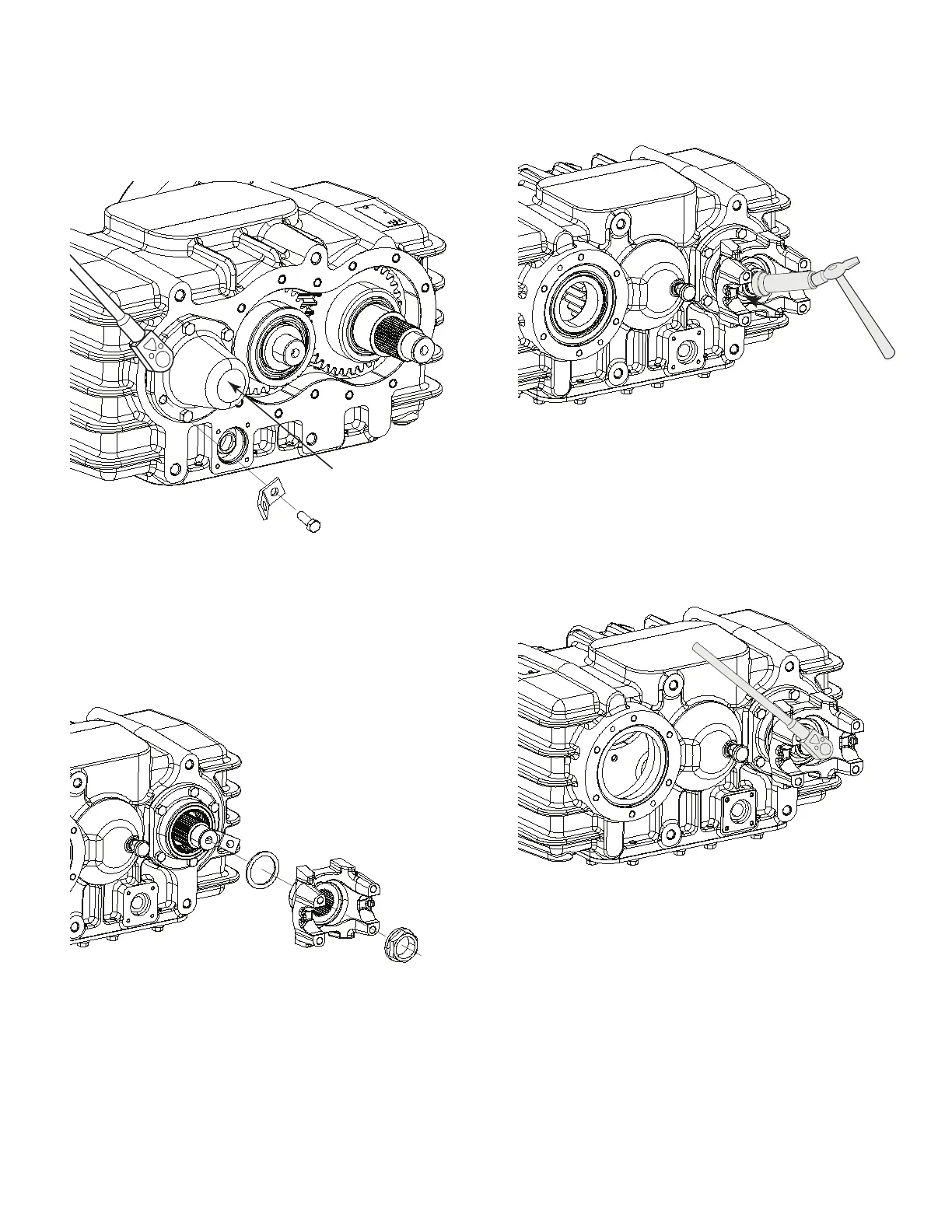
13. Install the gasket shims that were removed during disassembly
and install the input shaft rear cap. Use Loctite 272 threadlocker
on the bolt threads and torque to specifi cation. Install the bracket
in the location illustrated below. Figure 7.37.
Input Shaft
Rear Cap
4018269a
Figure 7.37
14. Install the input shaft washer in front of the forward most bearing
on the shaft. Install the input shaft yoke and torque the lock nut to
specifi cation. Figure 7.38.
4018270a
Figure 7.38
15. Lightly tap the shaft to rear of the case to seat the bearing. Figure
7.39.
4018271a
Figure 7.39
16. Using a torque wrench on the yoke nut, check the input shaft
rolling torque is 30±10 lb-in. If the rolling torque is not within
specifi cation, the input shaft rear cap will need to be removed and
shims of a different thickness used to obtain the specifi cation.
Figure 7.40.
4018272a
Figure 7.40



 To Next Page