eikon e1s
User Manual
Section 2: Operations and Installation Guide
Choosing cooking profiles for Press&Go menu
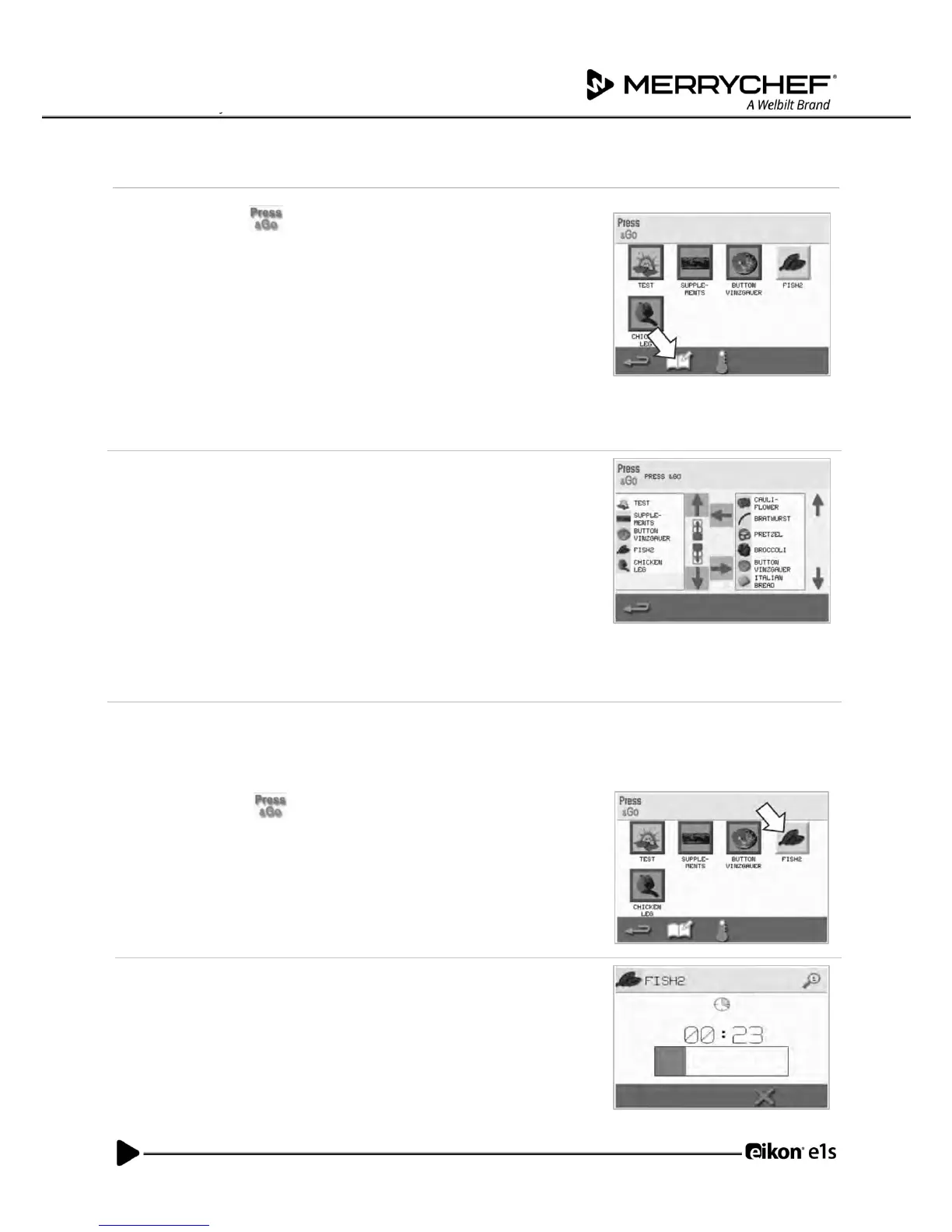
1. Select ‘Press&Go’ from the main menu screen, and then select the
‘edit cookbook’ symbol.
Two lists are displayed.
• The list on the left shows the cooking profiles that are part of the
‘Press&Go’ menu.
• The list on the right shows other cooking profiles that are
available.
Both lists can be scrolled up or down using the blue arrows on the right of
each list.
2. Select a cooking profile from the list on the left.
• Choose whether to change its position within the list or to
remove it into the list on the right.
• To change the order of cooking profiles in the left list, use the
blue up/down arrows in the middle.
• To move a selected cooking profile to or from the ‘Press&Go’
menu, use the green/red arrows in the middle.
• To make a cooking profile from the right list available in the
‘Press&Go’ menu, move it into the left list.
3. Select backspace to return to the ‘Press&Go’ menu screen when finished.
Running a cooking profile from the Press&Go menu
1. Select ‘Press&Go’ from the main menu screen and then select the
cooking profile required to cook.
Note: Follow any instructions on the screen, if displayed. If the product has
not been placed in the oven, at this stage open the oven door and place the
food on the cook plate and then press the green tick to start cooking.
2. The display shows the cooking time countdown.
The timer bar turns red to indicate that the cooking cycle has finished.



 To Next Page