eikon e1s
User Manual
Section 2: Operations and Installation Guide
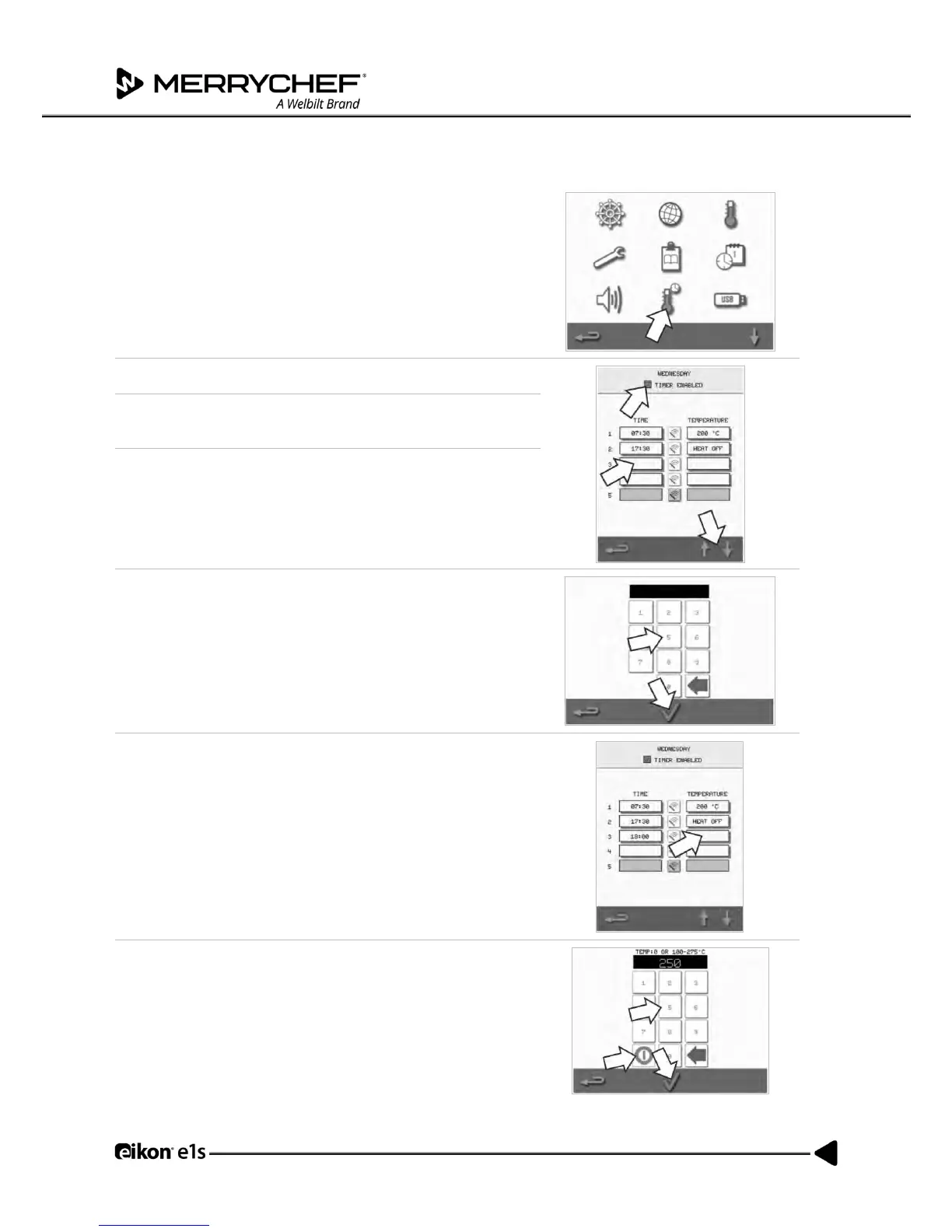
Temperature timer setting
1. Select the ‘thermometer / timer’ symbol from the settings
menu.
2. Select the ‘timer enabled’ checkbox (green tick).
3. Select a weekday using the up/down arrows at the bottom of
the screen.
4. Select an empty ‘time’ box (maximum of five per day) or clear
an existing ‘time’ box using the ‘wipe’ symbol next to it.
5. Enter the start time on the keypad.
Press the green tick to continue.
6. Select an empty ‘temperature’ box opposite the respective
‘time’ box or clear the required ‘temperature’ box using the
‘wipe’ symbol next to it.
7. Enter the cavity temperature required on the keypad.
Alternatively:
• Select zero to turn the heat OFF.
• Select the red circle symbol to switch OFF the
appliance.
Press the green tick to continue.



 To Next Page