eikon e1s
User Manual
Section 2: Operations and Installation Guide
Cavity temperature settings and labels
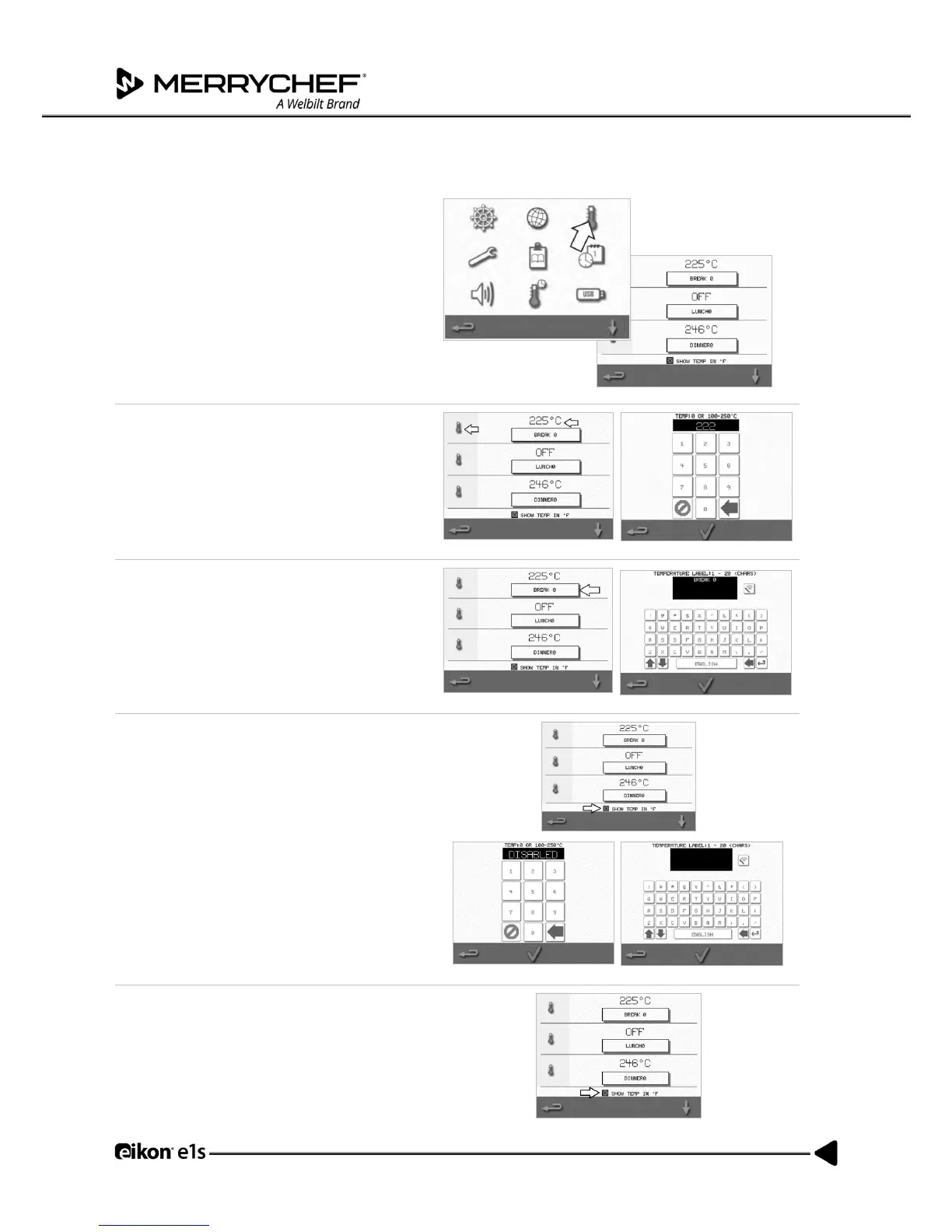
1. Select the ‘temperature’ symbol from the
settings menu.
The temperature screen is displayed if two or
more cavity temperatures are set above the
minimum. You can now:
A) Change a temperature set
B) Edit the existing temperature labels
C) Add a new temperature
D) Change the measurement unit
A) Change a temperature set
1. Select the temperature you want to change by
tapping the value or the red temperature
symbol next to it.
2. Edit the temperature as required using the
keypad.
3. Select the tick to continue.
B) Edit temperature labels
1. Select the required label below the
temperature.
2. Edit the label as required using the keypad
3. Select the tick to continue.
C) Add a new temperature
1. Select a disabled temperature option from the
screen (scroll down using arrow if required).
2. Select the temperature area marked as
‘disabled’ or the red temperature symbol.
4. Enter a temperature value using the keypad
and select the tick to continue.
5. Select the ‘Optional Label’ box to assign a label
to the temperature and select the tick to
continue.
D) Change measurement unit
You can change the temperature measurement
unit from Celsius to Fahrenheit and Fahrenheit to
Celsius by simply selecting or deselecting the unit
checkbox.



 To Next Page