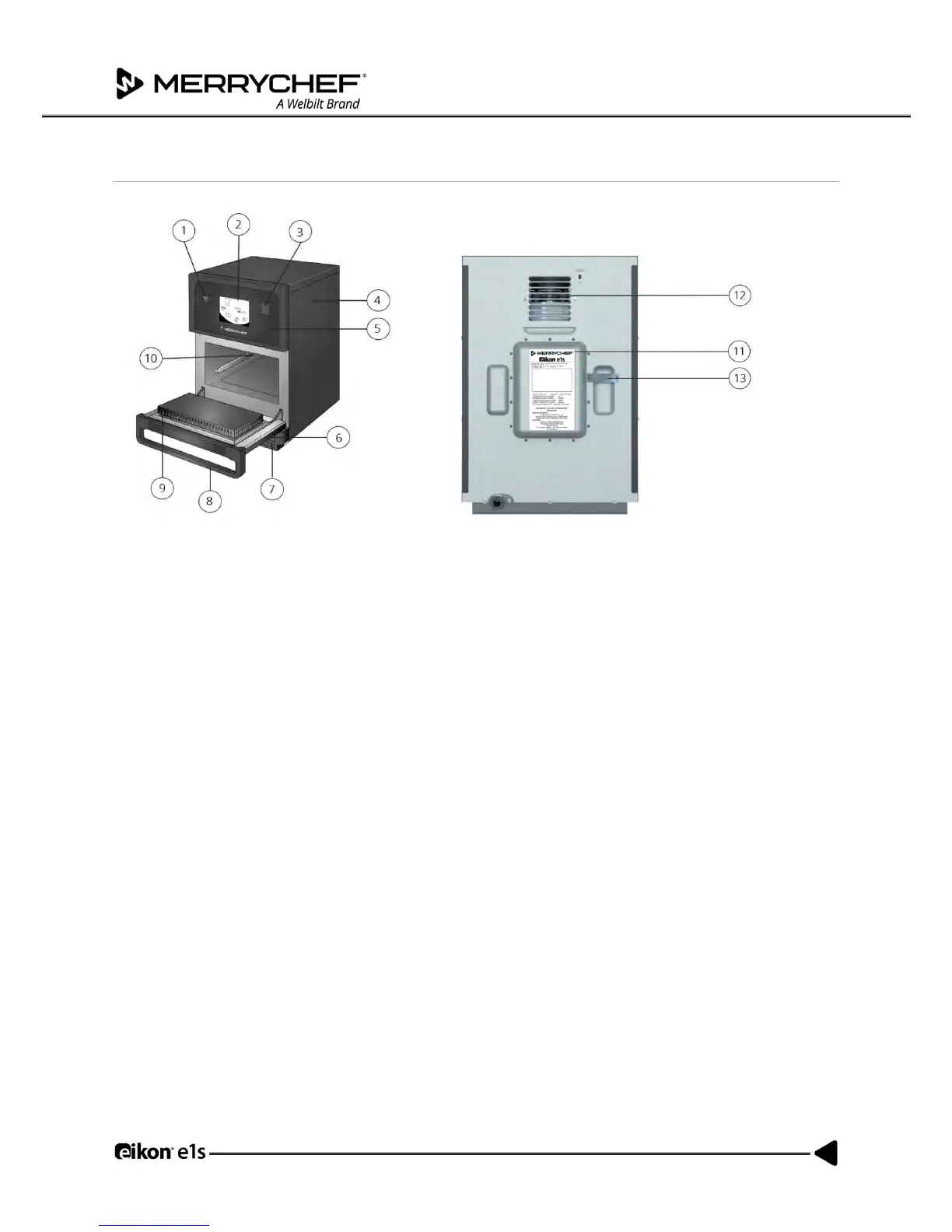
Appliance parts and their functions
Figure 2.3: Appliance parts and their functions
1) ON/OFF appliance switch – Used to turn the microwave combination oven on and off. Turning this switch
off does not isolate the appliance from the electricity supply.
2) easyTouch® screen control panel – When the appliance is switched on, the easyTouch® screen illuminates
the user interface.
3) USB port – A USB socket located under the cover allows updates to programmes stored on the appliance.
4) Protective cover – The cover can only be removed with specific tools. It prevents live parts from being
touched accidentally and prevents access to the moving fan. Always ensure the cover is securely in place.
5) Operating panel – Prevents live parts from being touched accidentally. Always ensure the panel is in place.
6) Appliance door – This is a precision-made energy barrier with three microwave safety interlocks. Always
keep it clean and do not use it to support heavy objects.
7) Air filter – Situated at the lower front of the appliance, the air filter is part of the ventilation system. Keep it
free of obstruction and clean it daily as described under Section 2G: Cleaning procedures.
8) Door handle – A rigid bar which is pulled downwards and away from the appliance to open it.
9) Door seals – Ensure a tight seal around the door. Always keep them clean and check regularly for signs of
damage.
10) Cavity – Also known as the cooking chamber, the cavity is constructed from stainless steel and used for
cooking products.
11) Nameplate – A plate on the rear of the oven that states the serial number, model type and electrical
specifications.
12) Air outlets - On the rear and are used to cool internal components and allow steam from the cavity to
escape. The air outlets must be kept free from obstruction and they will not allow microwave energy to
escape into the environment.
13) Steam pipe and cover – A covered pipe from the cavity to the back of the oven to vent steam during cooking
and prevent pressure build up.



 To Next Page