40
UPCE
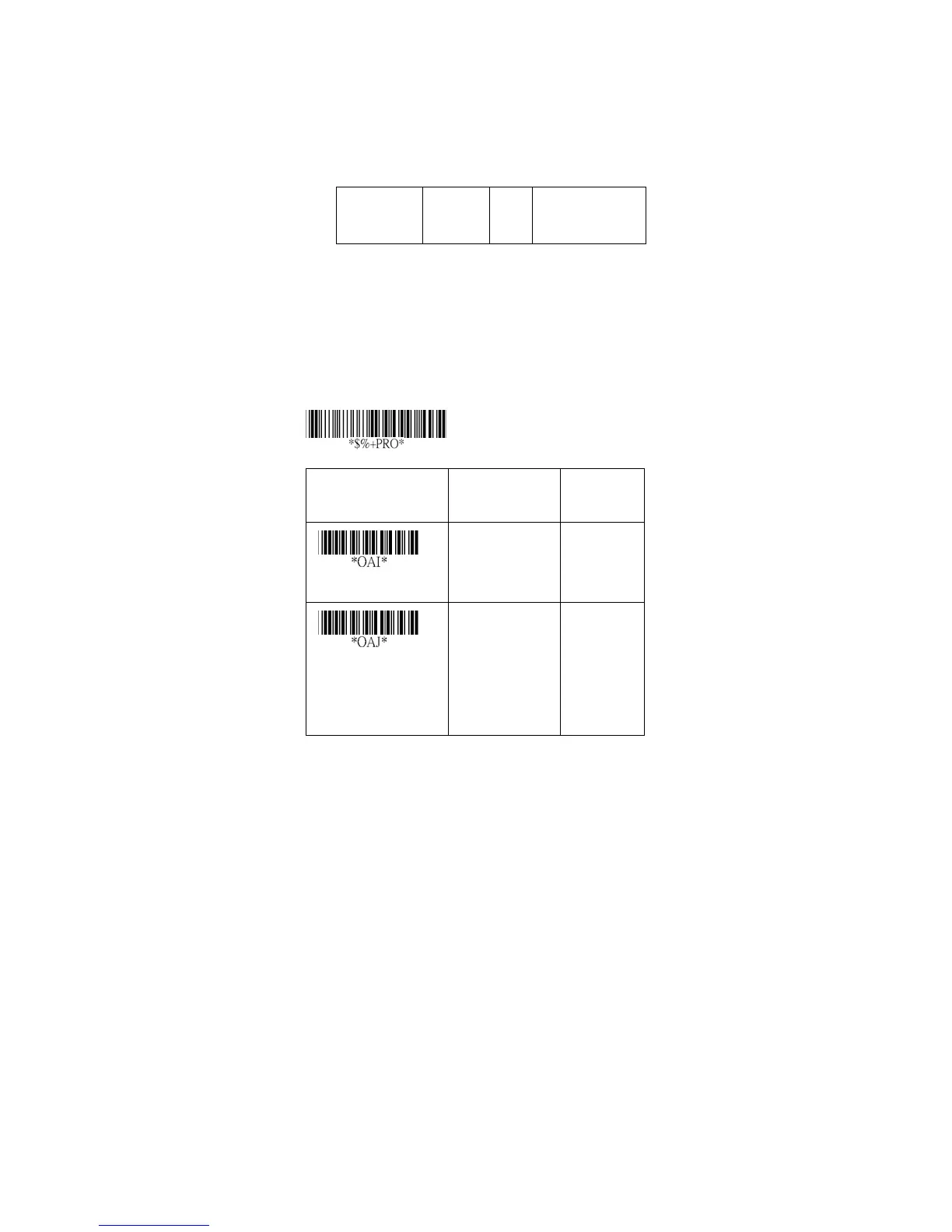
Insertion group selection: Refer to Insertion group
selection of UPCA.
Supplement digits:
For mat
Leading
Zero
Data
Digits
(6 Digits)
Check
Digit
Supplement Digits
2 or 5 or
UCC/EAN 128
Expansion: The expansion function is used only for UPCE
and EAN-8 code reading. It extends to 13-digits with “0”
digits when the feature is enabled.
Example: Barcode “0123654”
Output: “0012360000057”
UPCE-1: To enable scanner to read UPCE with leading
digit 1.
Option Bar Code Option Alphanumeri
c Entry
Insert group selection
00-44 00-44
00
*
Supplement digits
(For
8110/8150/8250)
None
2 digits
5 digits
UCC/EAN 128
Auto detection
00
*
01
02
03
04
Program



 To Next Page