MI 3295 Step Contact Voltage Measuring System Measurements
30
changing during the test the I
SET
parameter must be adjusted manually. The
measurement results cannot be corrected after the measurement.
7.2.3 Step voltage and Contact/Touch voltage measurements
While the Station injects the measuring current into earth the Step or Contact/Touch
voltage tests with the Meter can be carried out.
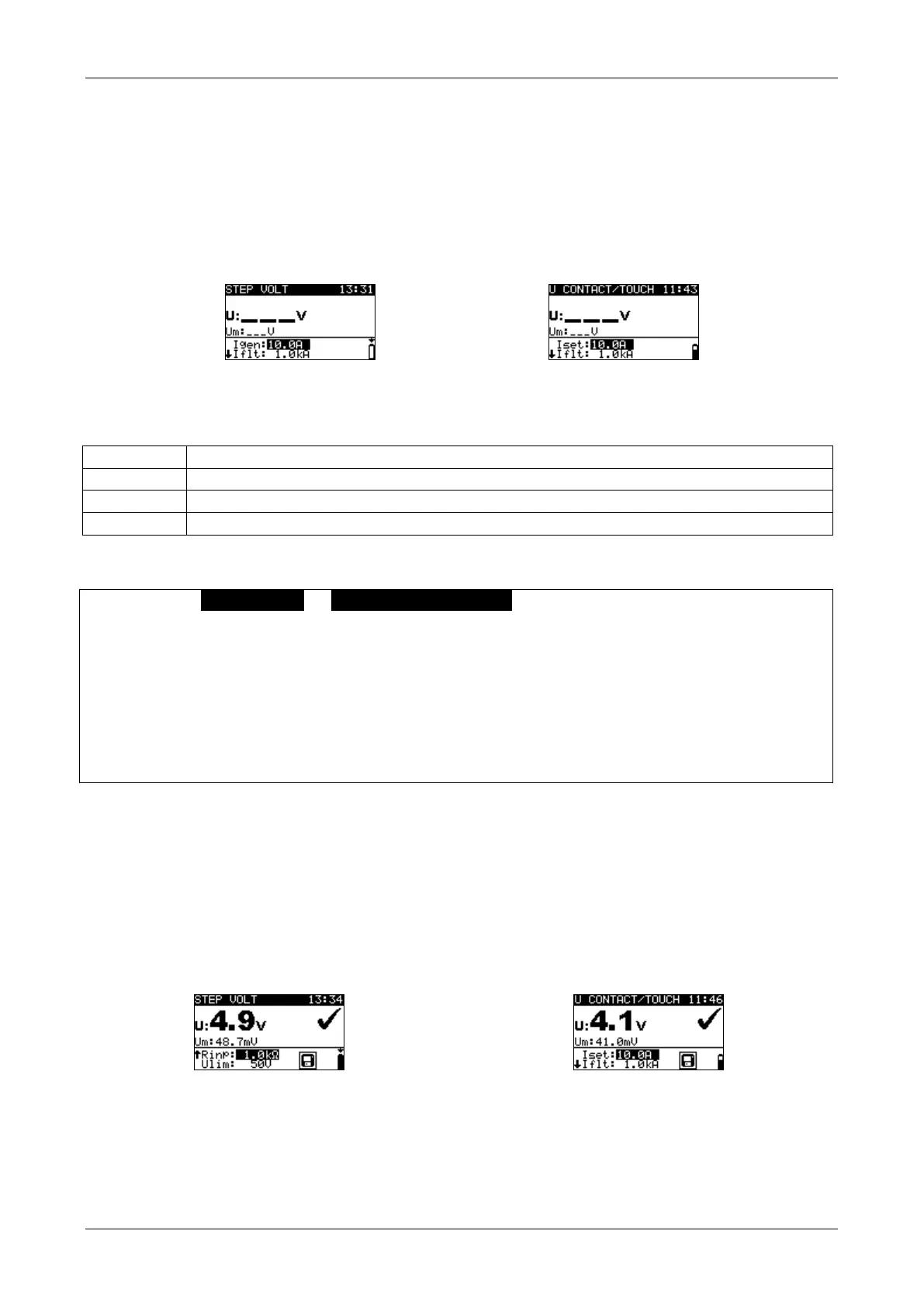
Figure 7.12: Step and Contact/Touch voltage screens
Test parameters for Step voltage and Contact/Touch voltage measurement
Maximum expected fault current ( 1 A ... 200 kA)
Test current manually set (10 mA … 50 A ) or uploaded from Station
Input resistance (1 MΩ, 1 kΩ, 2 kΩ (with additional adapter A 1304))
Limit step voltage (25 V, 50 V)
Step or Contact/Touch voltage measurements
Select STEP VOLT or U CONTACT/TOUCH function.
Set test parameters / limits (optional).
For Step voltage place the test electrodes (see chapter 7.1.3 Measurement for
more information).
For Contact/Touch voltage place one test electrode and connect accessible metal
part (see chapter 7.1.3 Measurement for more information).
Connect the test leads to the instrument.
Press the TEST key to perform the measurement.
Store the result by pressing the MEM key (optional).
Note:
The measurements can be carried out without synchronization. In this case the
measuring current must be controlled and set / changed manually. The results
cannot be corrected after the measurement.
Connections for Step voltage and Contact/Touch voltage measurement
For connections see Figure 7.2 and Figure 7.3.
Figure 7.13: Examples of Step voltage and Contact/Touch voltage measurement results
Displayed results for Step voltage and Contact/Touch voltage measurements:
U ............. calculated Step or Contact/Touch voltage
Um...........measured Step or Contact/Touch voltage



 To Next Page