STARTING&DRIVING
1Unfoldtheremotekey.
2Withaat-bladedtool,insertitbelowthearrowmark
atthesideofthekey(A),andpryupthebatterycover
carefullyuntilthelockpinsareseparated(B).
3Theninserttheat-bladedtoolintotheillustrated
position(C),andapplypressureinthedirection
indicatedbythearrowuntilthetailofthekeymakes
agap.
4Continuetousetheat-bladedtoolinsertingitinto
theendofthekey/batterycover(D),slightlyprythe
batterycoveruntilthetwobayonetsattheendof
batterycoverarereleased.
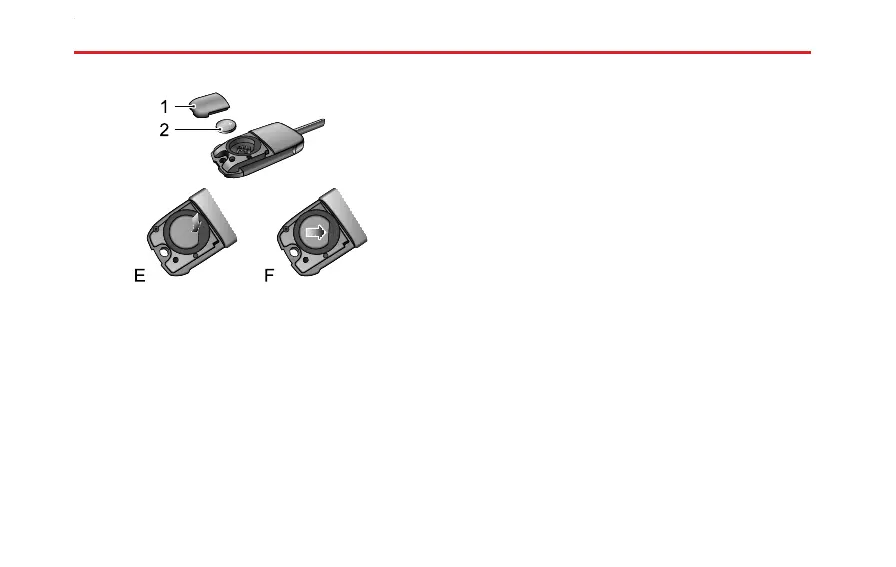
5Carefullypriseoffthebatterycover(1).
6Pressthefrontpartofbuttonbatteryusingslightforce
(E)toremovethebattery(2).
7Positionthenewbattery,ensuringthatcorrectpolarity
ismaintained(“+”sidefacingup),slideitforward(F)
ensuringitisfullyinsertedintotheslot.
Note:Makesurethepolarityiscorrect(positive
sideupward).
Note:ItisrecommendedtousetheCR2032
replacementbattery.
8Retthecoverandpresstightly,checkthegaparound
thecoveriseven.
9Inserttheremotekeyintoignitionswitchto
resynchroniseit.
160



 To Next Page