EasyManua.ls Logo

MGE UPS Systems 5000 RT - Access to Maintenance and Personalization Data; Display and Menu Navigation

MGE UPS Systems 5000 RT
44 pages
Print Icon
To Next Page IconTo Next Page
To Previous Page IconTo Previous Page
Loading...
Access to Maintenance and Personalization Data
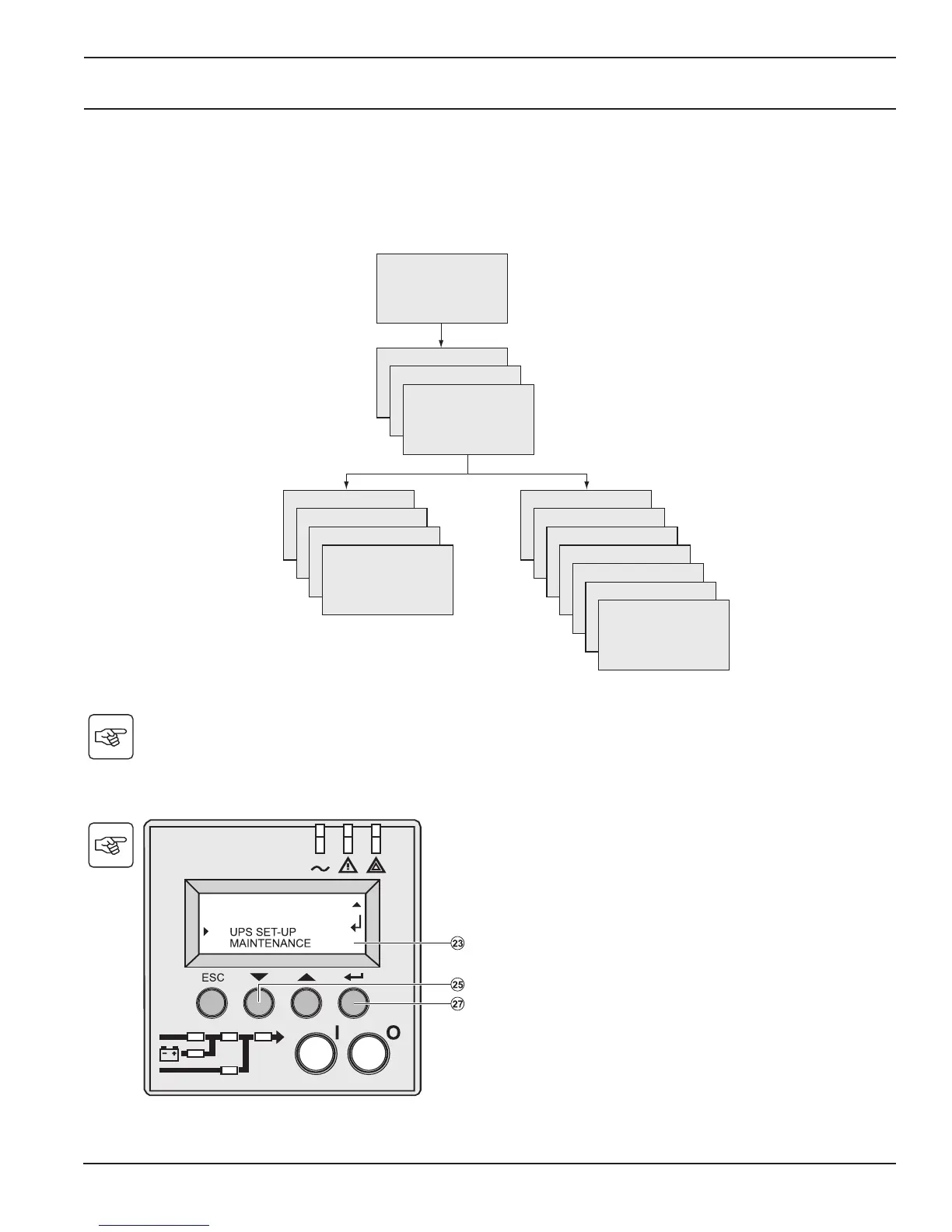
4.1 Display Organization
4.2 Access to Measurements
Press the scroll button (25) to access measurements for voltage, current, frequency, power output and battery capacity.
4.3 Access to UPS Set-Up and Maintenance Using the Control Panel (23)
Press the scroll button (25) a number of times to
point to the UPS set-up or Maintenance menu.
Press the “Enter” button (27) to get access.

Local settings
Output settings
ON/OFF settings
Battery settings
Model
UPS Set-up Maintenance
Measurements
Alarm History
Manual battery test
Led and Buzzer test
LCM
Statistics
Operation limits
UPS input measurements
Status and Alarms
UPS output measurements
Battery measurements
4 — 1
86-87050-00 A01 Access to Maintenance and
Personalization Data

Table of Contents

Related product manuals