5 — 1
86-87050-00 A01
Troubleshooting
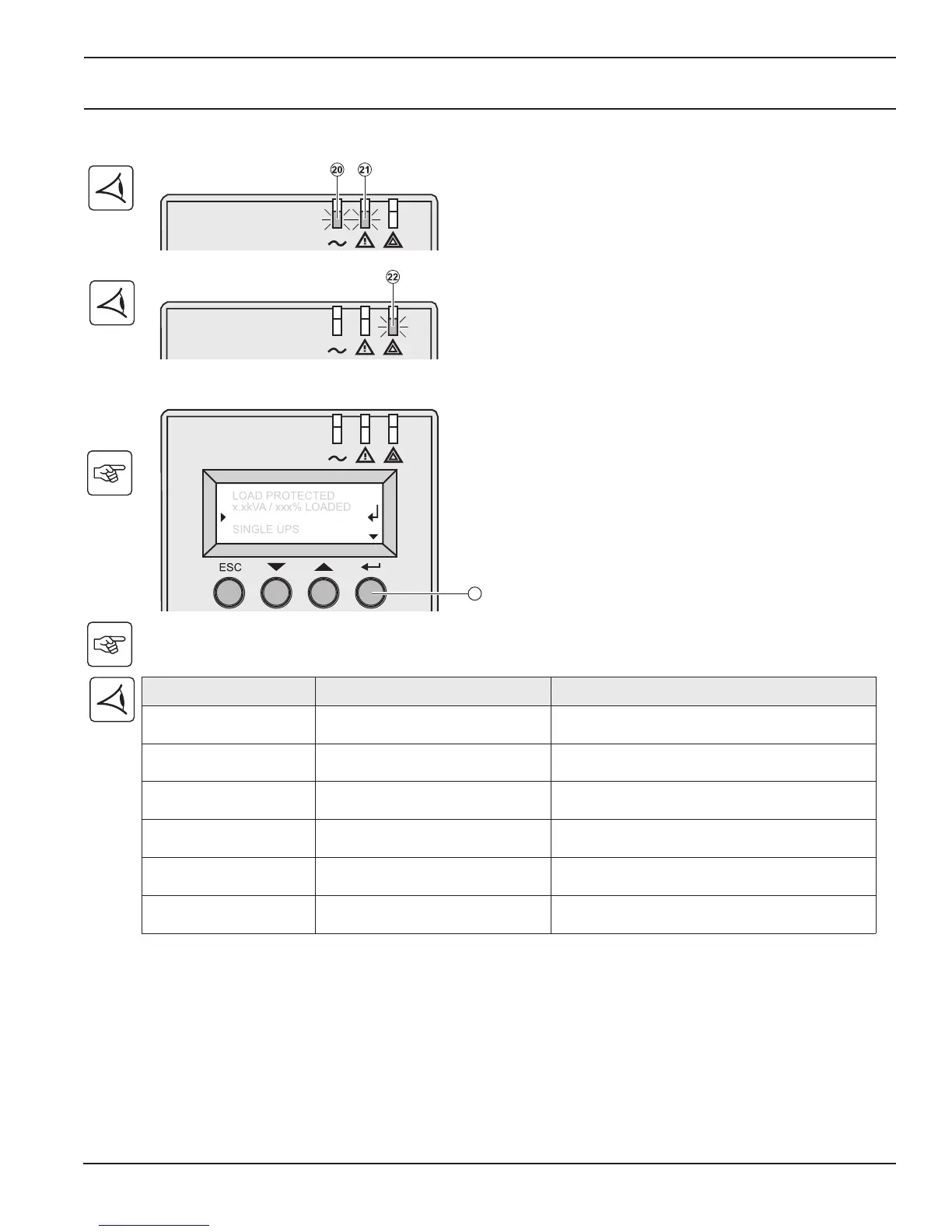
5.1 Troubleshooting LEDS (21) and (22)
5.2 Troubleshooting Not Requiring MGE UPS SYSTEMS After-Sales Support
Press the "Enter" button (27) to display the details below:
Displayed details Signification Correction
NO BATTERY The battery is incorrectly connected Check battery connections (see section 2.9)
I/O BAD CONNECTION
AC source is not connected to the
correct terminals
Check AC wiring
NO POWER MODULE
The power sub-module is not
inserted
Check power sub-module connections
(see section 7.1)
NO BATTERY MODULE
The battery sub-module is
incorrectly connected
Check battery connections (see section 7.2)
INV THERM OVERLOAD
The UPS shuts down automatically
because of a major overload
Check the power drawn by the connected devices
and disconnect any non-priority devices
INVERT LIMITATION
Short circuit conditions on output
devices
Check the installation at the UPS output (wiring, fault
equipment)





 To Next Page