Battery Settings
4.5 Maintenance
4.6 UPS Set-Up Using External Software
◗ Insert the Solution-Pac CD-ROM in the drive.
◗ On the first navigation screen, select "Point to Point solution" and follow the instructions on how to install the
Personal Solution-Pac software.
◗ Then select "Settings", "Advanced settings" and "UPS settings".
Note: This feature is only supported through Windows and the RS232 communication.
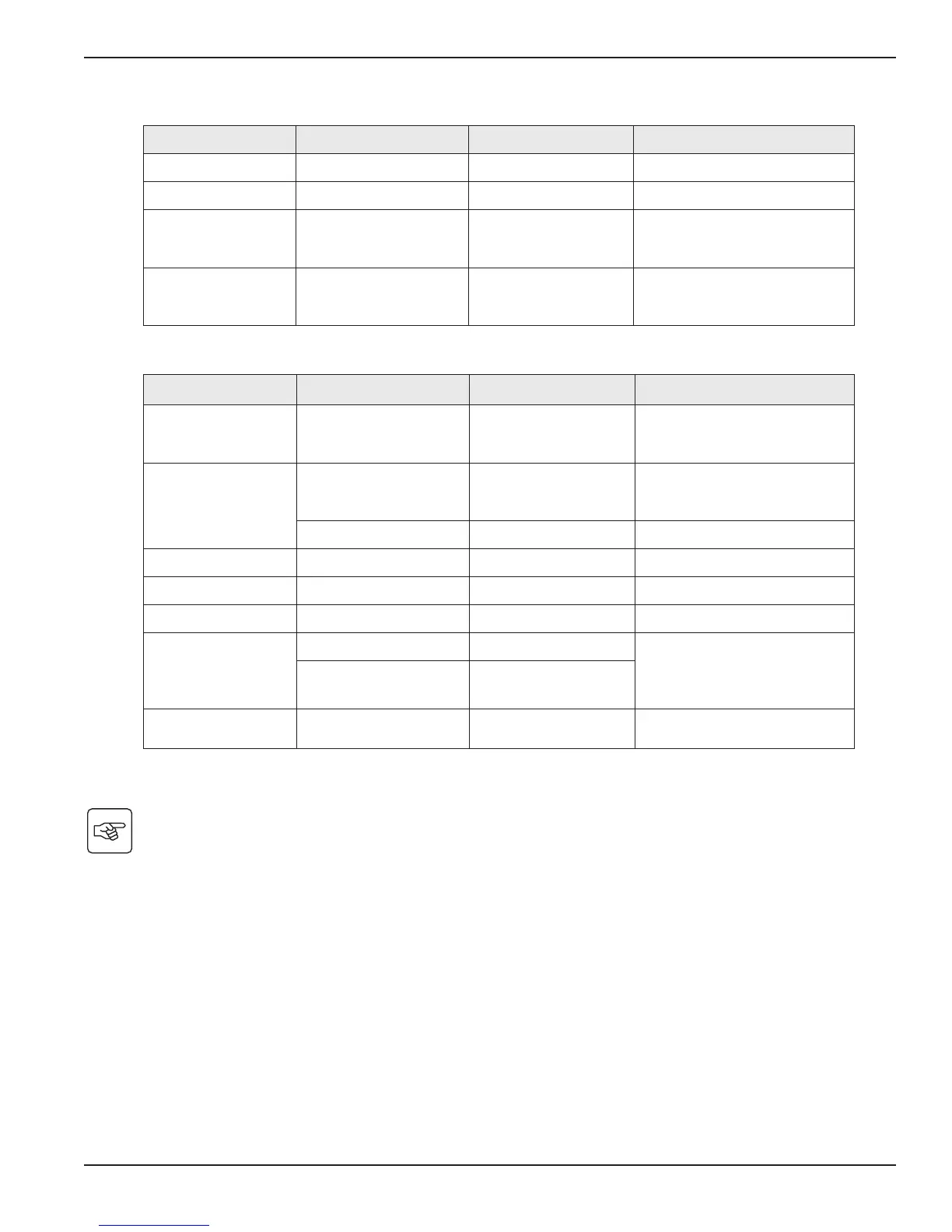
Function Sub-Function Option/Display Comments
Model Power Module
SN: xxxxxxxxx
SOFT: xxx
NT: xxx
Serial number
Soft version
Technical level
Alarm History
Read
Description
Date Hour
Alarm xxx
10 alarms can be stored
automatically
Erase No / Yes
Manual Batt Test Manual Battery Test No / Yes
Led & Buzzer Test Led & Buzzer Test No / Yes
Life Cycle Monitoring LCM Enable / Disable Life cycling monitoring alarms
Statistics
Auto Statistics Statistics
You need to register at
www.mgeups.com/Icm to get the
code and get access to free
statistics
Custom Statistics
Reset Date: No, Yes
Statistics
Operation Limits Operation Limits
Automatic alarms displayed when
UPS is operating near the limits
Function Factory Setting Options Comments
Auto Battery Test Every week No test / daily / monthly
Low Batt warning 20% 0 to 100% 1% increment
User Battery Settings
UPS reads number of
battery modules
connected
From 0 to 40 Ah 5 Ah increment
Deep Discharge
Protect
Yes No
Protection against deep
discharge. If disable, MGE UPS
SYSTEMS warranty will be void
Installation and User Manual
Access to Maintenance and
Personalization Data
4 — 3
86-87050-00 A01





 To Next Page