HygroCal100 User’s Manual
28
97500 Issue 3, January 2018
OPERATION
3.8.2 Automatic Mode
In order to program a calibration routine to run automatically, the operating mode
should fi rst be set to
Auto from the Calibration Settings Screen -> Mode.
A calibration routine can then be defi ned, through the Calibration Settings Screen ->
Program. Each point in the calibration is listed by row. Touching the up or down arrows
on the left of the list will scroll through the 10 points which can be assigned.
Each row contains a relative humidity value in %, and a duration in the format HH:MM.
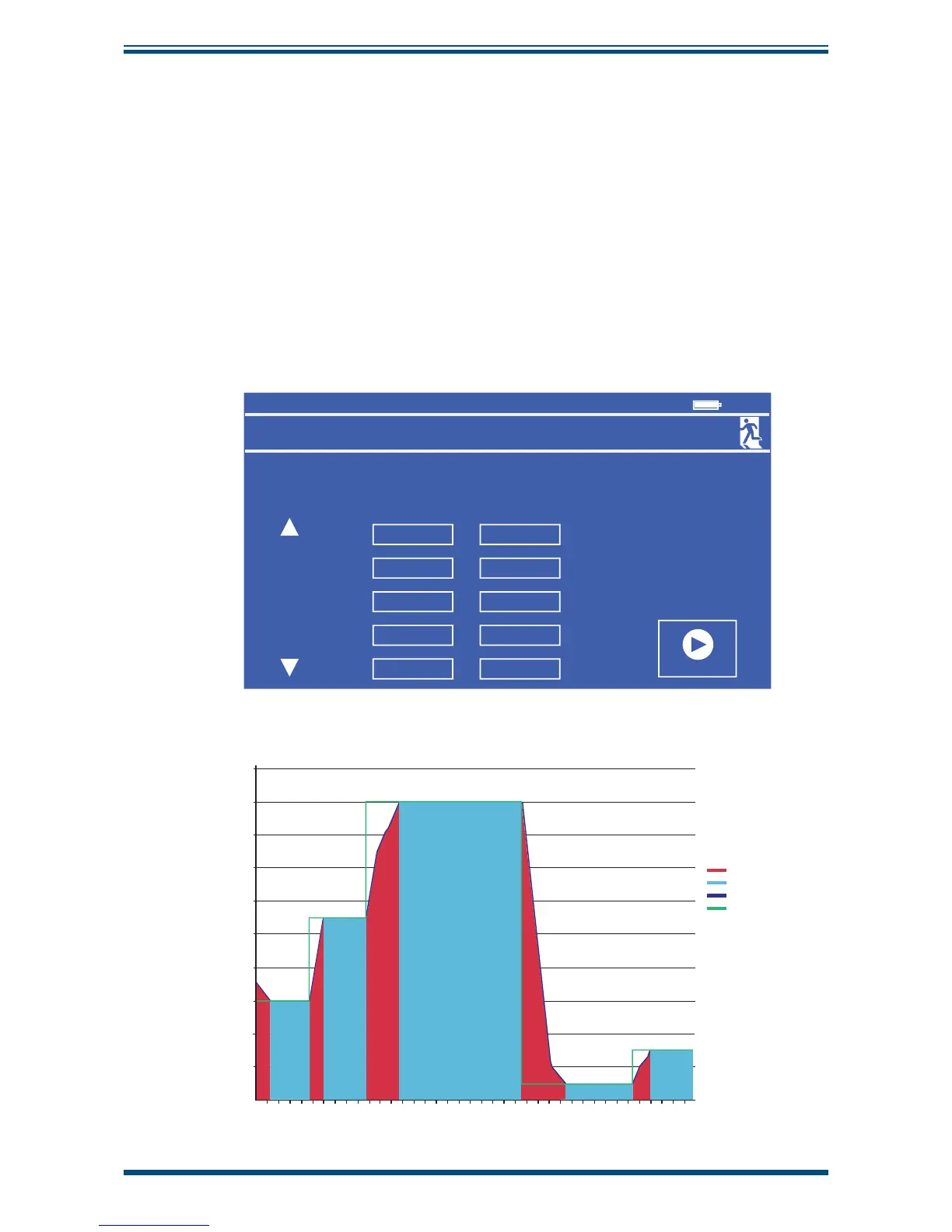
For each row, the target relative humidity value will be maintained for the duration.
NOTE: The duration does not include time taken to reach and stabilize on the
target. The duration time starts to count down once the measured RH value
has been stable to within ± 0.5% of the set point for 20 seconds. Consider the
example calibration routine in
Figure 30,
and its visualization in the chart in
Figure 31
.
Program
Calibration Routine
Point
START
1
RH
(%)
Duration
(hh:mm)
30.0 00:04
2
35.0 00:05
3
40.0 00:21
4
45.0 00:22
5
50.0 00:23
11:4


 To Next Page