1 About the 1365 GeoPyc
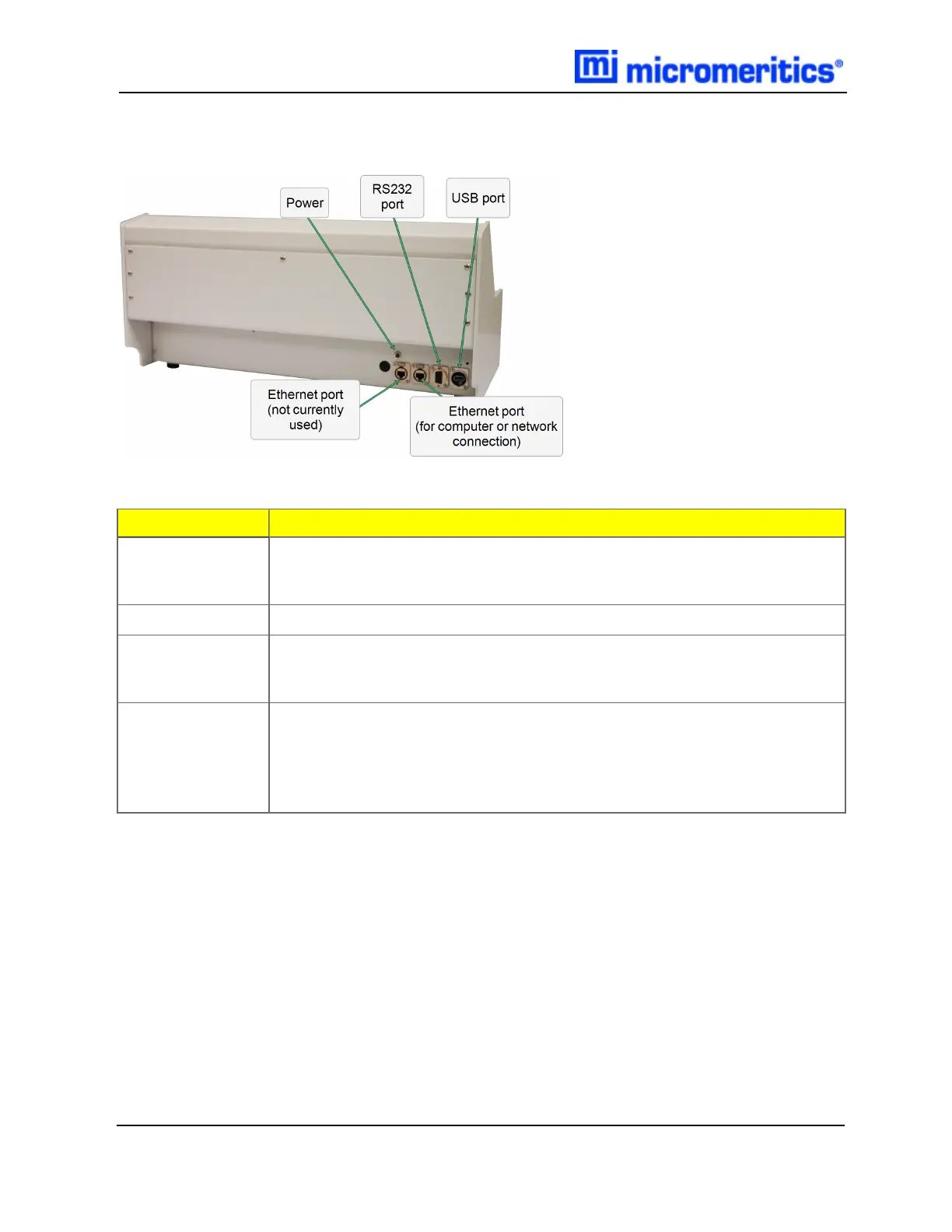
BACK PANEL
Component
Description
Ethernet ports
(2)
The port labeled Network (closest to the RS232 port) is used to connect the
analyzer to a network or directly to a computer. The other (closest to the
power connection ) is not currently used.
Power
For connecting the analyzer to the power supply adapter with a barrel plug.
RS232
A mass balance can be connected to the analyzer through the 9pinRS232
port. A suitable balance and cable are available through Micromeritics. Data is
transmitted through the USB port.
USBports
The USBports on the front and back of the analyzer can be used
interchangeably, however, to prevent wires from interfering with the operation
of the analyzer, use the USB port on the back for devices with cords. The
USB ports can be used to connect a printer or keyboard, export and import
data, and update software.
Back Panel Components
1 - 2
GeoPyc 1365 Operator Manual
136-42800-01 (Rev -) — Dec 2016


 To Next Page