5 INSTRUMENT
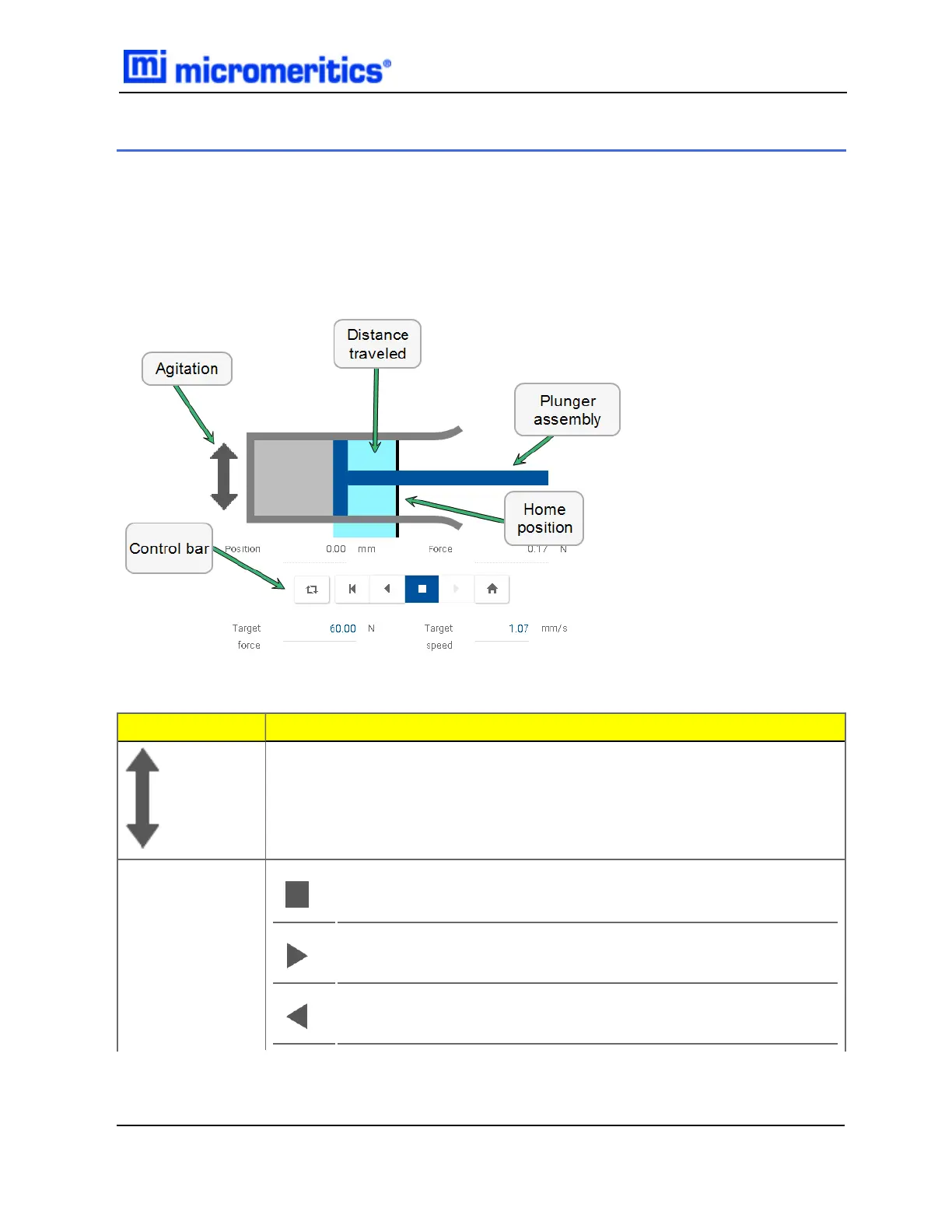
The plunger graphic moves as the analyzer plunger moves. Use the control bar to position the
plunger manually. Ahighlighted control bar button indicates the state of the operation. The plunger
cannot be controlled from remote browsers.
The control bar and entry fields are disabled when the analyzer status is Analyzing or Standby,
however the control bar buttons will still be highlighted to show the current state of the analyzer.
Field or Button
Description
Toggles chamber agitation. The button is highlighted when agitation is in pro-
gress.
Control bar
Stop the plunger movement.
Move the plunger out. This button is disabled when the plunger is at
the minimum limit switch.
Move the plunger in. This button is disabled when the plunger is at
the maximum limit switch.
Manual Control
5 Instrument
GeoPyc 1365 Operator Manual
136-42800-01 (Rev -) — Dec 2016
5 - 1


 To Next Page