Tasks
1.
On the TIMING - Holdover page, set the Time Error Limit (milliseconds) to the highest
acceptable value for absolute timing error (to UTC). Microsemi recommends a value
greater than or equal to 4 milliseconds.
2.
On the STATUS - GPS page, if the GPS receiver has a valid position (latitude, longitude, alti-
tude), the user can skip to step 3. Otherwise:
n Determine the approximate latitude, longitude, and altitude of the GPS antenna.
This can be done using a handheld GPS device, an online reference such as
Google Earth, or by looking up the Latitude and Longitude information provided
on the SyncServer Product Information CD-ROM.
n
On the REFERENCES - GPS page, enter the approximate latitude, longitude, and alti-
tude.
3.
Set the Mode to Position Hold and click the APPLY button.
Other Considerations
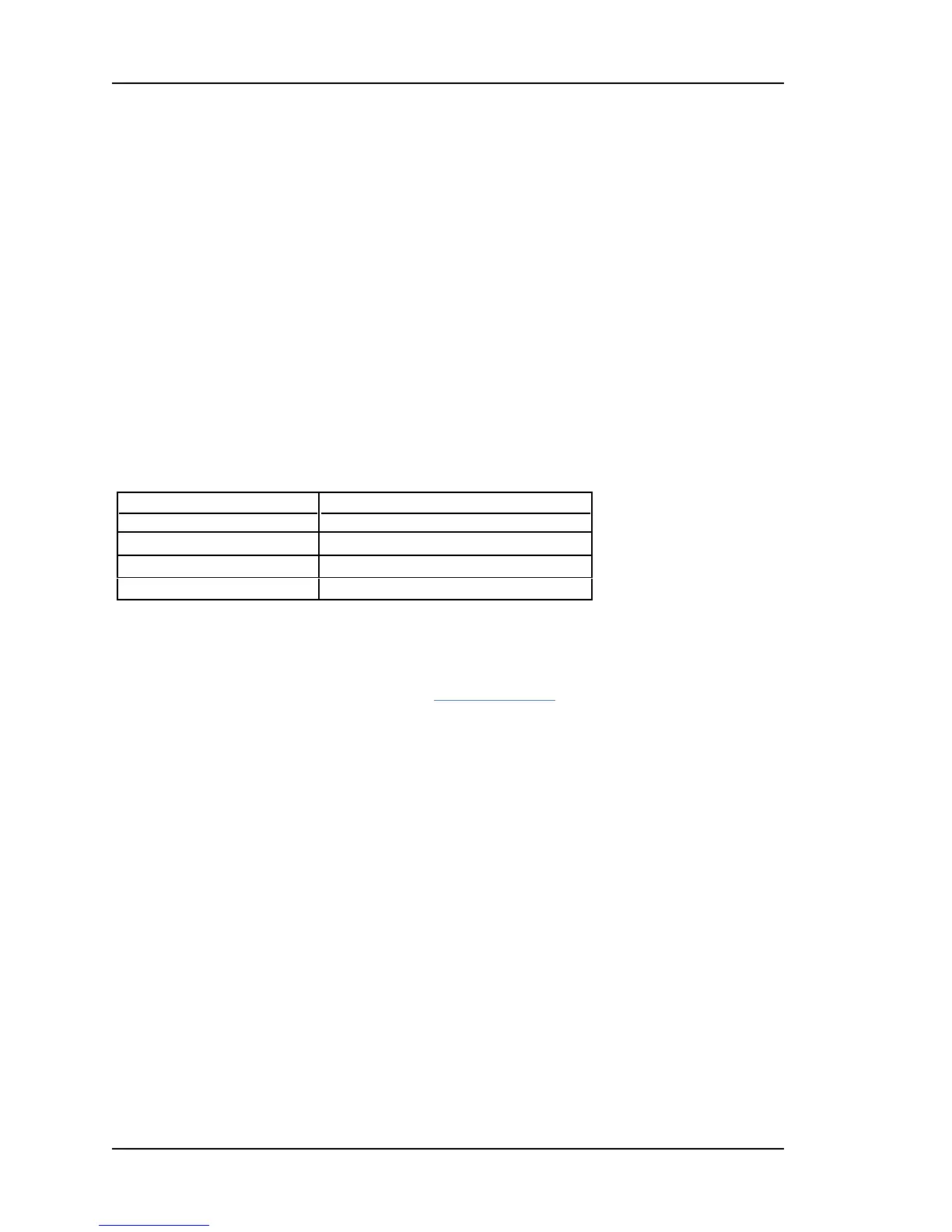
The accuracy of the user-entered position affects the timing accuracy of the GPS reference.
When GPS status is locked:
Position Accuracy Timing Accuracy
< 50 m (< 164 feet) < 0.005 ms
< 1 km (< 0.62 mile) < 0.1 ms
< 10 km (< 6.2 miles) < 1.0 ms
During window mode operation, if the GPS receiver is not locked to any satellites and no
other Input References are available, the GPS receiver enters holdover mode and is subject
to oscillator drift. Also see Oscillators (see "Timing Holdover" on page 85).
Verifying the GPS Installation
Verify the GPS antenna installation:
1.
Press the STATUS button on the front panel.
2.
Press the up arrow button to display the GPS STATUS screen.
3.
When the number of Satellites is equal or greater than "4", Status should be Locked.
4.
With GPS locked, the SYNC LED on the front panel should be green within approximately
15 minutes.
This can also be accomplished in the web interface using the STATUS - GPS page.
Verify synchronization over a 24-hour period to ensure that the GPS antenna installation
meets requirements. This can be accomplished by:
n
Observing the SYNC LED or STATUS - GPS page.
n
Configuring alarm notification (email, SNMP) to receive notification of the Timing GPS
Source Alarm on the ADMIN - Alarm page.
n Using FIND on the LOGS - messages page to search for "Timing GPS Source Alarm".
If the GPS installation does not meet requirements:
Page 104..........................................................................997-01520-02 Rev. G2



 To Next Page