© Midmark Corporation 2016
Necessary Computer Skills
This manual is intended for a user capable of using Microsoft
®
Windows
®
applications, who has some understanding of PC operations,
and who is familiar with the basic operations of Windows
®
.
This Operation Manual is designed as a comprehensive guide, and designed to educate the user on the operation and functions of
the IQecg
®
device. The information in this manual includes options currently available with IQecg
®
.
Configurations
Typical PC Configuration
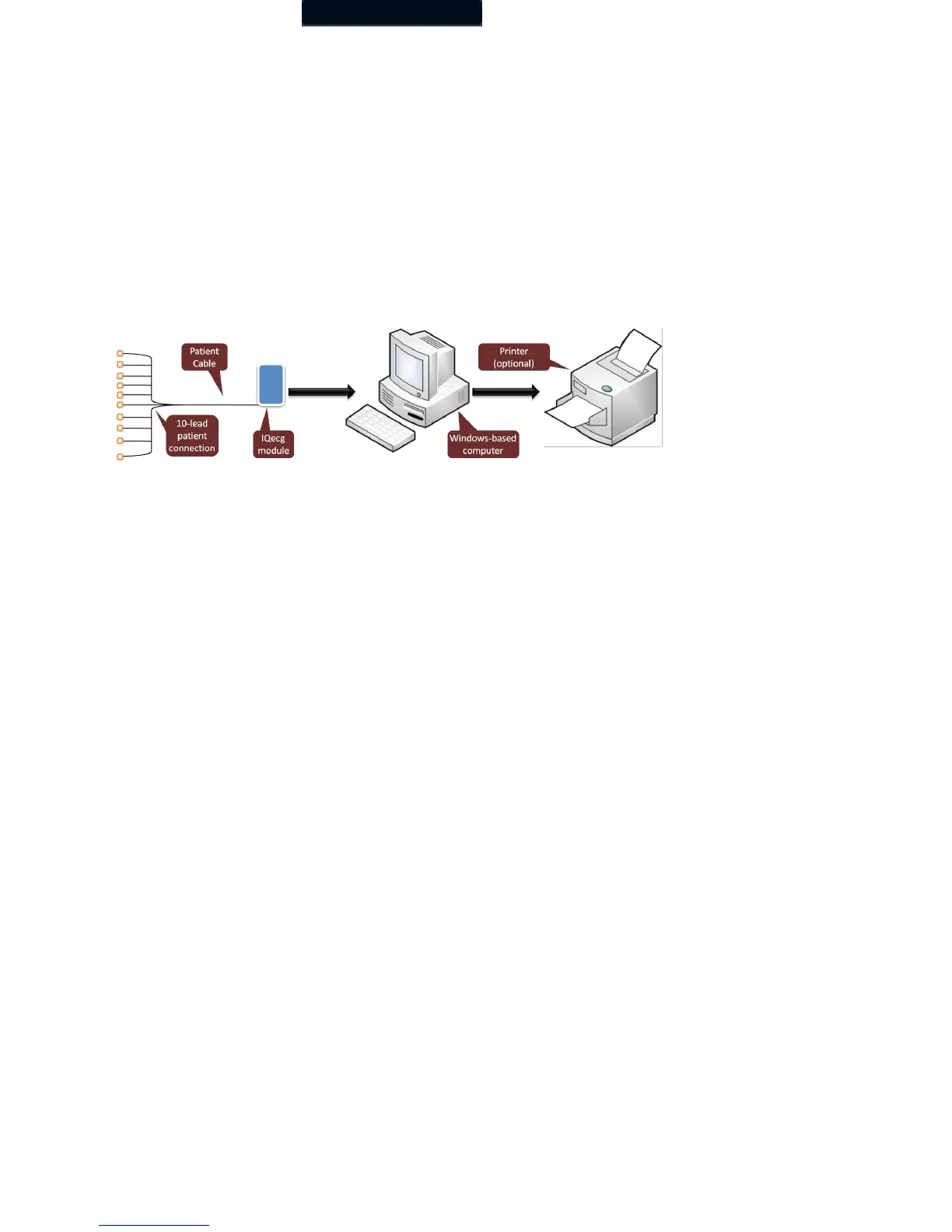
The following block diagram illustrates the standard configuration of the IQecg
®
system. The primary components are a Windows-
based PC, a printer, and the IQecg
®
acquisition module. A portable computer is recommended if mobility is a consideration. Please
refer to this diagram when setting up your IQecg
®
system.
Figure 1 Block Diagram for the IQecg
®
system
Thin Client Configurations
If you are working in a thin client environment, install the software on the Terminal Server and operate the IQecg
®
through a thin client
terminal.
IQmanager
®
supports the following thin client configuration: IQpath™ Software Solution. IQpath™ works with the USB port version
of the IQecg
®
in high-latency, limited-bandwidth network configurations with Windows-based PC clients.
Setting up any application in a network environment typically requires special access rights and knowledge of the network. Please
have the system administrator install and configure IQmanager
®
to the office environment.



 To Next Page