Preva Installation/Service Manual, 00-02-1577, Revision E01
46
Circuit Board
Verification
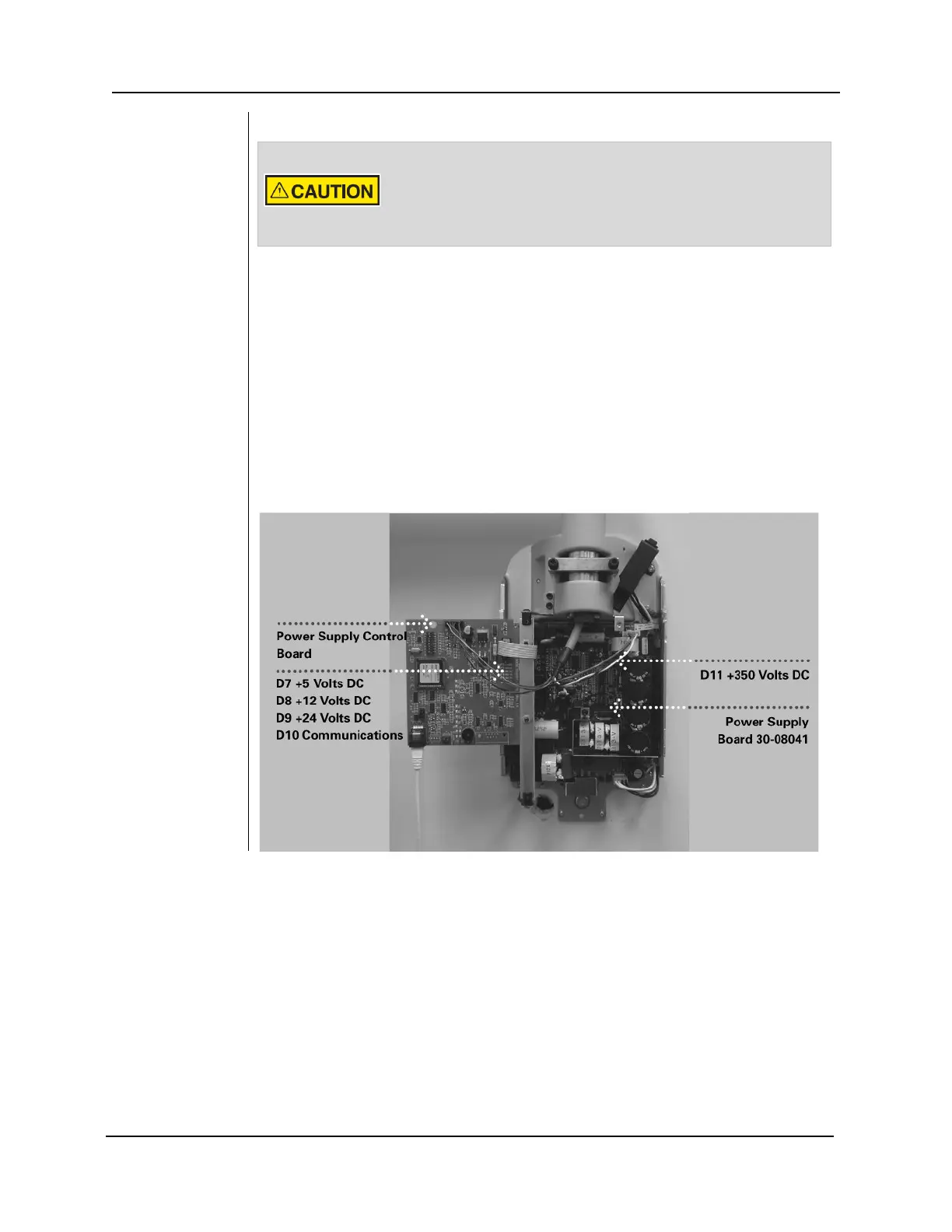
1. On Power Supply Board 30-08041, shown in Figure 34, verify that LED D11 is
illuminated. The illuminated LED verifies that appropriate supply voltages are
present.
Note: Stored electrical energy is present whenever D11 is illuminated.
2. On the Power Supply Control Board 30-08160, shown in Figure 34, verify that
LEDs D7 (+5VDC), D8 (+12VDC) and D9 (+24VDC) are illuminated and LED
D10 is flashing. Each illuminated LED verifies that appropriate supply voltages
are present. If the LEDs are not illuminated, refer to the “No Operator Display
but Power Switch is On” procedure in the Troubleshooting on page 75 of this
manual.
3. Turn off the Preva Dental X-ray System using the power switch as shown in
Figure 32.
The Power Supply Board 30-08041, when energized, contains
high electrical energy. Avoid contact with this board. After the
system is turned off, electrical energy will remain in the Power
Supply Board for several minutes. When attempting any
service on this board, first verify that voltage has dissipated.
Figure 34
Circuit Board
Verification



 To Next Page