6. Use a sharp knife to trim the edges and to cut the holes for the control panel buttons and
joysticks.
Position the control decals next to the appropriate hole locattons.
7.
Place the plastic cover over the decals and panel. Mark the outsrde shape of the panel and the hole
locations. Cut and deburr all holes, then trim the cover to shape. Mount with tamper resistant screws
8
Group the Player Controls by color: Start yellow, Pass
I
Change Player
-
red, Jump
I
Tackle
-
blue,
Turbo-white, Joysticks
-
black. The controls must be disassembled for panel mounting.
9.
Separate each switch from its push-button. Gently bend the large prong away from the microswitch
just enough to slide the switch off of the housing Unscrew the nut from the housing. Insert the push-
button housing through the switch hole from the front side of the control panel. Screw the nut finger
tight onto the switch housing from the back of the panel. Rotate the housing so that the switch
terminals will be properly oriented and tighten the nuts firmly. Snap the switch back onto the housing.
10. Repeat this step for each button of a different color. Continue until all button groups are mounted
11. Measure the thickness of the control panel. If it is less than ‘/; inch (13 mm), use the wooden spacers
to recess the joysticks below the surface. Thicker control panels do not require the wooden spacers.
12. Install a carriage bolt in each of the small holes surrounding the openrng for the joysticks.
If required,
place each wood spacer over the carriage bolts to correct the joystick mounting depth.
13. Disassemble a joystick for mounting. Invert the joystick and remove the “E”-ring from the shaft.
Remove the handle and the plastic ring (large washer) from the joystick base. Be sure
that
the
bushings remain in the base.
Place the top of the joystick base against the bottom of the control panel
(or spacer, if used) and align the mounting holes. Attach the base to the underside of the control
panel. Slide the plastic ring around the shaft so that the rough side is next to the shaft knob handle.
Slide the shaft through the control panel and base. Replace the “E”-ring.
14. Repeat this step for each of the other joysticks. Continue until all joysticks are mounted
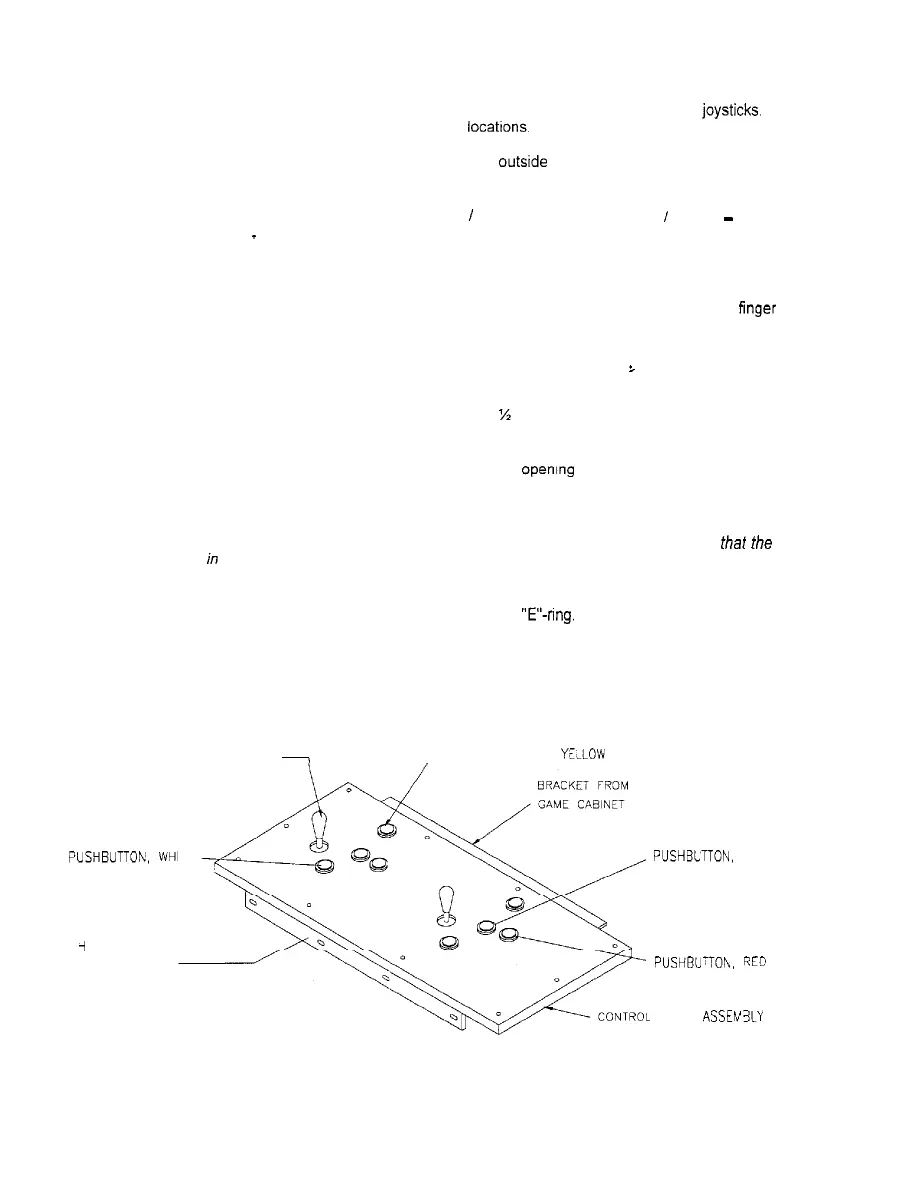
15. The completed control panel should now resemble the illustration below. Install the modified control
panel onto the modified cabinet using the existing mounting hardware.
49-WAY JOYSTICK, BLACK
PUSHBUTTON.
YELLOW
PUSHBUTTOh,
WHI
TE
i
NGE FROM
GAME CABINET
PUSHBLTTON.
BLUE
PUSHBU-TOh.
REC!
PANEL ASSEN3LY
TYPICAL COMPLETED CONTROL PANEL
l-8



 To Next Page