MM571W / MM572W Installation Instructions 15
CONTROL BOX INSTALLATION
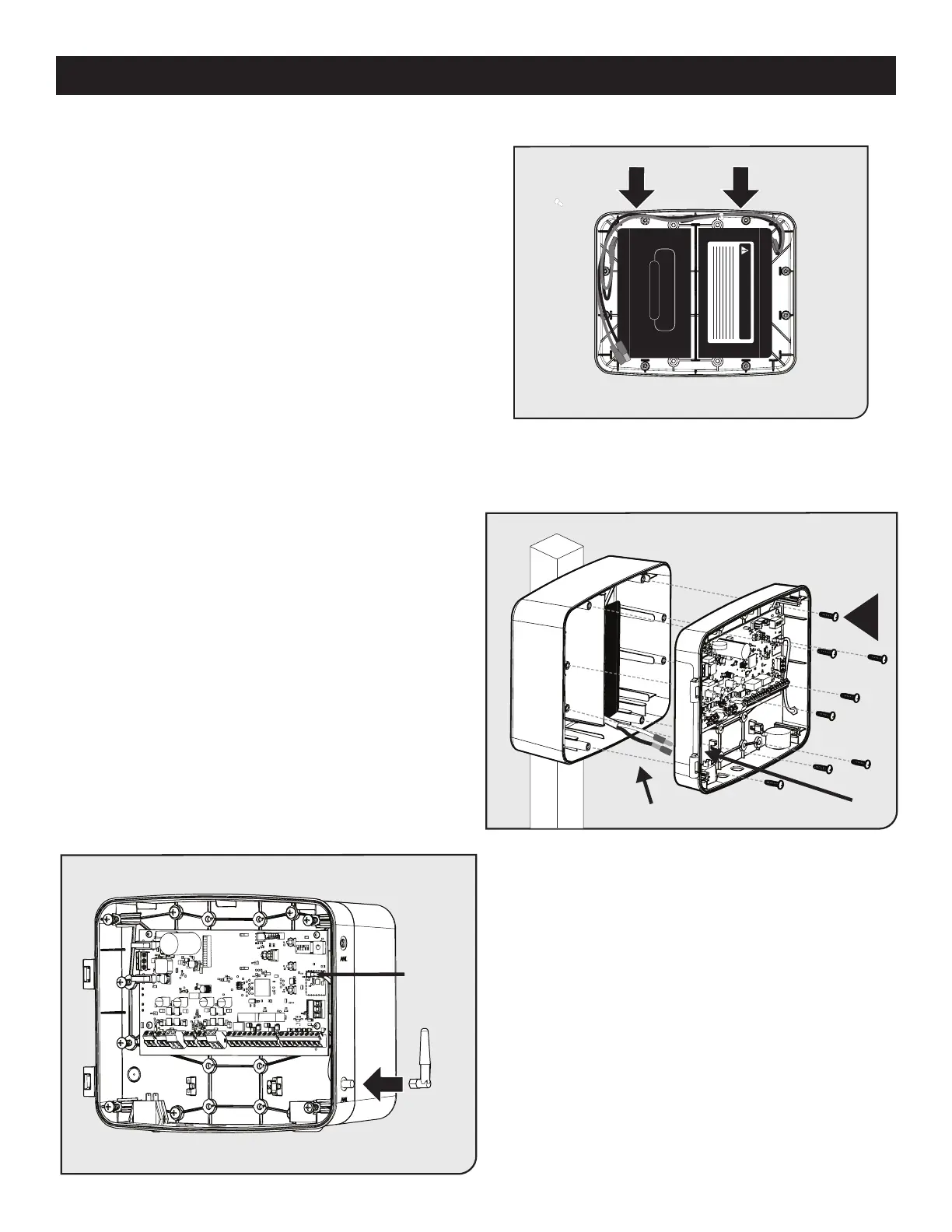
● If installing an optional second battery, connect the battery
harness as shown in Step 3.
● Place the second battery and route harness as shown.
● With the 7/32” drill bit, drill through the eight control
board panel access holes labeled “B”.
● Locate and knock out the battery cable access hole in
the panel.
● Feed the battery cables through the control board
casing access hole.
● Attach the control board casing using the eight screws
provided.
NOTE: Figure does not display the control panel cover.
The cover will be attached on hinges.
● Install the Antenna by screwing it in place on the
SMA connector.
● Orient the antenna to the sky, and securely tighten.
DANGER/POISON
CONSTANT VOLTAGE CHARGE
Feed battery cables through access hole
W
Attenna
Cable
Step 4
Step 5
Step 6











 To Next Page