22 MM571W / MM572W Installation Instructions
S2
S4
S3
LED1
LED2
LED3
TRANSMITTER PROGRAMMING
WARNING:
Changes, modications or adjustments not expressly approved by Nortek Security and Control, LLC could void the user’s
authority to operate this equipment. There Are No User Serviceable Parts.
S2
S4
S3
LED1
LED2
LED3
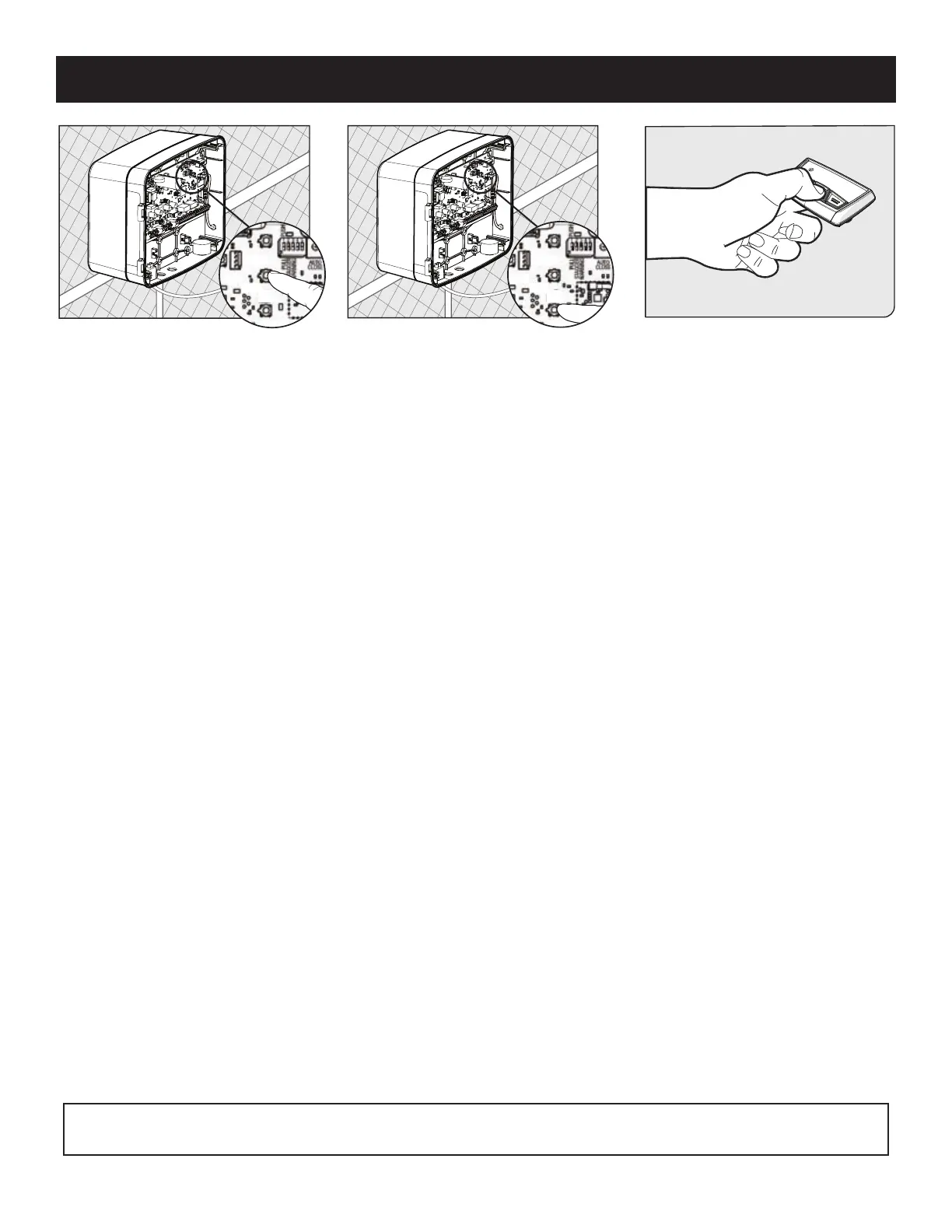
How to Learn a Transmitter:
1. On the control board, press and hold the (return/enter) button until LED2 beside the (return/enter) button turns on and the
buzzer sounds. Release the (return/enter) button.
2. Press and hold the desired transmitter button. Once learned, LED2 will ash and the buzzer will sound indicating that the
transmitter has been learned.
How to Erase a Transmitter or Keypad (MMK200) code:
Repeat steps 1-2 above to erase the learned transmitter or keypad code.
How to Erase ALL Learned Transmitters or Keypad codes:
1. Enter the 'Learn Transmitter' mode following step 1 above.
2. Press and hold the (down arrow) button until LED1, 2 & 3 ash and the buzzer sounds. (Approximately 10 seconds.)
Note: The control board can store a total of 50 transmitter and/or keypad codes. The system is compatible with Mighty Mule DIP
switch transmitters and keypads.











 To Next Page