14 MM571W / MM572W Installation Instructions
CONTROL BOX INSTALLATION
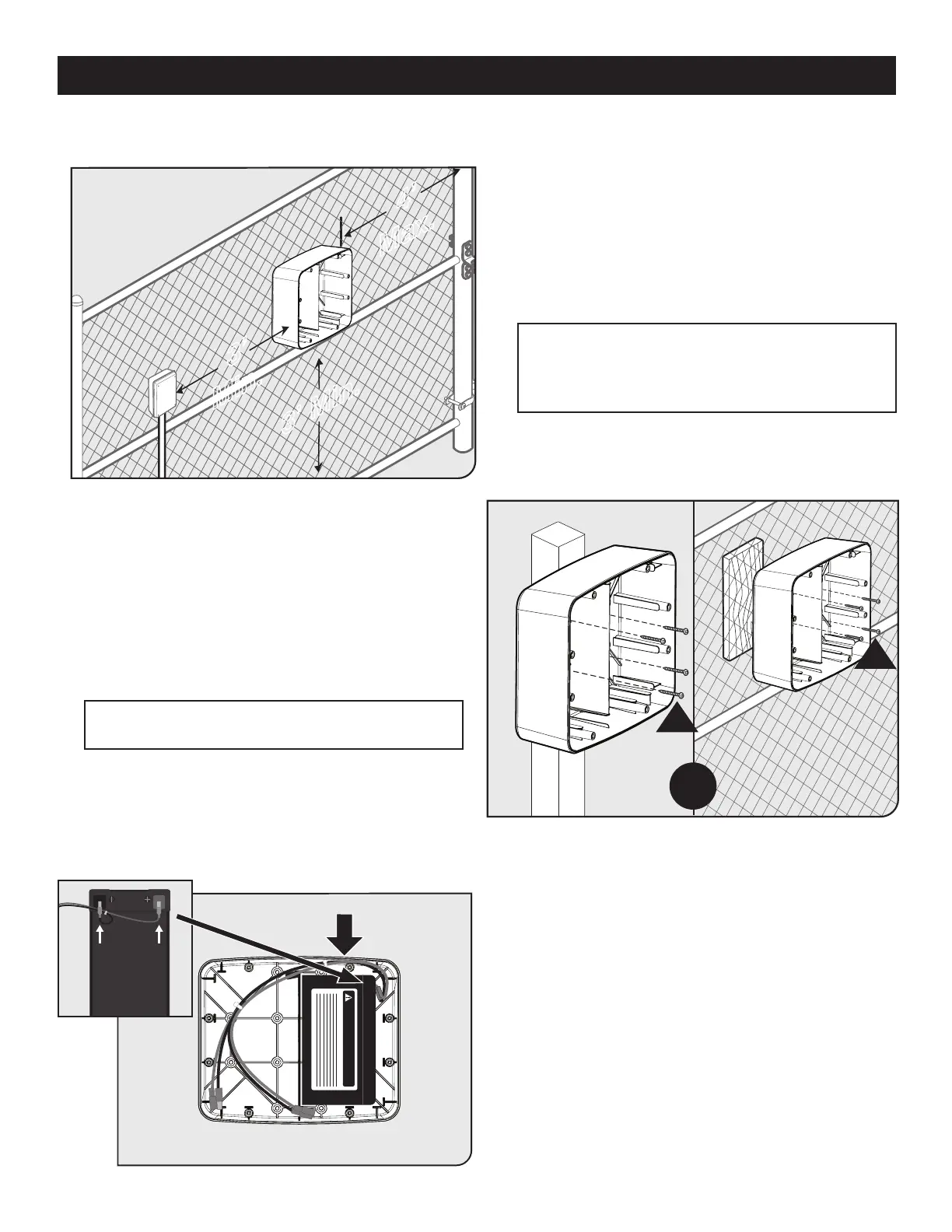
● Identify a suitable mounting location for your control
box at least 3 ft. from the ground and no more than 4 ft.
from the primary operator.
● Once you’ve identied a suitable mounting location,
mount the battery box using the supplied wood screws.
● If the mounting surface is not wood, additional hardware
may be required (not supplied).
● Connect the battery harness to the battery as shown -
red to positive, black to negative terminals.
● Place the battery into the right side of the battery box
with the terminals facing to the right and towards the top
of the battery box.
● Route the battery harness as shown.
DANGER/POISON
R
OR
R
3’ Min.
3’
Min.
4’
Max.
Step 1
Step 2
Step 3
Note: If you intend to install and use the MMS100
Wireless Connectivity System (sold separately) with your
gate operator, consider mounting your control box as
high as possible to improve radio performance.
Note: Orient the battery box with the arrow on the inside
of the box pointed up.











 To Next Page