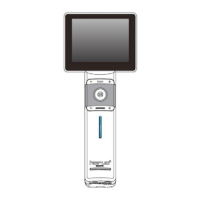
This document is the user manual for the MiiS Horus+ Scope Control Unit DSC 200, a digital hand-held eye camera system. The system is designed to record digital photographs and video of various parts of the human eye, depending on the optical lens attached.
Function Description
The MiiS Horus+ Scope system consists of a Control Unit (DSC 200) and interchangeable optical lenses:
- MiiS Horus+ Scope DEC 200 (Digital Eye Fundus Camera): Used to record digital photographs and video of the fundus (including retina, macula, and optic disc) of the human eye and surrounding area.
- MiiS Horus+ Scope DEA 200 (Digital Eye Anterior Camera): Used to record digital photographs and video of the anterior segment (including cornea, anterior chamber, and lens) of the human eye and surrounding area.
- MiiS Horus+ Scope DGC 200 (Digital Eye Surface Camera): Used to record digital photographs and video of the anterior area of the human eye and surrounding area.
The device supports both photo and video modes, with features like auto-focus, manual focus, and brightness adjustment. Patient ID can be entered and associated with images, and images can be exported in DICOM format.
Important Technical Specifications
Control Unit (DSC 200):
- Focus: Auto & manual focus
- Picture Resolution: 2560 x 1920 pixels
- Video Resolution: 1280 x 960 pixels
- LCD Monitor: 3.5" Full Color TFT-LCD Touch Panel
- Image Format: JPEG (Photograph) and H.264 (Video)
- Interface: Mini USB, AV out port
- File Transfer: Mini USB Port to PC
- Dynamic Video Output: Composite AV out, or USB live video enable from USB port
- File Storage: SD Card. Supports 2 G to 32 GB by FAT32 Format.
- Power Source: Rechargeable Lithium Battery 3.6V / Capacity 3350 mAh
- External Power: Source: 100~240 VAC, 50/60 Hz
- Power Adapter Spec.: Input Spec.: 100~240 VAC, 50/60 Hz, 0.2A; Output Spec.: 5V DC, 1.2A
- Charging station Input Spec.: 5V DC, 1.2 A
- Operating Time: Standby mode: 6 hours; Operating mode: 2~4.5 hours (Depend on optical lens used)
- Charging Time: 6 hours by DSC 200
- Expected service life: 5 years from the date of initial operation (with proper maintenance)
Optical Lens of Horus+ Scope DEC 200 (Digital Eye Fundus Camera):
- View Angle: 45 Degree (Typical)
- Diopter: -20 ~ +20D (Typical)
- Dimension: 20.1 x 9 x 20.3 cm (Typical)
- Weight: 450 Grams (Typical)
- Search Fundus Lighting: Two modes: natural white light-emitting diode (LED) or infrared LED. Green LED for fixation.
- Camera/video flash light: Natural white LED
Optical Lens of Horus+ Scope DEA 200 (Eye Anterior Camera):
- View Area: Wind End (H) 23.88*(V) 17.71 mm (typ.±5%); Tele End (H) 11.88*(V) 8.91 mm (typ.±5%)
- Working Distance: 80mm (Typical)
- Illumination Angle: ±45 degree (typ.±5%)
- Slit Length: 10mm (typ.±10%)
- Slit Width: 0.2~10 mm
- Slit Width Selection: ≤0.2, 0.2, 0.5, 2.0, Ф10 mm
- Filter: Transparent, cobalt blue, red-free (Green)
- Light: Conform to group II of ISO 15004-2:2007
- Weight: 580 Grams (Typical)
Optical Lens of Horus+ Scope DGC 200 (Digital Eye Surface Camera):
- View Angle: 21 Degree
- Dimension: 10.7 x 9 x 20.3 cm (Typical)
- Weight: 335 Grams (Typical)
- Camera/video light: Natural white LED or Blue LED
Operating Environment:
- Ambient temperature: 10°C to +35°C
- Relative humidity: 30% to 90%
- Atmospheric pressure: 800hPa to 1060hPa
- Shock (without packing): 10 G, duration 6 ms
Environment for Storage:
- Ambient temperature: -10°C to +55°C
- Relative humidity range: 10% to 95%
- Atmospheric pressure: 700 hPa to 1060 hPa
Environment for Transportation:
- Ambient temperature: -40°C to +70°C
- Relative humidity range: 10% to 95%
- Atmospheric pressure: 500 hPa to 1060 hPa
- Vibration, sinusoidal: 10 Hz to 500 Hz: 0.5G
- Shock: 30 G, duration 6 ms
- Bump: 10 G, duration 6 ms
Usage Features
- Assembling: Optical lenses are attached to the control unit by aligning marks and rotating clockwise until a click is heard. To unlock, press the lens lock and rotate counterclockwise.
- Power On/Off: Press the power button to turn on the control unit. The boot screen appears, followed by information icons on the LCD touch panel.
- Setup Mode: Access settings for each optical lens (DEC 200, DEA 200, DGC 200) to adjust parameters like aiming light/capture light (IR/White LED, White LED), IR brightness (1-5 levels), WHT brightness (0-15 levels), standby mode (on/off), date/time, UVC mode (on/off), over-exposure detection (on/off), DICOM export (on/off), and factory reset.
- Patient ID Entry: Supports patient ID as part of the file name. Users can create new patient IDs from scratch or based on existing ones.
- Shooting Modes: Choose between photo or video mode. Mark left/right eye for proper file naming.
- Auto-Shooting (DEC 200): A green frame on screen acts as an "IR spot indicator." Moving the IR spot into this frame triggers auto-shooting.
- Manual Focus: Use focus-adjustment buttons to switch to manual focus mode and optimize images.
- Brightness Adjustment: Use brightness adjustment keys on the control unit to adjust image brightness in photo mode.
- Red Free Function (DEC 200): Allows creation of digital red-free images directly from initial color images. A red-free switch icon appears for toggling.
- Slit Shape and Color Filters (DEA 200): Select by rotating wheels on the slit module.
- White Light/Blue Light Switch (DGC 200): Tap the icon on screen to switch between white and blue light for image capture.
- Fixation Setting (DEC 200): Choose fixation LED position and adjust brightness (up to 5B) for patient comfort.
- Holding Position (DEC 200): Hold the control unit with one hand, using the other to stabilize the lens on the patient's forehead, maintaining the lens horizontal to the eye.
- Playback: View photos, zoom in/out, navigate through previous/next photos, and delete images. Video files must be downloaded to a computer for viewing.
- Files Transferring: Transfer images to electronic devices via USB cable or SD card.
- Viewing on External Screens: Simultaneously view images on an LCD panel and computer/laptop screen (with UVC mode on and webcam application installed) or on a TV screen (via AV cable).
- Focus Calibration (DEC 200): Calibrate focus by aiming at an object 5 meters or greater in MF mode, adjusting FOCUS[-] to the clearest view, and long-pressing the date/time area to "Save Motor Position."
- Working Distance Calibration (DEA 200): Involves assembling a correction rod, moving the Slit Module and Zoom lens to specific positions, and then entering auto-calibration mode to set the working distance.
Maintenance Features
- Battery Charging: Charge the battery for at least five hours before first use.
- Battery Replacement: Open the battery cover, remove the old battery, and insert a new one in the correct direction.
- SD Card Formatting: Format the SD card via the setup menu. Note that all data will be deleted.
- Cleaning and Disinfection:
- Turn off the device before cleaning.
- Disinfect the control unit and charging station with a soft cloth moistened with 75% ethyl alcohol.
- Clean the optical lens with a cleaning cloth or lens cleaning tissue (e.g., THORLABS Inc.).
- Disinfect the eyecup with a soft cloth moistened with 75% ethyl alcohol before each use.
- The device is not intended to be sterilized.
- Storage: Remove the battery if the device is stored for over two weeks.
- Troubleshooting (DEC 200): Provides visual examples and explanations for common image issues such as small fundus images, hot spots, dark shadows, lines/spots in view, and cornea reflection, along with guidance on how to correct them.

 Need help?
 General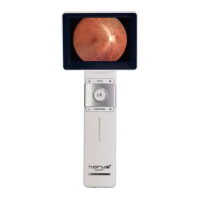

 To Next Page