-15-
Using the Setup mode
Turn on the power
To turn on the system, press the power button (ї 8) to turn on the control unit. Approximate-
ly one to two seconds later, the boot screen will appear on the LCD panel.
Note:
W
hen below conditions occur, user needs to turn oī the power and reassemble the optical
lens and control unit.
1.
Optical lens isn’t correctly assembled to the control unit.
When turning on the device, the device stays at boot screen and can’t enter to control
interface.
2.
The black screen appears on the LCD panel during operation.
Please check the optical lens is well-assembled to the control unit.
A. DEC 200
Enter the Setup mode
Using the [Setup] menu
It is recommended that all setting items are set according to user’s requirements for
Įrst time use.
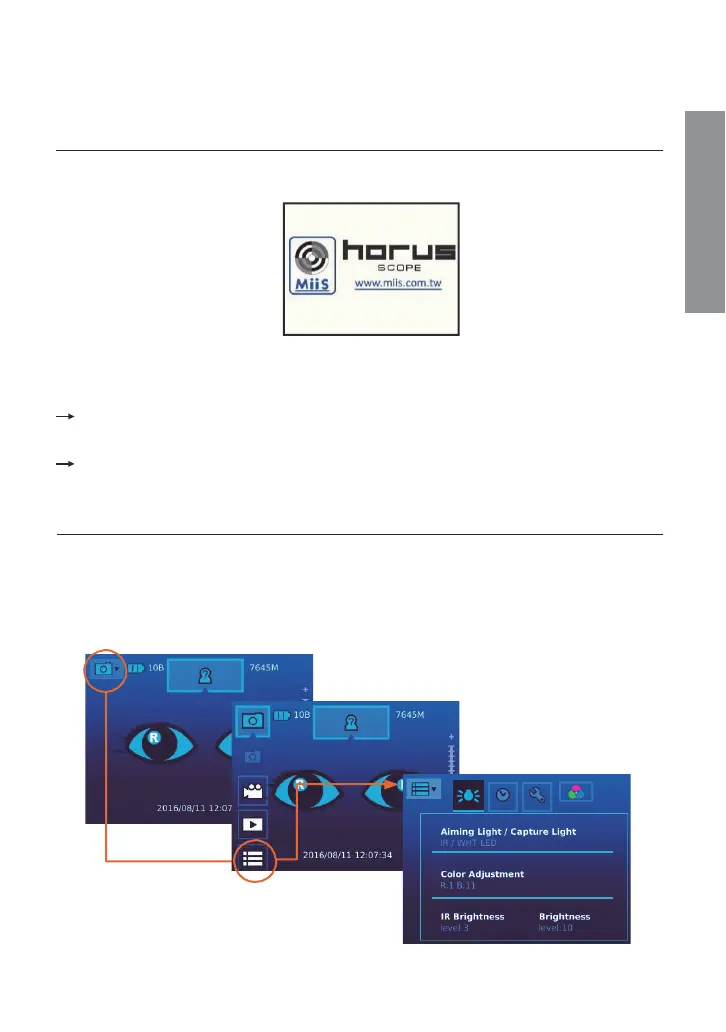
Bring up the [Setup] menu
Touch the photo icon and then touch the setup icon.
Preparations


 To Next Page