-33-
B. DEA 200
Step 1: Turn on the power
Press the power button to turn on the control unit. Approximately one to two
seconds later, the boot screen will appear on the LCD panel. After about 15 seconds,
the information icons will appear on the top of the LCD panel.
Step 2: Make sure SD card is inserted
Once the SD card has been inserted, the user can start to take photographs in any
shooting mode, either photo or video mode.
Step 3: Choose a shooting mode
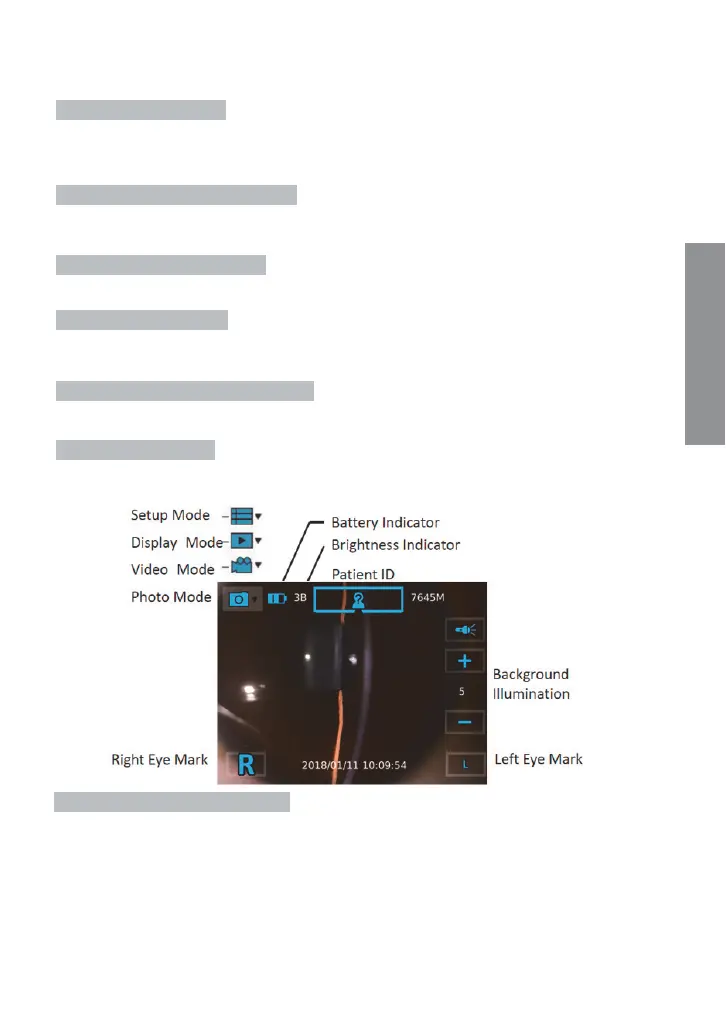
Tap the photo or the video mode icon to enter a shooting mode.
Step 4: Mark left/right eye
By doing so, the user can tell whether a photo/video is left eye or right eye of examinee
record from its Įle name.
Step 5: Select slit shape and color filters
Select slit shape and color filters by rotating wheels on slit module.
Step 5: Aim and preview
Position the camera correctly and adjust to appropriate settings to get a clear preview.
The image brightness can only be changed in photo mode.
Step 6: Press the OK button to shoot
Taking pictures


 To Next Page