-39-
Playback
Display mode
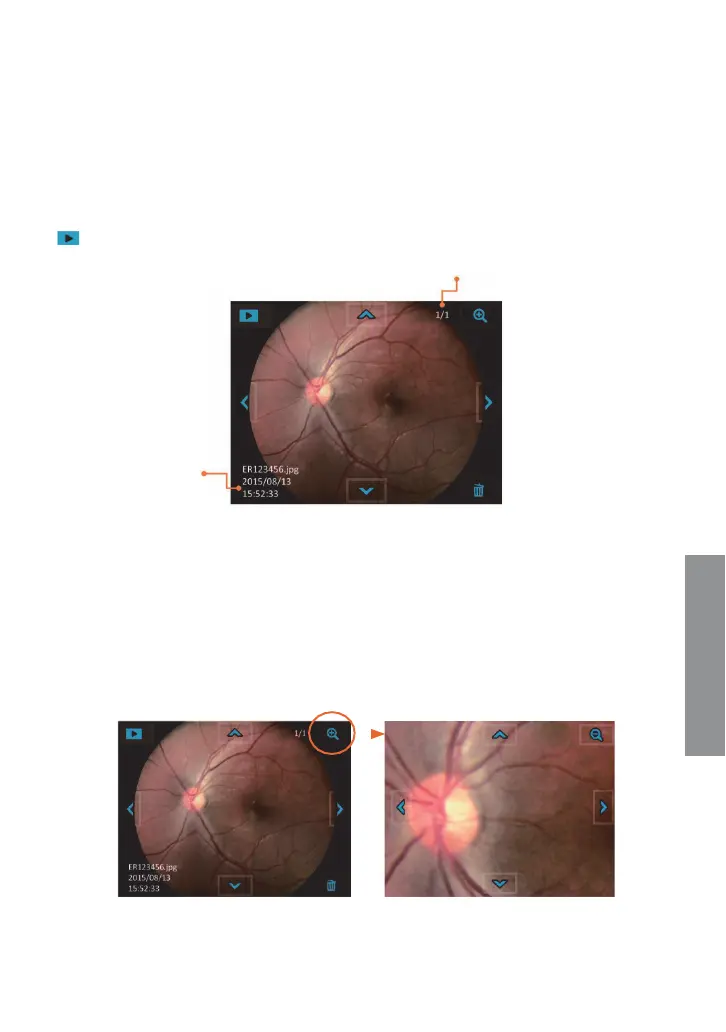
Touch the photo icon and then the display icon to see the photos that have been taken.
Display mode:
Picture number/Total pictures
Earlier date photo
Zoom in 1:1
Previous photo
File date
Patient ID
File nam
e
Next photo
Delete
Later date photo
Click the left or right arrow symbols to go to the previo
us or next photo, respectively. Click
the up or down arrow symbol to backward in days or forward in days. Zoom in and out on the
photo while in display photo. The user can delete photos by touching the delete icon.
The device does not support the video Įle display
on the control unit. Please download the
video Įle (.avi) to the computer to watch.
Enlarged viewing
Playback


 To Next Page