-14-
Assembling
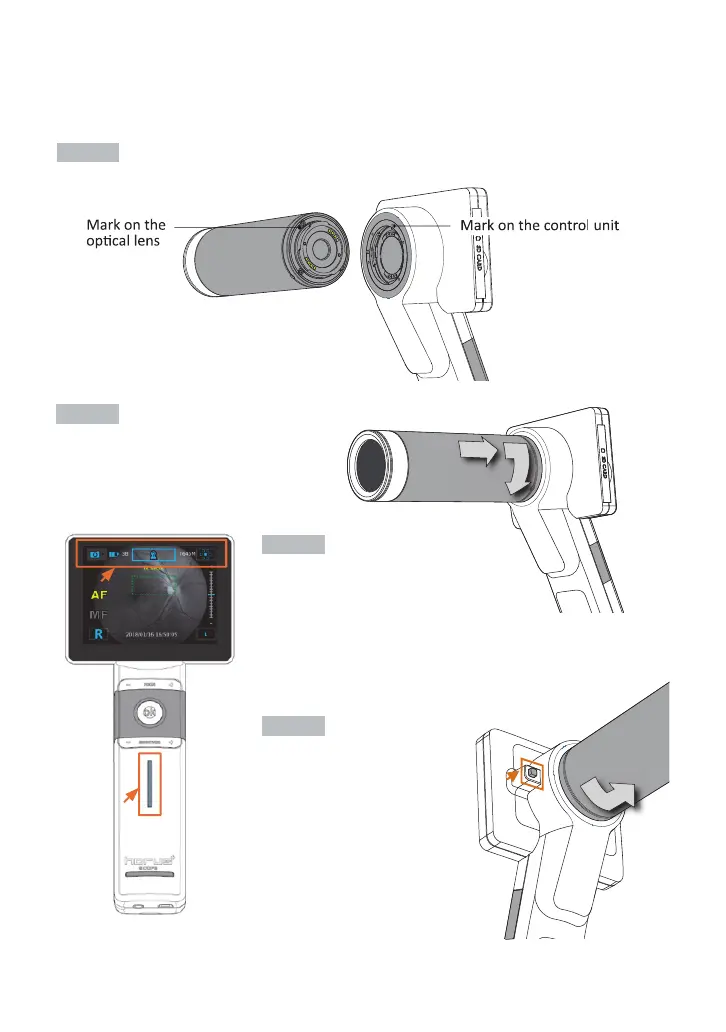
(Take Digital Eye Fundus Camera as an example.)
Step 1. ќ
Align the marks of the optical lens and control unit.
Step 2. ї
Hold the optical lens and attach it to
the control unit. Rotate and fasten the
optical lens in a clockwise direction.
You will hear a click when the lens locks
into the control unit.
Step 3. і
Turn on the power (ї 15). When
optical lens and control unit are
assembled correctly, the information
icons will appear on the top of LCD touch
panel. The screen will turn on, and then the blue light of the
power indicator (ї 13) will also turn on.
Step 4. ї
To unlock the optical lens,
press the lens lock and then
rotate the optical lens in a
counterclockwise direction.
Then the optical lens will be
unfastened.


 To Next Page