-41-
Miscellaneous
Files transferring
Transfer images to an electronic device (e.g., personal computer, laptop, or mobile phone) via
the USB cable or SD card.
Viewing on a computer/laptop screen
Turn on UVC mode to simultaneously view images both on LCD panel and the computer/lap-
top screen.
Viewing on a TV screen
Connect the camera and a TV through an AV cable, you can simultaneously view images on
both sides.
Focus calibration
A. DEC 200
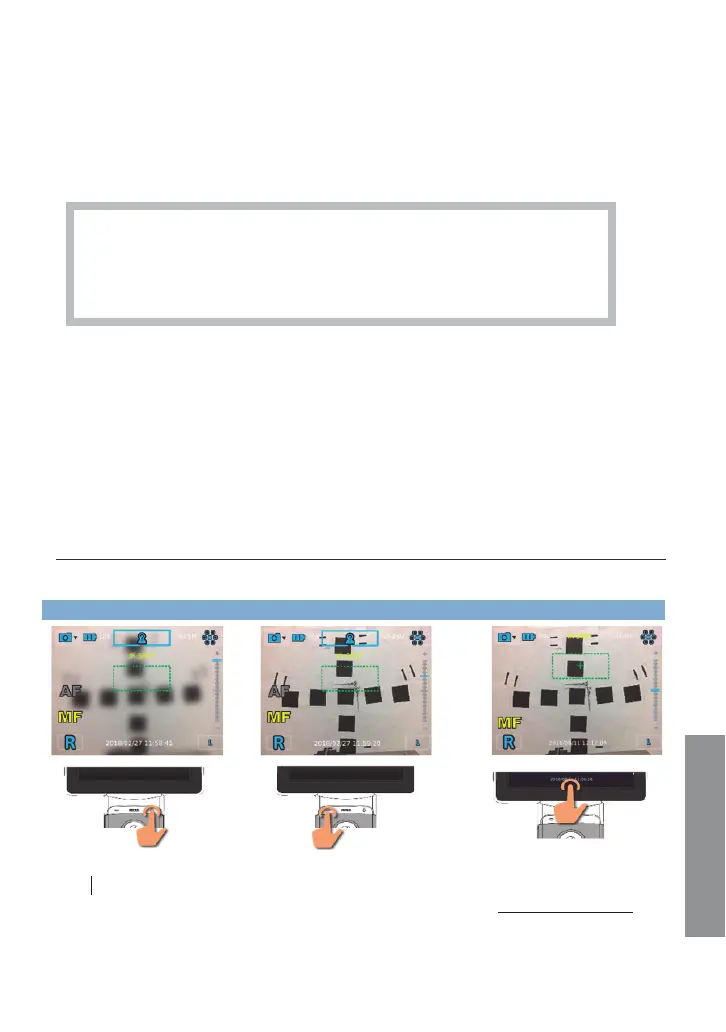
Focus on an object at a distance of 5 meters or greater in MF mode. Please follow the steps to
finish focus calibration of DEC 200.
Step 1 Step 2 Step 3
Adjust FOCUS[+] to max
value.
Aim to a target 5M away. Decrease
FOCUS value[-] till you have the
clearest view of your target.
Long press the date and
time till it changes to
“Save Motor Position”
to finish calibration.
Caution: Please don’t add [+] Focus value in step 2.
Please back to step 1 when you add Focus value accidentally.
It is the health c
are provider to protect patient health information and to
meet regulatory and HIPAA compliance. The images on DSC 200 may
contain identifiable patient information and it is the responsibility of the
health care provider to ensure that data safeguards are implemented to
protect patient health information.
Miscellaneous


 To Next Page