-25-
C. DGC 200
Enter the Setup model
Using the [Setup] menu
It is recommended that all setting items are set according to user’s requirements for
Įrst-time use.
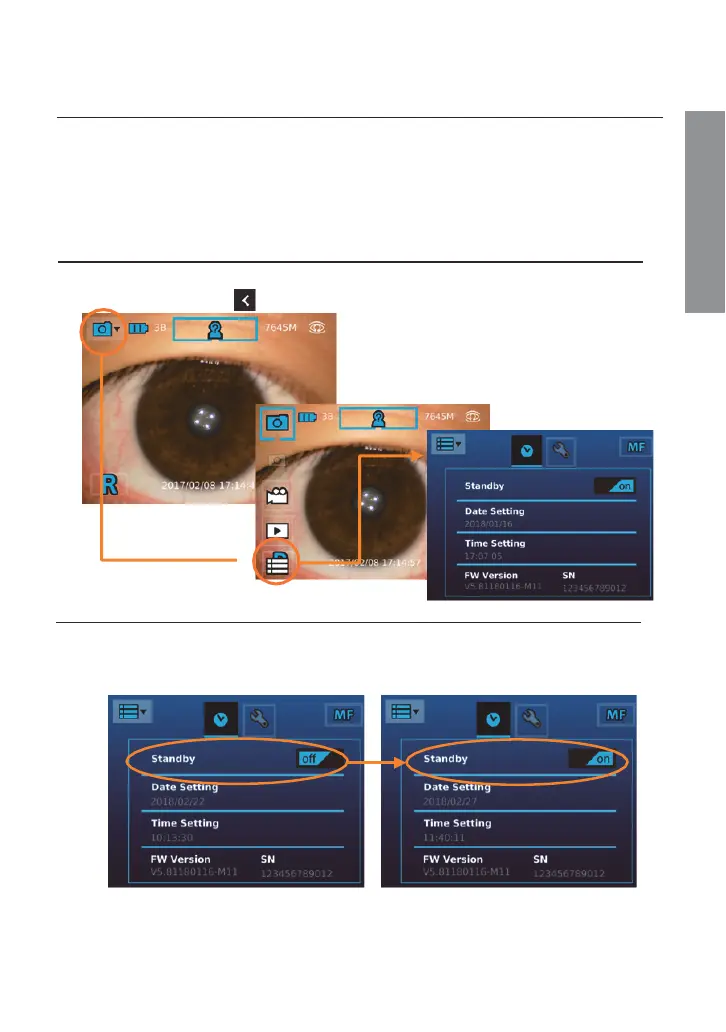
Bring up the [Setup] menu
Touch the photo icon and then touch the setup icon.
Exit the [Setup] menu
Once a setting adjustment is made, the new value aīec
ts the system immediately.
Use the upper back button or the OK button to exit the screen.
Settings
[Standby]
User can set standby mode to be on or off. Once the mode is on, the LCD panel will be
turned off if the system is idle for three minutes. Tap on the item to toggle the setting.
Preparations


 To Next Page