-28-
Entering the patient ID
Using patient ID as partial file name is supported in DSC 200.
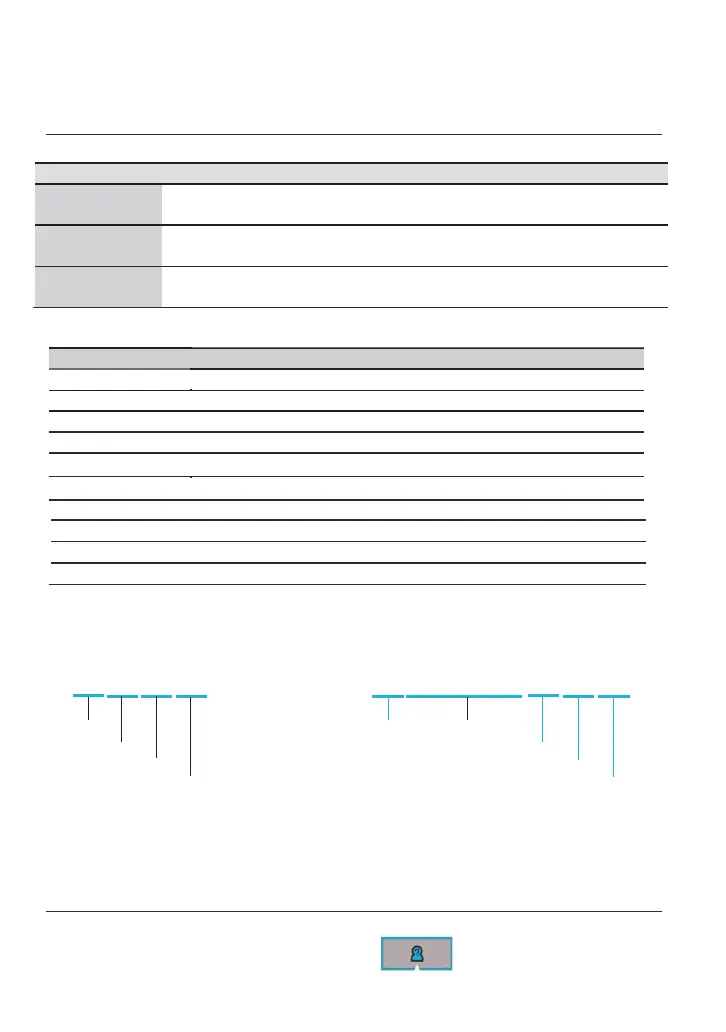
File naming rule
Product Name Model Name Picture Name without ID Picture Name with ID
Eye fundus
camera
DEC 200
ELHHMMSS.jpg
ERHHMMSS.jpg
ELXXXXXXXXXXHHMMSS.jpg
ERXXXXXXXXXXHHMMSS.jpg
Eye anterior
camera
DEA 200
ALHHMMSS.jpg
ARHHMMSS.jpg
ALXXXXXXXXXXHHMMSS.jpg
ARXXXXXXXXXXHHMMSS.jpg
Eye surface
camera
DGC 200
GLHHMMSS.jpg
GRHHMMSS.jpg
GLXXXXXXXXXXHHMMSS.jpg
GRXXXXXXXXXXHHMMSS.jpg
Meaning of each symbol:
Symbol
Meaning
EL Left eye photo taken by the eye fundus camera
ER Right eye photo taken by the eye fundus camera
AL Left eye photo taken by the eye anterior camera
AR Right eye photo taken by the eye anterior camera
GL Left eye photo taken by the eye surface camera
GR Right eye photo taken by the eye surface camera
HH Hour
MM Minute
SS
Second
XXXXXXXXXX Patient ID, up to 20 characters.
Example:
No I
D ID: ABCD12345
E L 1 6 1 4 3 1 .jpg E L ABCD12345 1 6 1 4 3 1 .jpg
Eye, Left Eye, Left Patient ID
Hour Hour
Minute Minute
Second Second
The image name is explained as follows:
EL: Left eye photo taken by the eye fundus camera; hour: 16; minute: 14; and second: 31.
If the given patient number is ABCD12345, the image mane would be written as
EL ABCD12345161431.jpg
Create a new patient ID from scratch (DICOM off)
By gently pressing the OK button, the user always goes back to a shooting mode, either photo or
video mode; from the top information icons, tap to start the process.


 To Next Page