-16-
Exit the [Setup] menu
Once a setting adjustment is made, the new value aīects the system immediately.
Use the upper back button or the OK button to exit the screen.
Settings
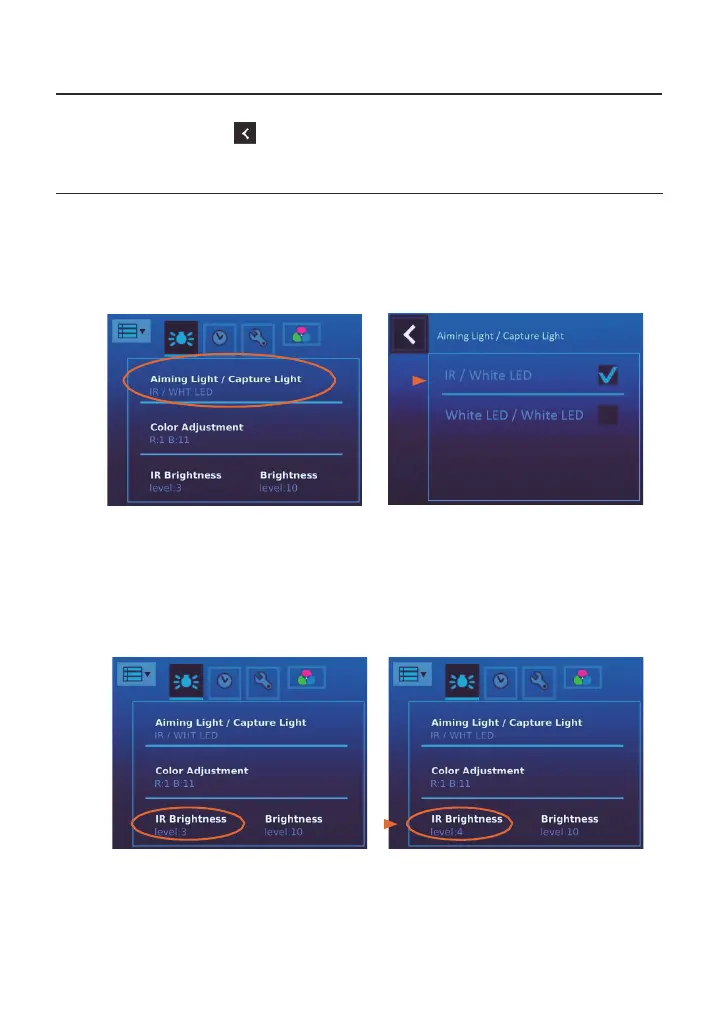
[Aiming Light/Capture Light]
The default setting of [Aiming Light/Capture Light] is [IR/White LED]. In the setting,
DEC 200 employs IR illumination for alignment and focusing to assure patient comfort.
With IR, the user observes fundus images monochromatically. At the moment of
press- ing the shutter button, the system will turn on the white LED instantly. Static
images and motion pictures will be captured in full color.
If the setting is [White LED/White LED], then the user
observes images in full color and
capture static images and motion pictures in full color.
[IR brightness]
The IR brightness has 5 levels; the default setting is level 3. The range is from 1
to 5.


 To Next Page